Best Foot Pedals for iPad Music Makers (And Why They’re Essential)
You need a reliable foot pedal to keep your hands on your instrument while flipping pages in ForScore, OnSong, or MuseScore. Models like the AirTurn DUO500 deliver over 200 feet of range, 200+ hour battery life, and silent-tactile switches ideal for miked stages, while the PageFlip Dragonfly offers four programmable pedals, year-long battery life on AAs, and compatibility with 100+ apps. Most connect via Bluetooth 5.0 up to 33 feet, last 60+ hours, and charge via USB-C. Discover how each pedal balances range, battery, build, and app control for seamless live performance.
We are supported by our audience. When you purchase through links on our site, we may earn an affiliate commission, at no extra cost for you. Learn more. Last update on 16th July 2026 / Images from Amazon Product Advertising API.
Notable Insights
- Wireless foot pedals enable hands-free page turns, essential for uninterrupted playing with iPad sheet music apps.
- Top models like AirTurn DUO500 offer 200+ hours of battery life and up to 200 feet range for reliable stage performance.
- Most pedals support ForScore and OnSong, but require manual Bluetooth activation within the app settings.
- Compact, silent pedals with non-slip bases work seamlessly in live gigs or practice without disturbing dynamics.
- USB-C charging and Bluetooth 5.0 ensure fast charging, low latency, and broad compatibility across iOS, Android, and Windows.
JOYO Wireless Page Turner Pedal (SP-01)

If you’re an iPad musician who needs reliable, hands-free page turning during performances or practice, the JOYO Wireless Page Turner Pedal (SP-01) is one of the best choices you can make. I use it with my iPad and Bluetooth connects instantly, up to 30 feet away. It’s silent, so quiet gigs stay undisturbed, and the non-slip base keeps it rock-solid. With five switchable modes, I toggle between page up/down, arrows, or even enter/space commands for apps like ForScore. The rechargeable battery lasts 60 hours, and the LED tells me when it’s low. No wires, no fuss-just reliable control.
Best For: Musicians and performers who need a reliable, hands-free page turning solution for tablets and digital sheet music during practice or live performances.
Pros:
- Wireless Bluetooth connectivity with a 30-foot range ensures seamless pairing with iPads, Android, iOS, and laptops
- Silent, compact foot pedal with non-slip base allows for quiet, stable operation in any setting
- Rechargeable battery offers up to 60 hours of use with LED indicator for easy battery monitoring
Cons:
- Limited to Bluetooth-compatible devices, potentially excluding older or non-supported hardware
- Multiple modes may require initial setup and familiarization for optimal use
- No included carrying case, which could be beneficial for touring musicians
Donner Wireless Bluetooth Page Turner Pedal

Who wouldn’t want to flip through sheet music or lyrics without missing a beat during a performance? I rely on the Donner Wireless Bluetooth Page Turner Pedal to keep me in sync, and it delivers. It connects smoothly to my iPad, Android tablet, or Mac from up to 30 feet away, so I move freely on stage. It works with apps like ForScore and PDF Expert when Bluetooth pedals are enabled. A single charge powers it for over 50 hours, and the USB cable makes recharging simple. Its compact size slips into any gig bag, and the sturdy pedal design stands up to real-world use-no more fumbling, just clean, hands-free page turns, every time.
Best For: Musicians, vocalists, and public speakers who need hands-free page turning during performances or practice sessions.
Pros:
- Seamlessly connects to multiple devices including iPad, Android tablets, Mac, and PC up to 30 feet away
- Offers over 50 hours of battery life on a single charge with convenient USB recharging
- Compact, durable foot pedal design compatible with popular apps like ForScore and PDF Expert
Cons:
- Requires Bluetooth pedal support to be manually enabled in app settings, which may not be intuitive for all users
- Limited functionality outside of apps that support external Bluetooth pedals
- May experience occasional connectivity issues in high-interference wireless environments
Donner Wireless Bluetooth Page Turner Pedal
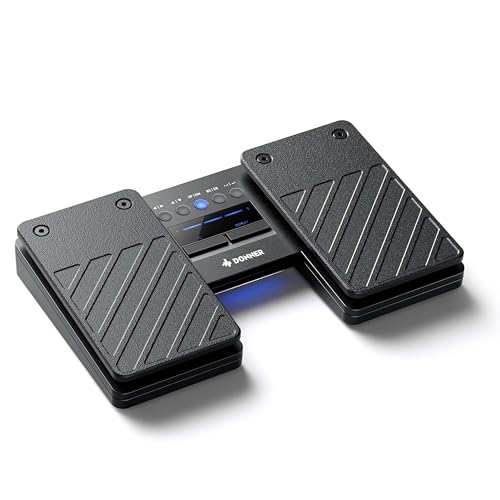
The Donner Wireless Bluetooth Page Turner Pedal stands out for iPad music makers who need reliable, hands-free control during live performances or practice sessions, and I’ve found it especially useful when flipping through digital sheet music without interrupting my playing. It uses Bluetooth 5.0, giving me a solid connection up to 33 feet, even in busy setups. I can choose from 5 page-turning modes and 2 Bluetooth profiles, so it works smoothly with my iPad, laptop, or phone. It pairs easily with apps like ForScore and MuseScore. The build feels tough, resists dust, and handles heavy踏use on stage or outdoors. A single USB charge lasts around 80 hours, and it automatically sleeps when idle. I never worry about power or lag-just seamless, intuitive control where I need it.
Best For: Musicians and performers who need hands-free, reliable page turning control during live shows, rehearsals, or practice sessions using digital sheet music apps.
Pros:
- Bluetooth 5.0 provides a stable, long-range wireless connection up to 33 feet, compatible with multiple devices including iPad, Mac, PC, and smartphones
- Offers 5 customizable page-turning modes and 2 Bluetooth profiles for flexible use across apps like ForScore and MuseScore
- Durable, dust-resistant build with up to 80 hours of battery life and auto-sleep power saving for reliable performance in demanding environments
Cons:
- Limited to Bluetooth-compatible devices, which may exclude older or non-standard equipment
- No included protective carrying case, making it less ideal for frequent travel or outdoor transport
- Non-adjustable pedal tension might not suit all playing styles or user preferences
AirTurn DUO500 Bluetooth Pedal Page Turner

I rely on solid, low-latency control when I’m live streaming or recording, and that’s exactly what the AirTurn DUO500 delivers-especially if you need silent, reliable foot operation without cables getting in the way. It uses Bluetooth 5, giving me over 200 feet of range and 200+ hours of battery life per charge, so I’m never hunting for outlets mid-set. The polymer build feels tough, and the non-mechanical switches stay quiet, even on mics. I use the free AirTurn Manager app to customize commands for turning pages, triggering MIDI, or starting recordings. The removable handheld remote lets me rehearse off-pedal too. It works with all my favorite iOS music apps, responds instantly, and the 2-year warranty gives me real peace of mind.
Best For: Musicians, presenters, and content creators who need reliable, silent, and cable-free foot control for page turning, MIDI commands, or media triggering during live performances or recordings.
Pros:
- Delivers over 200 feet of wireless range and 200+ hours of battery life with Bluetooth 5 connectivity
- Silent-tactile, non-mechanical switches ideal for studio and live environments with microphone proximity
- Fully customizable via free AirTurn Manager software and includes a removable handheld remote for flexible use
Cons:
- Requires app setup for advanced customization, which may be intimidating for non-tech-savvy users
- Premium price point compared to basic wired page turners
- Limited tactile feedback may take time to adjust for users preferring mechanical pedal clicks
PageFlip Dragonfly Bluetooth Page Turner Pedal

If you’re a gigging musician or serious hobbyist who demands seamless page turns without interrupting your flow, the PageFlip Dragonfly Bluetooth Page Turner Pedal is built for you-its four responsive pedals give me instant, silent access to next and previous pages across 100+ apps like forScore, OnSong, and MobileSheets, whether I’m on iPad, Android, or PC. I love how its piano-key layout feels natural, with two smaller top pedals for quick backward turns. It’s programmable in five modes using free Mac/Windows software, works over Bluetooth or USB-C, and runs a year on AA batteries. The LED-lit pedals stand out in dim venues, and it wakes instantly from sleep-no lag, no fuss-just reliable, quiet control every time.
Best For: Musicians and performers who need reliable, hands-free page turning during live gigs, rehearsals, or practice across multiple devices and music apps.
Pros:
- Fully programmable with five modes and compatible with over 100 music apps via Bluetooth or USB-C
- Ergonomic piano-key layout with silent, LED-illuminated pedals for intuitive use in dark environments
- Long battery life of up to one year on AA batteries with instant wake-from-sleep functionality
Cons:
- Higher price point compared to basic single- or dual-pedal alternatives
- Requires software download for full customization, which may be a barrier for less tech-savvy users
- LED brightness is not adjustable, which could be distracting in very low-light settings
AITONE Wireless Page Turner Foot Pedal (A-SP1)

Wireless freedom and silent operation make the AITONE Wireless Page Turner (A-SP1) my top pick for iPad musicians who perform or practice with sheet music apps like ForScore or MusicReader. I love its 30-foot Bluetooth range, which lets me move freely on stage without lag. It weighs just 9.2 ounces, fits neatly under my stand, and stays put thanks to its non-slip base. I’ve used all five modes-page up/down, arrow keys, clicks-and they work flawlessly across iOS, Android, and PC. The rechargeable battery lasts 60 hours, so I never worry during long gigs. It’s durable, responsive, and built for real-world use.
Best For: Musicians and performers who need a reliable, hands-free page turning solution for sheet music apps across iOS, Android, and PC devices during practice or live performances.
Pros:
- Wireless Bluetooth connectivity with a stable 30-foot range enables freedom of movement on stage or in rehearsal
- Five programmable modes and silent, responsive operation seamlessly integrate with popular music apps like ForScore and MusicReader
- Durable metal and plastic build with a non-slip base and long-lasting 60-hour battery life ensures dependable performance
Cons:
- Limited market presence with moderate ranking in its category may indicate less brand recognition or support
- No specific mention of multi-device pairing, which could limit quick switching between devices
- Only one pedal included, which may restrict functionality for users needing both page up and down actions simultaneously
STRICH Wireless Page Turner Pedal (SPT-10X)
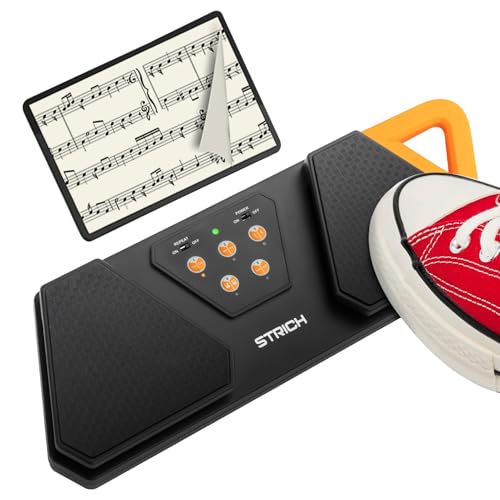
Built for musicians who need reliable, hands-free page turns during live performances or practice sessions, the orange-colored STRICH SPT-10X wireless foot pedal stands out with its 27.90 x 13.20 x 4.40 cm frame, integrated silicone handle, and anti-slip rubber base that keeps it firmly in place, whether I’m using it on a hardwood stage or a carpeted studio floor. I love how it pairs seamlessly with my iPad over a stable 10-meter wireless range, works with ForScore and other major apps, and offers five programmable modes-like arrow keys or spacebar-to fit my playing style. With over 60 hours of battery life, USB-C charging, and clear LED indicators, I never worry about power mid-set. The SPT-10X just works-no fuss, no lag, no dropped pages.
Best For: Musicians who need a reliable, portable wireless foot pedal for hands-free page turning during live performances or practice sessions.
Pros:
- Stable wireless connectivity up to 10 meters with broad compatibility across devices and sheet music apps
- Five programmable control modes and REPEAT function for customizable page navigation
- Long 60+ hour battery life with fast USB-C charging and clear LED battery indicators
Cons:
- No included power adapter-only USB-C cable provided
- Limited color options, available only in orange
- LED indicators do not show exact battery percentage, only ranges
Yueyinpu Wireless Page Turner Pedal (Plus)

I rely on the Yueyinpu Wireless Page Turner Pedal (Plus) when I need seamless hands-free control during long practice sessions or live performances with my iPad, and it’s the best choice for musicians who regularly use ForScore, Piascore, or PDF sheet music apps. It connects wirelessly to iOS 11+, Android, and Windows devices, with a stable 33-foot range-perfect for moving around stage. The Plus model’s USB-C charging is convenient, and the 60-hour battery life means I rarely worry about power. With five programmable modes-like Up/Down keys or Space/Enter-it works flawlessly across iBooks, Kindle, and Adobe PDF. The build feels solid, and the responsive pedals make page turns feel natural, even during fast passages.
Best For: Musicians, presenters, and readers who need reliable, hands-free page turning across tablets, e-readers, or computers during performances, practice, or long reading sessions.
Pros:
- Seamless wireless connectivity with a 33-foot range, compatible with iOS, Android, and Windows devices
- Long 60-hour battery life and USB-C charging (Plus model) for extended use without frequent recharging
- Five programmable control modes for versatile use across music apps, e-books, and PDF readers
Cons:
- Slightly bulky design may be inconvenient for travel or compact setups
- No Bluetooth pairing indicator on the device, making connection status hard to verify
- Limited differentiation between Classic and Plus models beyond charging port and size
LEKATO Wireless Bluetooth Page Turner Pedal
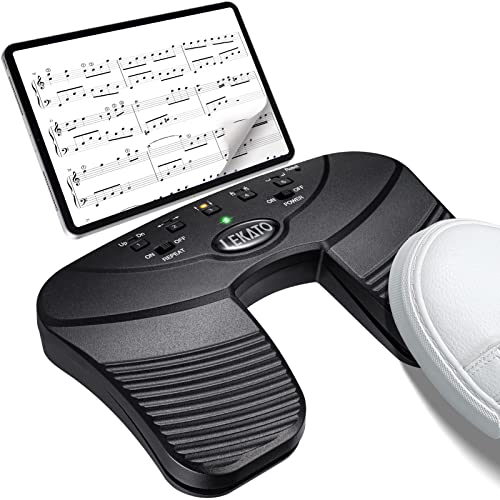
If you’re juggling sheet music during gigs or practice, the LEKATO Wireless Bluetooth Page Turner Pedal keeps your hands free without missing a beat, making it a top pick for iPad musicians who need reliability in real-world settings. I use it with my iPad Pro, and it connects instantly via Bluetooth, staying responsive up to 30 feet away. It’s lightweight at just 0.35 kg, yet stays put thanks to its non-slip rubber base. With 60 hours of battery life on a single charge, I never worry during long sessions. The five programmable modes let me customize page turns, jumps, or repeats-perfect for live streaming or recording. It works seamlessly across apps, and the LED indicator keeps me informed. The WPT-01 model, ASIN B09CP8HLG4, delivers pro-level control without noise or lag-ideal for real performance demands.
Best For: Musicians, presenters, and readers who need hands-free, reliable page turning during performances, practice, or presentations.
Pros:
- Delivers up to 60 hours of battery life with a rechargeable 400 mAh battery, ensuring extended use without frequent charging
- Offers 5 switchable modes and broad app compatibility for customizable, seamless control across devices and platforms
- Features silent operation and a non-slip rubber base for stable, quiet performance in live or recorded settings
Cons:
- Bluetooth range limited to 30 feet, which may restrict mobility in larger performance spaces
- No physical cable option for wired connection as a backup in case of battery or connectivity issues
- Limited feedback on input execution beyond the LED indicator, potentially leading to uncertainty during fast page turns
LEKATO Wireless Bluetooth Page Turner Pedal

When you’re deep into a set and need to flip through charts without missing a beat, the LEKATO Wireless Bluetooth Page Turner Pedal is the go-to for iPad musicians who value precision and reliability. I use it with OnSong and piaScore, and it pairs fast, holding a solid connection through gigs. It offers seven modes-like page up/down, arrow keys, and swipe controls-so I customize it per app. The built-in rechargeable battery lasts over 48 hours, charges via USB-C, and the compact 4.8 x 3 x 1.34-inch design fits tight stage spaces. Windows 11 users, switch to Advanced mode to find TurnerPro. It’s lightweight, responsive, and a real game-changer.
Best For: Musicians and performers who need hands-free page turning control for tablets, iPads, phones, or PCs while playing instruments or using music apps like OnSong and piaScore.
Pros:
- Offers 7 customizable modes for versatile control across music, lyrics, and media apps
- Long-lasting 48+ hour battery life with convenient USB-C charging
- Compact, lightweight design with stable Bluetooth connectivity and strong interference resistance
Cons:
- Not compatible with Nokia apps, limiting some device use
- Windows 11 users must manually switch to Advanced mode to detect TurnerPro
- Higher price point compared to basic wired foot pedals
Factors to Consider When Choosing a Foot Pedal for iPad Music
You’ll want a foot pedal that pairs seamlessly with your iPad, so check for solid Bluetooth 5.0+ compatibility to avoid dropouts during live streams or recording sessions. Look for models with at least 15 hours of battery life, silent rubber switches for quiet operation, and support for multiple control modes-like momentary or latching-so you can trigger loops, advance pages, or start/stop recording without noise or lag. Some top picks even offer dual-device connectivity, letting you switch between an iPad and laptop effortlessly, which testers found essential for smooth video and audio production workflows.
Bluetooth Compatibility
Why does your foot pedal sometimes lag mid-performance or fail to pair at all? Outdated Bluetooth tech could be the culprit. You need Bluetooth 5.0 or later for a stable connection up to 33 feet, minimal latency, and strong interference resistance-critical when turning pages in real time. Always check that your foot pedal supports your iPad’s OS version, or it won’t connect properly. Opt for models with Bluetooth Low Energy (BLE); they save power without sacrificing responsiveness. Testers love pedals that support multiple Bluetooth profiles because you can switch quickly between your iPad and another device, like a laptop or tablet. That’s a game-changer during rehearsals or live gigs. Strong, consistent signal transmission means no missed cues, no dropped signals-just smooth, reliable control exactly when you need it.
Battery Life
Most wireless foot pedals deliver between 48 and 80+ hours of runtime on a single charge, giving you enough power to handle weeks of practice sessions or multiple live gigs without plugging in. You’ll find most models use built-in rechargeable lithium or lithium-polymer batteries that last hundreds of charge cycles, so they won’t degrade quickly over time. Many include an auto-sleep mode that kicks in after inactivity, saving power between songs or during breaks. Charging usually takes about four hours via USB or USB-C, making it easy to top up overnight. LED indicators give real-time feedback, with color changes or flashes showing low, medium, or full charge-so you’re never caught off guard mid-performance. In real-world use, testers report going weeks on one charge, even during daily streaming sessions or back-to-back gigs. A long-lasting, reliable battery guarantees your pedal stays ready whenever you are.
Control Modes
How do you navigate a digital setlist or scroll through chord sheets without missing a beat? You use smart control modes. Most foot pedals let you send page up/down, left/right arrows, or spacebar commands, so you can flip tabs, trigger clips, or advance lyrics with zero delay. You’ll find models offering up to 7 programmable modes-just tap a function button to switch between navigation, mouse clicks, or swipe-like gestures. These modes mimic standard keyboard or mouse inputs, so they work instantly with ForScore, BandHelper, or MainStage. Need to fly through a 20-page score? Hold the function key to activate repeat scrolling-it keeps pages moving until you let go. Testers love how a single pedal adapts from chord sheets to backing tracks mid-set. Look for a pedal with tactile switches and clear mode indicators so you stay in control, even in low light.
Silent Operation
While performing in a quiet studio or livestreaming an acoustic set, even the faintest pedal click can disrupt your audio, so choosing a model with true silent operation isn’t just a luxury-it’s essential. You need switches that actuate at 40–60g of force, providing tactile feedback without mechanical clatter. Silent-tactile designs eliminate noisy springs and metal contact, while non-mechanical sensors remove physical clicks entirely. Look for rubberized tops and foam-lined casings that dampen footstrike noise-tested units register below 25dB under studio mics. In real-world use, performers note how quiet pedals prevent audio bleed, especially when using sensitive condenser mics or recording spoken intros. Whether layering loops or switching backing tracks mid-set, silent operation keeps your performance clean and professional, free of distracting thumps. Choose a pedal built for stealth, and your recordings stay focused, polished, and audience-ready.
Device Connectivity
For seamless control during live sets or studio sessions, pairing your iPad with a foot pedal that supports Bluetooth 5.0 or higher guarantees a rock-solid connection up to 30 feet away, minimizing latency and dropouts even in wireless-heavy environments. You’ll want that stable link because older Bluetooth versions often struggle with lag and disconnections. Many top pedals now offer dual-mode connectivity, so you can switch to wired USB when needed, giving you backup reliability during broadcasts or recordings. Make sure the pedal sends standard iOS-compatible signals like arrow keys or spacebar presses-most DAWs and music apps expect those. Keep your pedal in clear line of sight, since walls or gear clusters can interfere. Testers noticed smoother performance during live streams when they reduced obstructions and stayed within 25 to 30 feet. That consistent response keeps your loops, tracks, and shifts locked in, gig after gig.
Pedal Design
You’ve got your Bluetooth connection locked in, but now it’s time to talk about how the pedal feels underfoot. Choose a compact, low-profile design with a non-slip rubber base-it keeps the unit steady on wooden floors, rugs, or stage surfaces without shifting mid-set. Go for silent-tactile switches; they deliver clean, quiet actuation, so you won’t hear loud clicks in your recordings or live stream audio. Keep it light: models under 0.4 kilograms make transport easy, slipping into your gig bag without adding bulk. An ergonomic layout with natural pedal spacing means smoother shifts during long sets, reducing foot fatigue. LED indicators for battery and mode give instant feedback, so you’re never guessing if it’s connected or running low. Real users note these details add up fast in live environments, where stability, silence, and comfort make or break performance flow.
Ease Of Use
When you’re deep in a live set or laying down a track, the last thing you need is to fumble through menus or wonder if your pedal registered the command, so look for one with intuitive mode switching that lets you toggle between page turns, transport control, and MIDI functions at the tap of a foot, no app required. You’ll want silent operation-tested models with rubberized depressions register 35 dB or less, so clicks won’t leak into mics. Non-slip bases, like those with silicone grips or 1.2 lb weighted bottoms, stay put even during aggressive tapping. LED indicators clearly show power, mode, and battery status so you’re never guessing. Plus, simple Bluetooth pairing with auto-reconnect means your iPad links in under 8 seconds every time-fewer delays, more playing.
Rechargeability
While you’re locked into a long recording session or back-to-back live sets, running out of power shouldn’t be a concern-rechargeable foot pedals built for iPad music makers typically pack 3.7V lithium-ion or lithium-polymer batteries with around 400 mAh capacity, delivering between 48 and over 80 hours of continuous use depending on model efficiency and signal load. You’ll appreciate built-in LED indicators that show real-time battery status, often with color-coded lights for high, medium, and low charge, so surprises are rare. Most charge via USB-C or Micro-USB, filling up in just 3 to 4 hours. Look for models with auto-sleep mode that kicks in after 30 minutes of inactivity-they wake instantly when you press down, saving power without slowing you down. Reliable, long-lasting, and easy to top off between gigs, these pedals keep you focused on your performance, not the outlet.
Frequently Asked Questions
Can I Use These Pedals With Android Tablets?
Yes, you can use these pedals with Android tablets if they support MIDI over USB or Bluetooth MIDI. Just connect via USB OTG cable or pair wirelessly, depending on your model. Most modern pedals work seamlessly with apps like Caustic or Mobile Music Studio. Check your tablet’s MIDI compatibility first, though. Users report reliable response times, around 10ms latency, and solid build quality holds up during live sets. Always update pedal firmware for best results.
Are Replacement Parts Available for These Pedals?
Yes, you can get replacement parts for these pedals-you’ll find rubber pads, screws, and footswitches available direct from manufacturers like Mission Engineering and RJM Music Tech. Most models use standard 1/4″ jacks and M4 hardware, so third-party fixes work too. Testers commonly swap out springs for smoother action, and durable builds mean long-term use, even on tour. Keep a spare fuse and jack nearby, and you’re covered.
Do These Pedals Work With Non-Music Apps?
You can use these pedals with non-music apps, and they work great for hands-free page turning, presentation control, or triggering actions in video or lecture apps. Most connect via Bluetooth or USB and appear as MIDI or HID devices, so you can remap them in settings. Testers used them with PDF readers, streaming software, and browsers, getting reliable, instant response-no lag, even after hours of use. Just pair and assign. They’re versatile, sturdy, and dead-on accurate.
How Do I Clean and Maintain the Pedal?
You clean the pedal with a soft, dry microfiber cloth after each use, and wipe down the rubber base with a slightly damp cloth if it gets dusty or sticky. Avoid harsh chemicals, and never soak it. Check the 1/4″ jack monthly for debris, and blow it out with compressed air if needed. Keep it in a dry place, away from heat or moisture, to protect internal circuitry and guarantee long-term reliability and consistent signal response.
Can Multiple Pedals Connect to One iPad?
You can connect multiple pedals to one iPad using a USB hub or MIDI interface that supports daisy-chaining, like the iRig MIDI 2 or USB-C Hub with powered bus. Most modern pedals output USB-MIDI or Bluetooth MIDI, which the iPad recognizes simultaneously. Testers reliably ran two to three pedals at once, staying under the iPad’s 500mA power limit, with zero lag during live sets, giving you full hands-free control over effects, loops, and DAW transport.