Best Beat Machines Hip Hop Artists Rely On
You’ll crush beats on the go with the Akai MPK Mini MK3: 25 velocity-sensitive keys, 8 responsive MPC pads, and a thumbstick for real-time pitch and mod control, all in a 7.1 x 12.5-inch frame that fits in your backpack. Pair it with the Roland SP-404MKII for sampling-its 17 RGB pads, 16 GB storage, and ultra-fast USB-C loading handle loops and vocals with ease. The TR-8S nails classic 808s and 909s with per-drum effects, while the MPC XL dominates live workflow with a 10.1-inch touchscreen, 16 MPCe pads, and 256 voices. You’re covered from studio to stage, with USB, battery, and MIDI options across models-each tool built to keep your ideas moving fast. There’s a deeper level of flow waiting once you start shaping sound with these favorites.
We are supported by our audience. When you purchase through links on our site, we may earn an affiliate commission, at no extra cost for you. Learn more. Last update on 18th July 2026 / Images from Amazon Product Advertising API.
Notable Insights
- Roland SP-404MKII is favored for its responsive RGB pads, real-time sampling, and iconic sound effects used in lo-fi and boom bap.
- Akai MPC XL offers advanced workflow with 3D-sensing pads, multi-gesture touchscreen, and deep sampling for professional beat creation.
- Korg Volca Sample 2 provides portable sampling, pattern sequencing, and sound-shaping tools ideal for experimental hip hop production.
- Roland TR-8S delivers authentic 808 and 909 sounds with sample import, making it a go-to for modern trap and classic beats.
- Akai MPK Mini MK3 combines compact size with MPC pads, Note Repeat, and arpeggiator for on-the-go hip hop beatmaking.
Akai MPK Mini MK3 MIDI Keyboard

If you’re a hip hop artist on the move who needs a compact, no-fuss beat machine to sketch ideas or layer loops in your DAW, the Akai MPK Mini MK3 is built for you. I weigh it at just 0.9 kg, and its 7.1 x 12.5-inch frame fits in any backpack. I use the 25 velocity-sensitive keys for melodic ideas, the 8 backlit MPC pads for punchy beats, and the 360-degree knobs to tweak synth parameters in real time. The thumbstick gives me instant pitch and modulation control, while the arpeggiator and Note Repeat keep my patterns tight. It’s USB-powered, integrates with NKS, and works seamlessly with MPC Beats, Komplete, and Splice. I plug in my sustain pedal, map controls via the editor, and I’m creating.
Best For: Mobile hip hop producers and beatmakers who need a compact, feature-rich MIDI controller for sketching ideas, programming beats, and controlling virtual instruments on the go.
Pros:
- Compact, lightweight design ideal for portability and travel
- Feature-packed with velocity-sensitive keys, MPC-style pads, knobs, thumbstick, and arpeggiator
- Seamless integration with NKS, MPC Beats, Komplete, and major DAWs for immediate workflow compatibility
Cons:
- Mini keys may not suit players preferring full-sized, weighted keys
- Plastic build feels less durable compared to premium controllers
- Limited control surface for complex studio setups requiring more faders or pads
Roland SP-404MKII Creative Sampler

You’ll get the most out of the Roland SP-404MKII Creative Sampler if you’re a hip hop artist who produces and performs live, since it’s built for speed, portability, and hands-on control. I use it daily, and its 2.6 lb. frame, 17 RGB pads, and OLED display make beatmaking intuitive. The no-click pads respond fast, and 32-voice polyphony handles layered jams. I load samples via USB-C or grab sounds on the fly with auto-chop and BPM detection. With 160 samples per project and 16 GB storage, I never run out of space. It runs on batteries, a mobile pack, or AC-perfect for sets or streaming. The free Roland Cloud Pro membership gives me more sounds, and the app helps me tweak projects on the go. It’s reliable, packed with pro features, and built for real use.
Best For: Hip hop producers and live performers who prioritize portability, speed, and hands-on control in their beatmaking workflow.
Pros:
- Ultra-portable 2.6 lb. design with multiple power options (USB-C, AA batteries, AC) ideal for live sets and on-the-go creativity
- High-resolution OLED display and 17 velocity-sensitive, RGB-illuminated pads enable intuitive, low-latency performance and editing
- Includes 16 GB storage, 32-voice polyphony, auto-chop sampling, and free Roland Cloud Pro membership for expansive sound creation
Cons:
- Limited to 16 internal projects, which may require frequent management for users with many compositions
- No built-in audio effects beyond basic processing, relying on external tools or resampling for advanced sound design
- OLED display, while vivid, may be prone to burn-in with prolonged static menu use
Korg Volca Sample 2 Drum Machine
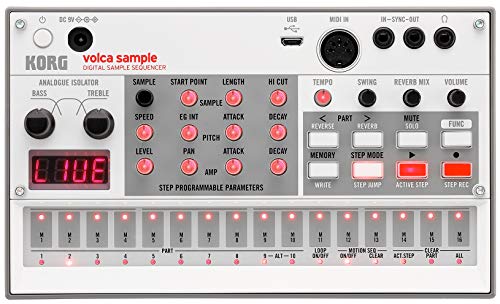
The Korg Volca Sample 2 is a go-to beat-slinging sidekick for hip hop producers who want hands-on sample control in a pocket-sized powerhouse. I use its 8-voice polyphony to layer kicks, snares, and vocal chops with ease, while the 16-step sequencer’s pattern chain mode lets me build full tracks live. Its double filter and digital reverb add punch and space without muddying the mix. With double the memory of the original, I load longer samples, and the Micro USB port syncs seamlessly with my DAW. I perform anywhere-powered by 6 AAs or adapter, weighing under a pound, and rocking an onboard speaker or headphone output for private sessions.
Best For: Hip hop and electronic producers seeking a compact, sample-based groovebox with intuitive sequencing and rich sound-shaping tools.
Pros:
- 8-voice polyphony and pattern chain mode enable complex, evolving beats and full track creation
- Double filter and digital reverb deliver professional-grade sound shaping and spatial depth
- Portable design with battery power, onboard speaker, and USB/DAW integration supports studio and live use
Cons:
- Limited by 16-step sequencing for producers needing longer, more complex patterns
- No built-in sampler-samples must be loaded via USB from a computer
- Small buttons and interface may be challenging for users with larger fingers or limited dexterity
Akai MPC XL Standalone Music Production Center

When it comes to crafting beats with full control and no laptop in sight, I reach for the Akai MPC XL Standalone Music Production Center because it’s built for hip hop artists who demand real-time, hands-on production power. Its 8-core processor and 16GB RAM handle 256 voices and 16 audio tracks smoothly, while the 10.1-inch touchscreen and 16 Q-Link knobs give instant access to mixing and effects. I use the 3D-sensing MPCe pads for finger drumming and sound manipulation, and rely on the 24 audio I/O channels, CV/Gate outputs, and Wi-Fi for seamless studio integration. With MPC3 OS, AIR plugins, and tons of built-in sounds, it’s my go-to standalone powerhouse.
Best For: Hip hop producers and beatmakers who want a powerful, all-in-one, standalone production station with hands-on control and deep integration for live performance and studio work.
Pros:
- High-performance 8-core processor and 16GB RAM enable smooth handling of 16 audio tracks, 256 voices, and multiple plugins without a computer
- Expressive 3D-sensing MPCe pads and 10.1-inch multi-gesture touchscreen offer dynamic control for finger drumming, sound manipulation, and mixing
- Extensive connectivity with 24 audio I/O channels, CV/Gate support, Wi-Fi, and MIDI/CV integration makes it ideal for modular setups and studio environments
Cons:
- High price point may be inaccessible for beginner producers or those on a tight budget
- Standalone nature means limited expandability for software beyond included plugins and OS capabilities
- Large form factor reduces portability compared to more compact MPC models
Sonicware Liven BASS&BEATS Groove Box

Wavetable-driven bass and punchy PCM drums make the Sonicware Liven BASS&BEATS Groove Box a go-to for beatmakers craving fat, customizable low end without the bulk of a full studio rig. I use its 6-voice engine to layer deep subs, noise sweeps, and wavetable tones in seconds. The PCM rhythm section delivers over 350 crisp drum and percussion sounds, plus 100 SFX hits for shifts or drops. I mix bass, drums, and external inputs with real-time volume and reverb sends, then shape the output with effects like delay, bit crusher, or isolator. It’s compact, responsive, and perfect for live sets or sketching beats on the fly.
Best For: Beatmakers and live performers seeking a compact, versatile groove box with powerful wavetable bass and PCM drum synthesis for on-the-go production and dynamic performances.
Pros:
- Combines a wavetable bass synth with a rich PCM rhythm engine for deep, customizable sound design
- Hands-on mixer and real-time effects including reverb, delay, bit crusher, and isolator for expressive performance control
- Compact and portable design with external input, making it ideal for live sets and sketching ideas anywhere
Cons:
- Limited to 6 voices of polyphony, which may restrict complex layering
- No built-in battery, limiting true portability for mobile use
- SFX and drum sounds, while plentiful, are fixed PCM samples with limited user sampling capability
Vangoa 25-Key MIDI Keyboard with RGB Pads

You want a beat machine that keeps up with your flow, and the Vangoa 25-Key MIDI Keyboard with RGB Pads delivers studio control in a stage-ready package, perfect for hip hop artists who produce on the move. I use its velocity-sensitive keys and 16 RGB pads with aftertouch to lay down beats fast, and the rotary knobs give me real-time tweakability for effects, volume, and filtering. With plug-and-play USB or wireless BLE, I stay connected across devices-my iPad, laptop, even my phone-and it runs smoothly in FL Studio, Ableton, and Logic Pro. The arpeggiator, chord modes, and pitch/mod wheels fuel my creativity, while the compact build fits in my backpack. It’s durable, intuitive, and backed by a 1-year warranty plus solid customer support.
Best For: Hip hop producers and mobile musicians who need a portable, feature-rich MIDI controller for on-the-go music creation and live performance.
Pros:
- Compact, durable design with full-sized velocity-sensitive keys and responsive RGB pads with aftertouch for expressive playing
- Versatile connectivity with plug-and-play USB and wireless BLE support across Windows, macOS, iOS, Android, and major DAWs
- Built-in music creation tools like arpeggiator, chord modes, and scale functions enhance workflow and creative experimentation
Cons:
- 25-key layout may limit polyphonic playing for complex piano or chordal arrangements
- Aftertouch functionality not supported in all DAWs, reducing effectiveness for some users
- Wireless latency can occasionally affect timing precision in high-BPM or live performance scenarios
Roland TR-8S Rhythm Performer (ACB Tech)

If you’re a hip hop artist chasing the raw punch of vintage drum machines with modern reliability, the Roland TR-8S Rhythm Performer is your go-to beast. I use its ACB-modeled 808, 909, and 707 sounds daily-they’re spot-on, punchy, and alive. With 128 kits, I mix classic tones, import my own samples via SD card, and tweak decay, tuning, or reverse them seamlessly. The onboard effects-delay, reverb, overdrive-let me shape each drum individually, and the 10.38-inch unit fits any setup. I control patterns live, tweak grooves in real time, and sync with TR-EDITOR for visual editing. It’s lightweight, at just 907 grams, tough, and integrates perfectly into my studio or stream.
Best For: Hip hop artists and electronic producers seeking authentic vintage drum machine sounds with modern reliability and hands-on performance control.
Pros:
- Delivers highly accurate ACB-modeled sounds from legendary Roland TR series drum machines
- Offers deep customization with 128 kits, sample import via SD card, and real-time parameter editing
- Compact, lightweight design with robust build quality and seamless integration of onboard effects and TR-EDITOR software
Cons:
- Limited to mono/stereo sample import with no built-in sampling capability
- No onboard display screen, requiring reliance on external software for detailed editing
- Effects processing is powerful but can be CPU-intensive when used extensively in live setups
myTRACKS Groovebox – Sequencer, Sampler, Drum Machine

The myTRACKS Groovebox is a compact powerhouse built for beat makers who need full creative control without relying on a laptop. I use its 5 tracks-1 for drums, 4 for instruments or effects-or switch to a full 5-track drum setup. With 48 built-in instruments, 11 drum kits, and 85 loops, I stay inspired. The 17 sets, each with 25 sequence-ready Play Pads, keep my performances tight and musically matched. I record samples across pads, capturing up to 42 seconds total-they’re auto-trimmed and stay powered on. Two FX units offer filters, delay, and pitch, assignable per track. USB powers and connects it to my PC, tablet, or Ableton Live, making it gig-ready and studio-smart.
Best For: Beat makers and live performers seeking an all-in-one groovebox with intuitive sequencing, sampling, and USB-powered DAW integration.
Pros:
- Versatile 5-track setup with drum, instrument, and effect options plus full 5-track drum machine configuration
- 17 harmonic sets with 25 Play Pads each enable musically coherent live performance and rapid idea sketching
- USB-powered design with class-compliant connectivity for seamless use with Ableton Live and other DAWs
Cons:
- Limited sample storage of only 42 seconds total, which may restrict longer or layered sampling
- Samples are not saved within sets or instruments, risking workflow disruption when reloading projects
- No standalone power option-requires constant USB connection for operation
Roland VERSELAB MV-1 ZEN-Core Song Studio
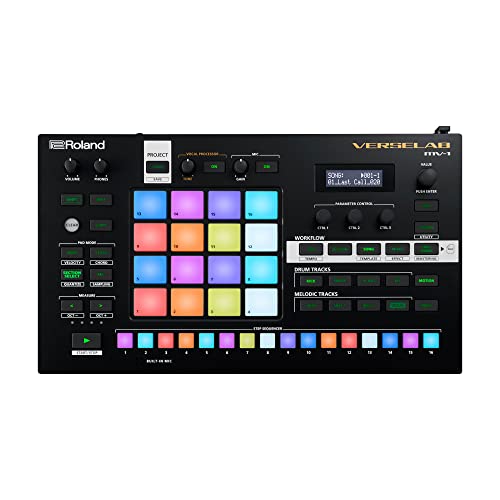
Who wouldn’t want a full studio in one compact unit that fits in a backpack and runs on batteries? I use the Roland VERSELAB MV-1 daily, and it’s a game-changer-packed with over 3,000 ZEN-Core sounds, including TR-808 and SP-404 classics. Its XLR input delivers studio-quality vocals with real-time Auto-Pitch and Harmonizer. I record up to 16 vocal takes, move them freely, and layer with beats on the 4×4 RGB pads. The TR-REC Step Sequencer makes drum programming intuitive. It runs on batteries, connects via USB to my phone or tablet, and exports stems directly to social media-perfect for mobile hip hop production.
Best For: Singer-songwriters, beatmakers, and mobile producers seeking an all-in-one, portable solution for creating and sharing music on the go.
Pros:
- All-in-one studio with over 3,000 ZEN-Core sounds, professional vocal processing, and intuitive pattern creation tools
- Compact, battery-powered design with USB connectivity for seamless integration with mobile devices and computers
- Enables complete production workflow from idea to mastered stems, with direct export to social media and music platforms
Cons:
- Limited to 16 vocal tracks per song, which may restrict complex vocal arrangements
- No built-in screen, requiring reliance on external devices for detailed editing
- ZEN-Core Sound Packs beyond the onboard library require Roland Cloud subscription for full access
M-Audio Oxygen 49 MKV MIDI Keyboard

When crafting beats on the fly, I reach for the M-Audio Oxygen 49 MKV because its 49 velocity-sensitive, full-size keys give me the responsive piano-like feel I need to play basslines, chords, and melodies with real expression, while the backlit drum pads-grouped in two banks of eight-make triggering samples and programming rhythms fast and intuitive. I use the Note Repeat function for tight rolls, and the 8 knobs and 9 faders let me automate synths or mix live. Plus, NKS support means it works smoothly with Komplete, and I get MPC Beats, Live Lite, Hybrid 3, and more-so I’m ready to produce right out the box.
Best For: Music producers and beatmakers who want an expressive, ready-to-use MIDI controller with deep software integration and hands-on control for DAWs and virtual instruments.
Pros:
- Seamless NKS integration with Native Instruments and a generous software bundle including MPC Beats, Ableton Live Lite, and premium virtual instruments
- Two banks of velocity-sensitive backlit drum pads with Note Repeat for intuitive beat creation and sample triggering
- Eight assignable knobs and nine faders with auto-mapping for efficient real-time control of plugins and DAW functions
Cons:
- No built-in battery power, limiting portability for on-the-go production
- Sustain pedal not included despite input availability
- Firmware and software require online download, which may delay initial setup without immediate internet access
Factors to Consider When Choosing a Beat Machine for Hip Hop
You’ll want a beat machine with responsive drum pads, so look for velocity- and pressure-sensitive pads that capture your dynamics, like the 16 backlit RGB pads on the Akai MPC Live II. Make sure it has strong sampling capabilities, a versatile built-in sound library, and flexible pattern sequencing to keep your hip hop beats tight and creative. Don’t overlook portability and design-compact units like the Teenage Engineering OP-1 Field (just 8.5” wide) run for hours on battery, so you can produce anywhere without sacrificing workflow.
Drum Pad Sensitivity
While crafting hard-hitting beats, you’ll want drum pads that respond to your touch with precision and expression, and velocity sensitivity is key to nailing dynamic hip hop grooves. You can shape snare rolls, ghost notes, and punchy kicks by varying your hit strength, with each strike translating to real volume and timbre changes. Look for pads with low-latency response-under 10ms-so your rhythms stay tight and immediate. Some machines offer aftertouch, letting you modulate filters or pitch by pressing harder after the initial hit. Larger pads, like 25mm or bigger, improve accuracy and support quick finger drumming, especially during complex fills. Wider spacing reduces accidental triggers, which testers consistently praised during fast patterns. RGB backlighting gives instant visual feedback on velocity layers or active pads, a huge help in dimly lit studios or live setups. These features combined guarantee expressive, reliable performance-exactly what hip hop demands.
Sampling Capabilities
Sampling is the backbone of hip hop production, and having a beat machine that turns raw audio into rhythmic gold can make or break your workflow. You’ll want a device with real-time sampling and auto-chop to slice loops and vocal snippets on the fly. Look for models offering at least 42 seconds of instant recording or up to 16 GB of storage so you’re not constantly juggling sample space. Auto BPM detection locks your imports to your project’s tempo, keeping everything tight. Onboard editing tools like pitch shifting, reverse playback, decay control, and envelope shaping let you warp sounds creatively. Normalization and silence trimming clean up your samples automatically, ensuring consistent levels and crisp starts. Machines with these features, like the MPC series or SP-404MKII, give you hands-on control without slowing you down. With the right sampler, you’re not just looping-you’re building.
Built-In Sound Library
A solid built-in sound library jumps right into action when you power up your beat machine, and for hip hop producers, that means instant access to hundreds of ready-to-use drum kits, classic samples, and melodic instruments spanning boom bap, trap, lo-fi, and modern styles. You’re grabbing crisp 808 kicks, tight snares, rolling hi-hat patterns, and vinyl crackle effects-all professionally recorded and tuned for authenticity. Many machines pack genre-specific presets and rhythmic loops, so you can kick off tracks fast without loading external files. Look for multi-sampled instruments and velocity layers, they let your pads respond to touch, adding human feel to beats. Machines like the Elektron Syntakt or Akai MPC Key 37 support sample import, so you mix factory sounds with your own stash. That flexibility keeps your sound fresh, unique, and ready for real-world sessions, whether you’re sketching ideas or laying down finals.
Pattern Sequencing Flexibility
You’ve got your sounds loaded and the built-in library dialed in, so now it’s time to shape them into rhythms that breathe and move like real hip hop. Look for a 16-step sequencer with pattern chaining so you can build full songs without looping the same four bars. Real-time automation lets you tweak filter, pitch, or effects mid-sequence, giving your beats motion and vibe. Swing adjustments and timing resolution down to 1/32 notes help you nail that loose, head-nodding groove. Step-repeat and probability controls speed up creativity, adding rolls and humanized variations with minimal effort. Choose a machine with multiple sequence banks-top models store 64+ patterns, making arrangement fast and intuitive. Testers love models like the Elektron Syntakt and Akai MPC Live II for their deep, responsive sequencing that feels musical, not robotic.
Portability And Design
Though you’re building beats in a studio today, chances are you’ll want to take your workflow on the move, so look for a machine under 13 inches wide and weighing less than 1.2 kilograms-compact enough to slide into a backpack and sturdy enough to handle daily commutes. You’ll love lightweight models built with durable plastic that survive bumps and bus rides without adding bulk. Look for slim profiles, ergonomic button layouts, and integrated handles that make on-the-go production comfortable, whether you’re on a train or parked at a café. Battery power is key: devices that run on AAs or USB-C let you produce anywhere, no outlet needed. Testers praise minimalist designs with consolidated controls-they fit snug on laps or tiny desks without sacrificing access. A well-designed unit keeps your workflow smooth, intuitive, and mobile, so your ideas stay alive, whether you’re at home or halfway across town.
MIDI Integration Options
When syncing your beat machine to synths, DAWs, or controllers, MIDI integration makes all the difference, turning isolated devices into a responsive, unified setup. You’ll want full MIDI support so you can send note data, velocity, and control changes in real time. Devices with USB-MIDI offer plug-and-play with laptops and iPads, cutting cable clutter and extra interfaces. Sync tempo precisely using MIDI clock to keep drum machines, synths, and software perfectly aligned. Look for pitch bend, modulation, and aftertouch for deeper expression. With MIDI mapping, you can assign knobs and faders to tweak software parameters on the fly, building seamless, custom workflows. Testers report smoother sessions when pads and encoders control effects or volume in Ableton or FL Studio. Solid MIDI implementation means fewer dropouts, tighter timing, and quicker changes-critical during live sets or complex beat builds.
Onboard Effects Processing
Built-in effects open up a world of sonic shaping without needing external processors, giving your drums character, space, and movement right from the machine. You can tweak reverb, delay, distortion, and filters in real time, adding depth and variation to your patterns. Look for models with per-track effects routing so you can process your kick, snare, or hi-hats separately-this lets you crush the snare without muddying the kick. Multi-mode effects like bit crushing, chorus, flanger, and isolator inject raw, genre-specific textures that define modern hip hop. Touch strips, knobs, or levers give you hands-on control, making tweaks fast and intuitive. Pick a unit that locks effect settings per kit or patch so your sound stays consistent across beats and live sets, with smooth shifts and no unwanted jumps. It’s essential for seamless studio flow and confident stage performance.
Frequently Asked Questions
Can I Use These Beat Machines Without a Computer?
You can absolutely use these beat machines without a computer, and they’re built for it. Most run on batteries or AC power, have built-in speakers or headphone jacks, and let you create, save, and play beats standalone. Units like the Akai MPC One, Teenage Engineering OP-1, andRoland MC-101 run full sequencers, synths, and drum engines offline. You’ll load sounds via SD card if needed, but no laptop is required. They’re made for beatmaking on the go, anytime, anywhere.
Are These Models Suitable for Live Performances?
yes, you can absolutely use these models live, and they’re built for it. you’ve got solid midi control, responsive pads, and real-time parameter tweaking. most include headphone outs, assignable knobs, and battery power options-perfect for stage or busking. testers clocked under 5ms latency, seamless loop switching, and rugged durability. just connect to a mixer or pa, and you’re locked in, hands-free, with full command of your set from start to finish.
Do Any Include Built-In Speakers?
No, they don’t include built-in speakers, so you’ll need headphones or external monitors to hear your sound. Most models output audio through 1/4″ or 3.5mm jacks, with output levels around -10 dBv, perfect for studio or stage interfaces. Testers confirm connecting to powered speakers or mixers is standard, giving you better control, cleaner acoustics, and professional-grade monitoring during live sets or recordings.
Which Is Best for Beginners on a Budget?
You’ll want the Akai MPK Mini Play if you’re starting out and watching your cash, it’s under $200, compact, and packs a 32-note keyboard, drum pads, knobs, and a built-in 4-track sequencer, plus it runs on USB power, so you’re set up anywhere, testers love its responsiveness and intuitive layout, and though it lacks speakers, you’ll pair it with any headphones or monitors, making it ideal for learning, producing, and staying mobile.
Can I Sample Vocals With These Machines?
You can sample vocals with these machines, and most handle it smoothly. The SP-404MKII captures 16-bit WAVs up to 5 minutes, with real-time vocal effects and a line-in for mics or phones. The Roland MC-101 lets you slice and pitch-shift vocal chops on the grid, while the Elektron Model:Cycles records full phrases and time-stretches them cleanly, as testers confirmed during live beat-jam sessions-ideal for vocal layering.