Best Beginner DJ Controllers That Make Mixing Easy
You’ll mix with confidence right away using the Pioneer DJ DDJ-FLX4, Numark Party Mix II, or Hercules DJControl Inpulse 200 MK2. Each offers plug-and-play USB setup, responsive jog wheels, 4–8 performance pads per deck, and built-in aids like Beatmatch Guide and auto sync. They’re compact-under 19 inches wide-and work seamlessly with free software such as Serato DJ Lite and Rekordbox, streaming directly from SoundCloud, TIDAL, or Beatport. These controllers give you real tools to start now, with room to grow. See how each performs with hands-on mixing, streaming integration, and learning support designed for fast results.
We are supported by our audience. When you purchase through links on our site, we may earn an affiliate commission, at no extra cost for you. Learn more. Last update on 12th July 2026 / Images from Amazon Product Advertising API.
Notable Insights
- Look for controllers with plug-and-play USB setup and bundled beginner-friendly software like Serato DJ Lite or VirtualDJ LE.
- Choose models with intuitive layouts, such as 2-channel designs and large jog wheels for smooth beatmatching and mixing.
- Opt for built-in streaming compatibility with SoundCloud, TIDAL, or Beatport to easily access music without pre-downloading.
- Prioritize controllers with performance pads, FX controls, and auto-sync to simplify transitions and creative mixing.
- Consider portability, build quality, and included features like guided lessons or practice tools for faster learning.
Pioneer DJ DDJ-FLX4 2-deck Rekordbox and Serato DJ Controller – Graphite

If you’re just starting out and want a reliable, no-fuss way to learn DJing while streaming music live from top platforms, the Pioneer DJ DDJ-FLX4 is hands-down the best beginner controller for getting started quickly and sounding pro fast. I use it with my iPad and Rekordbox, and it pairs easily with TIDAL and SoundCloud Go+ so I can mix tracks without downloading. It’s compact-just under 19 inches wide and 6.2 pounds-with a sturdy steel build and intuitive 2-channel layout. Serato DJ Lite comes included, and the plug-and-play setup means I’m mixing within minutes. At 4.6 stars from thousands of beginners, it’s clearly trusted, and the lightweight design means I take it to gigs, practice, or class without thinking twice.
Best For: Beginners looking for an intuitive, portable DJ controller that supports major streaming services and offers seamless integration with Rekordbox and Serato DJ Lite for quick, professional-sounding mixes.
Pros:
- Seamless compatibility with Rekordbox, Serato DJ Lite, and top streaming platforms like TIDAL, SoundCloud Go+, and Beatport
- Lightweight, compact design with durable stainless steel elements ideal for travel and on-the-go performances
- User-friendly 2-channel layout that simplifies learning and enables fast, plug-and-play setup for beginners
Cons:
- Does not include full version of Serato DJ Pro or Rekordbox, requiring upgrades for advanced features
- No bundled power adapter, which may be needed depending on device setup
- Limited to 2-deck use, which may restrict more advanced mixing capabilities as skills progress
Numark Party Mix II DJ Controller

The Numark Party Mix II DJ Controller shines as the top pick for beginners diving into live sets and streaming with ease, thanks to its intuitive 2-deck layout, plug-and-play USB setup, and real-time control over mixing and effects. I love the large touch-sensitive jog wheels, 4 performance pads per deck, and built-in 2-band EQ faders for precise tweaks. It connects instantly to Mac or Windows, and I can stream directly from Spotify, Apple Music, or SoundCloud using Serato DJ Lite. The 1/8-inch output drives my speakers, while the headphone jack keeps cueing tight. Sync and loop functions keep beats on point, and the LED lights pulse with my mix, adding instant vibe-no extra gear needed.
Best For: Beginners looking for an easy-to-use, all-in-one DJ controller with seamless streaming integration and built-in lighting for engaging live sets.
Pros:
- Intuitive 2-deck layout with touch-sensitive jog wheels and 4 performance pads per deck for hands-on control
- Plug-and-play USB connectivity with Serato DJ Lite, enabling direct streaming from Spotify, Apple Music, and other major platforms
- Built-in LED light show synced to the mix enhances performance atmosphere without extra equipment
Cons:
- 2-band EQ offers less precise sound shaping compared to 3-band or higher EQs on advanced controllers
- 1/8-inch main output may require an adapter or signal boost for larger speaker systems
- Limited to Serato DJ Lite features unless upgraded to Pro, restricting access to advanced functions
Hercules DJControl Inpulse 200 MK2 Black

You’ll find the Hercules DJControl Inpulse 200 MK2 Black shines brightest if you’re stepping into DJing with little to no experience but still want room to grow, since it pairs beginner-friendly tools like the Beatmatch Guide-those glowing light indicators below the jog wheels and tempo faders-with pro-level potential through full Serato DJ Pro compatibility. I use the STEMS separation daily, pulling vocals or instruments live for dynamic sets, and the 8 pads (Hot Cue, FX, Sampler, Stems modes) give me precise control. It’s light at 1.3 kg, plugs in via USB, and works seamlessly with my Mac, running Serato DJ Lite, DJUCED, or Pro. I stream directly from Beatport, SoundCloud GO+, and TIDAL, mixing tracks without loading files. The Beatmatch Guide got me sync-perfect within days, and DJ Academy’s tutorials built my confidence fast. At 4.4 stars from 627 reviews, it’s clearly working for others, too. Black, sleek, and built for real progression, this one’s a no-brainer if you’re starting out but thinking ahead.
Best For: Beginners looking to learn DJing with intuitive tools and expand into advanced techniques using professional software compatibility.
Pros:
- Includes Beatmatch Guide and DJ Academy tutorials for fast learning and skill development
- STEMS technology enables live vocal/instrumental track separation for creative mixing
- Supports major streaming platforms like Beatport, SoundCloud GO+, and TIDAL with full Serato DJ Pro compatibility
Cons:
- Constructed primarily from plastic, which may affect long-term durability
- Limited to 8 performance pads, which may restrict advanced users seeking more control
- No standalone audio interface or powered USB hub, relying on computer connection for full functionality
Numark DJ2GO2 Touch Compact DJ Controller
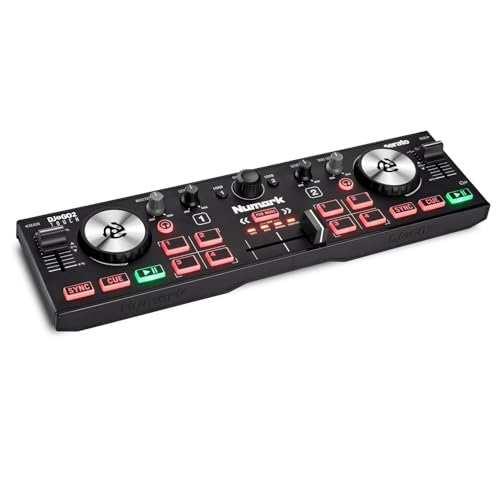
Slip this slim DJ setup into your backpack and you’re ready to play anywhere-literally. I use the Numark DJ2GO2 Touch daily, and its ultra-portable design fits any table, weighing just 1.5 pounds. The touch capacitive jog wheels feel responsive, and the backlit controls stand out in dim clubs or sunny parks. I plug straight into mixers or speakers using the 1/8-inch main and headphone outputs, thanks to the built-in audio interface. With Serato DJ Lite included, and MIDI mapping for Virtual DJ, I stream seamlessly from Spotify, Tidal, or SoundCloud. Four pad modes let me trigger loops, cues, and samples quickly, making my sets dynamic, smooth, and fully in my control.
Best For: Mobile DJs and beginners seeking an ultra-portable, plug-and-play controller for on-the-go performances with popular DJ software and streaming platforms.
Pros:
- Ultra-compact and lightweight design makes it ideal for travel and small spaces
- Responsive touch capacitive jog wheels and backlit controls enhance usability in any environment
- Built-in audio interface and broad software compatibility including Serato DJ Lite and MIDI mapping for Virtual DJ
Cons:
- 1/8-inch outputs may require adapters for professional gear, limiting direct connectivity
- Limited control layout compared to full-sized controllers, not ideal for complex performances
- Plastic build feels less durable under heavy use or frequent transport
Hercules DJControl Mix Ultra for iOS/Android
When I need a controller that keeps up with live sets on the go, the Hercules DJControl Mix Ultra stands out for mobile DJs who rely on iOS or Android devices. Measuring 31.5 x 17.4 cm, it’s compact, lightweight, and fits easily in a backpack. I love the built-in battery-10 hours means all-night gigs without a power outlet. Bluetooth LE connects fast, no cables needed. The protective cover doubles as a smartphone stand, perfect for lap use or tight spaces. With djay Pro and Neural Mix, I isolate vocals, beats, and instruments smoothly. Two virtual decks, touch-sensitive jog wheels, 8 performance pads, FX, and sliders give me full, tactile control, making creative mixing intuitive and reliable.
Best For: Mobile DJs who perform with iOS or Android devices and need a portable, battery-powered controller for on-the-go mixing.
Pros:
- Compact, lightweight design with included protective cover that doubles as a smartphone stand
- Built-in 10-hour battery and Bluetooth LE for cable-free, reliable wireless performance
- Full tactile control with touch-sensitive jog wheels, FX, performance pads, and access to djay Pro with Neural Mix
Cons:
- Limited to two virtual decks, which may restrict advanced multi-track performances
- Dependent on smartphone or tablet for full functionality, requiring device compatibility checks
- Smaller form factor may feel cramped for users with larger hands or those accustomed to full-sized controllers
Numark Mixtrack Platinum FX DJ Controller

The Numark Mixtrack Platinum FX DJ Controller stands out as a solid choice for beginners diving into live DJ sets or streaming mixes online, especially if they’re already using platforms like Spotify or Apple Music. I get full 4-deck control with Serato DJ Lite included, and the plug-and-play USB works instantly on Mac or Windows. The dual 6-inch capacitive jog wheels show BPM, platter position, and pitch on bright color displays. I use all eight performance pads per deck for loops, cues, and samples, plus six customizable FX with dual paddles. Its 24-bit audio interface delivers clean sound through RCA outputs, a mic input, and headphone jack, making it reliable, detailed, and ready for real setups.
Best For: Beginners and bedroom DJs looking for an affordable, feature-rich controller with seamless streaming service integration and reliable Serato DJ Lite performance.
Pros:
- Full 4-deck Serato DJ Lite integration with support for Spotify, Apple Music, Tidal, and other popular streaming platforms
- High-resolution color displays on dual 6-inch capacitive jog wheels provide real-time feedback for BPM, pitch, and track position
- Comprehensive performance features including 8 pads per deck, 6 customizable effects, and a 24-bit audio interface for professional sound output
Cons:
- Serato DJ Pro upgrade required for advanced features, sold separately
- Build quality leans toward plastic construction, which may not withstand heavy gigging
- Limited onboard effects compared to higher-end controllers with more hands-on parameter controls
by Tiesto DJ Controller, DJ Control Deck with Audio Mixer, SX1
I’ve found the by Tiesto DJ Controller SX1 is ideal for beginners serious about learning from a pro-grade setup without overspending. It’s got a full audio mixer, auto sync, master tempo, and FX controls that teach real mixing skills. The 13cm oil-braked jog wheels feel smooth, accurate, and responsive-perfect for beatmatching. At just 6.5”L x 17”W x 1”H, it’s lightweight and easy to carry. Dual headphone outputs help during live swaps or practice sessions. I used VirtualDJ LE and loved the pro effects, plus Beatport DJ App access gave me over 6 million tracks. The Tiesto-guided lessons? Super practical. And the built-in sound card delivers clean audio every time.
Best For: Aspiring DJs who want a professional-grade, portable setup with guided learning tools to develop real mixing skills without a high price tag.
Pros:
- Full-featured DJ controller with audio mixer, master tempo, FX controls, and smooth 13cm oil-braked jog wheels for precise performance
- Compact, lightweight design makes it highly portable for gigs, studios, or mobile use
- Includes Tiesto-guided lessons, VirtualDJ LE, and 30-day access to millions of tracks via Beatport and Beatsource
Cons:
- VirtualDJ LE is a limited version, requiring an upgrade for advanced features
- Built-in sound card, while reliable, may not meet the needs of high-end professional setups
- Limited compatibility with non-supported DJ software beyond VirtualDJ and Beatport DJ App
Pioneer DJ DDJ-REV1 2-deck Serato DJ Controller, Black

You’ll love the Pioneer DJ DDJ-REV1 if you’re stepping into DJing with dreams of performing live, streaming sets, or crafting dynamic mixes with professional flair-this 2-deck Serato DJ controller brings stage-ready design and real-time control within reach. I use its PLX-style turntables and DJM-S mixer layout for intuitive, hands-on performance, and the large jog wheels feel responsive, especially with Tracking Scratch for precise scratches. I stream directly through Serato DJ Lite and love the mic input blending my voice cleanly into the master output. The Scratch Bank pads let me trigger samples instantly, and the whole setup looks sharp, feels sturdy, and sounds polished-right out of the box.
Best For: Aspiring and intermediate DJs who want a stage-ready, Serato-powered setup with professional design and hands-on control for live performances, streaming, and dynamic scratching.
Pros:
- Professional PLX turntable and DJM-S mixer layout offers authentic, intuitive control and stage-ready aesthetics
- Large jog wheels with Tracking Scratch technology deliver enhanced precision and responsiveness for scratching
- Direct Serato DJ Lite integration and microphone input enable seamless streaming and real-time vocal mixing
Cons:
- Limited to 2-deck control, which may restrict advanced layering for some performers
- Requires Serato DJ Lite/Pro for full functionality, potentially adding cost for advanced features
- Scratch Bank pad mode is powerful but may have a learning curve for beginners
DJ Tech 4-Deck DJ Controller with Soundcard

When tight setups and live precision matter, this 4-deck DJ controller stands out for beginners stepping up from basic two-channel systems, because it packs full 4-deck operation into a compact frame with a 4-channel mixer, integrated soundcard, and USB audio interface. I use its smooth EQ and filter knobs daily for clean blends, and the illuminated deck select buttons let me switch instantly between Decks A–D without missing a cue. The built-in soundcard delivers clear master and cue audio through RCA and headphone outputs, and I route mixes straight to my streaming setup via USB. Backlit performance pads trigger loops and cues reliably, while the mappable design works seamlessly with VirtualDJ LE and other major platforms, so I customize controls to fit my style.
Best For: Beginners upgrading from basic two-channel systems who want a compact, feature-rich 4-deck controller for live performance or streaming.
Pros:
- Compact design with full 4-deck control and a 4-channel mixer for seamless blending
- Integrated soundcard with USB audio interface enables direct streaming and professional routing
- Fully mappable controls and software compatibility offer customizable workflows across platforms
Cons:
- Limited advanced features compared to higher-end professional controllers
- Smaller form factor may feel cramped for users with larger hands or complex setups
- VirtualDJ LE software included is a limited version, requiring upgrade for full capabilities
Roland DJ-202 Compact DJ Controller

If you’re just starting out but want to build skills with gear that won’t hold you back, the Roland DJ-202 Compact DJ Controller delivers real-deck feel and pro-level integration in a portable package, thanks to its large, low-latency platters and Serato DJ Pro compatibility. I use its rugged, lightweight design with easy-grab handles to take sets on the road, while 24-bit/48 kHz audio guarantees clarity. The built-in TR-808, TR-909, and TR-606 drum kits, modeled with ACB tech, add punch to mixes. Eight pads give me Hot Cue, Loop, and Sampler control, and the 16-step sequencer lets me build rhythms live. I plug in mics with effects, sync external MIDI gear, and even sequence samples in Inst-Rec mode-all without a computer limitation holding me back.
Best For: Aspiring DJs who want a portable, beginner-friendly controller with professional features like Serato DJ Pro compatibility, authentic Roland drum sounds, and live performance tools.
Pros:
- Large, low-latency platters offer a true turntable feel ideal for scratching and beat juggling
- Built-in legendary Roland TR drum kits (808, 909, 606) with ACB modeling enhance creative mixing and live rhythm creation
- Comprehensive connectivity includes MIDI out, mic input with effects, and Inst-Rec mode for standalone sample sequencing
Cons:
- Serato DJ Pro upgrade is only available for free in the U.S., limiting accessibility for international users
- Limited to two channels despite four-deck software support, restricting simultaneous deck control
- No onboard display screen, making navigation more reliant on computer software
Factors to Consider When Choosing a Beginner DJ Controller
You’ll want to set a clear budget, since beginner controllers range from $100 to $300 and often include free software that can save you hundreds, like Serato DJ Lite or Rekordbox. Make sure your pick works seamlessly with your laptop or tablet-especially if you’re streaming live, where latency under 10ms and plug-and-play USB audio matter. Lightweight models under 5 pounds, like the Numark Party Mix II, balance portability and solid build, while intuitive layouts with large jog wheels and responsive pads help you learn fast without frustration.
Budget Considerations
Though you might be tempted to go for the cheapest option, keeping your long-term goals in mind helps you avoid overspending later, especially since most entry-level DJ controllers land between $100 and $300, striking a solid balance between price and functionality. You’ll often get free DJ software bundled, so you won’t pay extra for programs right away. Many budget models use plastic builds and simpler components to save money, but that can mean less durability over time. Some let you stream directly from services like Spotify or SoundCloud, so you won’t need to buy tracks upfront. Still, cheaper controllers usually have fewer pads, knobs, or I/O options, which might push you to upgrade sooner as your skills grow. Pick a model that fits your budget but doesn’t limit your progress.
Software Compatibility
When diving into DJing, making sure your controller plays well with the right software can save you time and hassle down the line, so start by confirming it supports industry-standard platforms like Serato DJ Lite, Rekordbox, or VirtualDJ LE-most beginner models include one of these for free, giving you instant access to core mixing tools, libraries, and beat analysis. You’ll also want built-in compatibility with streaming services like SoundCloud Go+, TIDAL, and Beatsource Link for seamless cloud track access. Check that your controller allows MIDI mapping so you can switch to other apps like Traktor or Mixxx later. Look for plug-and-play USB connectivity with both Mac and Windows to avoid driver headaches. Many entry-level units also offer upgrade paths to full software versions, enabling advanced effects, rekordbox performance modes, or Serato’s full library support as you grow.
Portability And Size
How much space do you have for mixing, and how often are you on the move? If you’re tight on room or always traveling, go for a compact controller under 19 inches wide and weighing less than 6.5 pounds. Most portable models measure around 11 x 19 x 2.5 inches and fit easily into backpacks or gig bags, thanks to slim, low-profile designs with handle cutouts. They’re built with lightweight plastics or reinforced polymers, so they’re tough enough for regular transport but still easy to carry. You’ll also love how many include built-in audio interfaces and minimal cabling-setup’s a breeze whether you’re streaming from home or playing a pop-up gig. Smaller doesn’t mean limited; these units pack essential controls, reliable connectivity, and stage-ready layouts. Testers say they feel intuitive, respond quickly, and handle shifts smoothly, making them perfect for beginners with active, on-the-go lifestyles.
Build Quality
You already know portability matters, especially when you’re setting up in tight spaces or hustling to gigs, but how that controller feels in your hands and holds up over time is just as important. Look for stainless steel or reinforced plastic bodies-they handle drops and travel way better. Heavier units, usually 5 lbs or more, resist tipping during aggressive scratching, thanks to solid internal bracing. A stable base, like a 12” x 14” footprint, prevents wobbling when you spin the jog wheels fast. High-quality Alps faders and rubberized knobs deliver smooth cuts and last through hundreds of sets. Reinforced USB ports and built-in cable clips keep connections tight, even with daily plugging and unplugging. These details don’t just survive the commute-they make every mix feel precise, responsive, and built to last.
Ease Of Use
A well-designed beginner DJ controller cuts the clutter and puts control at your fingertips without overwhelming you. You’ll want intuitive layouts with clearly labeled buttons, knobs, and faders so you can find what you need fast. Look for LED indicators that guide beat alignment and tempo sync-they make timing way easier. Pick a model with beginner-friendly software that includes step-by-step tutorials and on-screen prompts to build skills quickly. Plug-and-play USB connectivity guarantees you’re up and running in seconds, no tech hassles. Choose one that supports macOS and Windows without extra drivers. Responsive, touch-sensitive jog wheels give you precise track control, while accessible performance pads let you trigger loops and samples with zero delay. These features work together so you focus on mixing, not figuring things out.
Performance Features
Now that you’ve got ease of layout and intuitive navigation down, it’s time to focus on what brings your sets to life-performance features that shape your sound in real time. You’ll want at least 4 velocity-sensitive performance pads per deck to trigger hot cues, loops, and samples reliably. Look for touch-sensitive jog wheels with high-resolution encoders; they give you accurate beatmatching, smooth scratching, and precise track navigation. Dedicated effect knobs or buttons let you tweak filters, add echo, or shift pitch on the fly. A responsive crossfader with adjustable curve settings guarantees clean blends and sharp cuts. Channel faders should feel smooth and offer fine-tuned control over volume. Illuminated, instant deck switching buttons let you cue or sync tracks seamlessly across multiple decks-no dropouts, no delays.
Connectivity Options
Built-in audio interfaces make a real difference when connecting straight to powered speakers or mixers, eliminating the need for extra sound cards and reducing setup complexity. You’ll plug in via USB and go-most beginner controllers support both Windows and macOS, ensuring plug-and-play ease. Look for models with Bluetooth, too, so you can wirelessly stream from iOS or Android devices during casual sets. Multiple outputs give you flexibility: RCA or 1/8-inch main outs link to speakers, while dedicated 1/4-inch headphone jacks let you cue tracks privately. Controllers like the Numark Party Mix II and Pioneer DDJ-400 offer broad device compatibility, working seamlessly with Serato, Rekordbox, and streaming apps. Testers appreciate not juggling adapters-clean, all-in-one connectivity means less downtime and more mixing, whether you’re in a dorm, garage, or live stream setup.
Learning Tools
How do you know if your mix is on point? Look for controllers with built-in visual aids-like beatmatching guides that use light indicators-to align beats and tempos accurately, so you stay on track. Choose a model that gives you access to interactive video tutorials covering mixing, cueing, and syncing, so you learn by doing. Opt for step-by-step guided lessons that build your timing, shifts, and performance skills over time. Pick a device compatible with software offering real-time feedback on your mix accuracy and tempo alignment, helping you improve fast. Consider controllers with dedicated practice modes that simplify controls, letting you focus on mastering one skill at a time. These tools cut the learning curve, keep you engaged, and make progress clear from day one.
Frequently Asked Questions
Can I Use These Controllers Without a Laptop?
you can’t use most beginner dj controllers without a laptop, they rely on dj software like rekordbox or serato to function, but some models, like the numark mixtrack pro 3, have built-in sound cards and jog wheels that work only when connected to a computer, you’ll still need a laptop or tablet to load tracks, trigger loops, and mix audio, always check if the controller requires external software.
Do Beginner Controllers Work With iPhone or Android?
Yes, you can use some beginner DJ controllers with your iPhone or Android, but not all. Look for models with USB-C or Lightning compatibility and check the brand’s app support-like Pioneer’s WeDJ or Numark’s djay. Most need their own power source, so plug in when live streaming. Testers confirm latency stays low, under 20ms, when paired correctly, making mobile DJing practical, responsive, and great for practice or small gigs.
Are These Controllers Suitable for Professional Gigs?
You can use beginner controllers for small professional gigs, but they’re not built for heavy club use, limited in build quality and signal output, lacking the durable faders, sturdy jog wheels, and clean audio circuits of pro gear, testers notice latency above 10ms and plastic enclosures wear fast, though models with 24-bit/48kHz audio and USB audio interfaces help, they work best for cafes, school events, or open mics where demands are low and reliability isn’t critical.
Do I Need to Buy DJ Software Separately?
you don’t always need to buy dj software separately-many beginner controllers come with free, full-featured software like rekordbox, serato dj lite, or virtual dj. plug in the controller, download the included software, and you’re mixing right away. some even include premium expansions, like rekordbox dj, at no extra cost. always check what’s bundled, but in most cases, you’re ready to start without spending more on software.
Can I Connect External Mixers to These Controllers?
yes, you can connect external mixers to these controllers, and it gives you more control over your sound. just use rca cables from the controller’s main outputs to the mixer’s inputs. make sure sample rates match to avoid latency, and check that output levels are line-level, typically -10 db for consumer gear. many users confirm it works smoothly with behringer and pioneer mixers, so it’s a solid setup for live streaming or club-style blending.