Cleaning Dust and Debris From Green Screen Surfaces Before Starting Any Livestream Session
You need to clean dust and debris from your green screen before every livestream-micro-shadows from grime cause jagged edges, green fringes, and flicker in keying software. Use a microfiber cloth and soft brush to wipe the surface gently, then blast seams with compressed air. Spot clean stains with 70% isopropyl alcohol, air dry fully, and stretch tightly to avoid wrinkles. A smooth, contaminant-free surface guarantees clean mattes and zero spill glow. Keep it covered when stored, and you’ll see why pros never skip prep.
We are supported by our audience. When you purchase through links on our site, we may earn an affiliate commission, at no extra cost for you. Learn more. Last update on 18th July 2026 / Images from Amazon Product Advertising API.
Notable Insights
- Inspect the green screen under bright, even lighting to identify dust, debris, and shadows before cleaning.
- Use a soft-bristle brush or microfiber cloth to gently remove loose particles without damaging the surface.
- Clear debris from seams and folds with compressed air or a vacuum with a brush attachment.
- Dampen a cloth with distilled water and mild detergent to wipe grime, avoiding excess moisture.
- Air dry completely and stretch tightly on the frame to ensure a smooth, wrinkle-free surface for keying.
How Contaminants Ruin Green Screen Keys
Dirt, dust, and grime aren’t just eyesores-they’re keying killers. When contaminants sit on green screens, they scatter light, breaking up even lighting and creating micro-shadows that confuse chroma key software. That means jagged edges, partial transparency, or leftover chunks of the green area in your final composite. Uneven reflectance from debris causes color spill, washing your talent in unnatural green glows, especially under bright studio LEDs. Dust particles highlight fabric weave, making the background texture visible and ruining edge accuracy. Stains or oils change local hues, so the software can’t generate a clean matte. Even small shadows from crumbs or smudges disrupt luminance uniformity, which is non-negotiable for reliable keying. You’ll fight flicker, noise, and inconsistent masking frame to frame-killing realism in live streams. A flawless chroma key starts with a spotless, uniformly lit green area, free of any contaminants that compromise optical consistency.
Essential Tools for Cleaning Green Screens
When you’re prepping for a live stream, having the right tools on hand makes all the difference in keeping your green screen looking pristine and keying perfectly. A microfiber cloth glides smoothly over the fabric screen, lifting dust without scratches or pilling. Use a soft-bristle brush, like a lens cleaning brush, to gently sweep away particles from textured surfaces. For tight spots-seams, folds, frame joints-compressed air blasts away buildup without contact. If you’ve got a large or mounted setup, a vacuum cleaner with a brush attachment efficiently pulls off heavier debris. Spot clean stains with a 70% water, 30% isopropyl alcohol solution in a spray bottle; it dissolves grime fast while reducing moisture risk on coated fabrics. These tools, tested by streaming pros, guarantee reliable keys and crisp backgrounds every time.
Step-by-Step Green Screen Cleaning Process
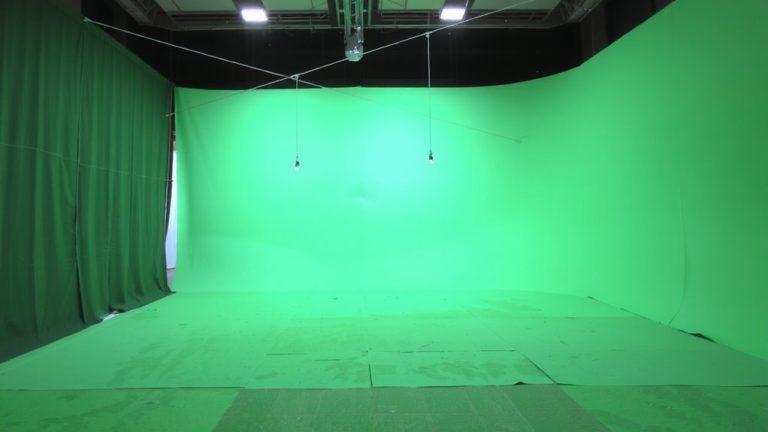
While lighting plays a major role in chroma key quality, how you clean your green screen can make or break a seamless background replacement in your live stream. Start by inspecting the surface under bright, evenly lit conditions to catch dust, debris, or stains that could disrupt chroma keying. Make sure to avoid any shadows during inspection-use diffused lighting and stay a few feet away from the screen for accuracy. Gently remove loose particles with a soft brush or microfiber cloth, never abrasive tools. For light grime, lightly dampen the cloth with distilled water and a drop of mild, non-ionic detergent. Let the screen air dry completely in a controlled space before setup. Then stretch it tightly on its frame to eliminate wrinkles. A smooth, clean, evenly lit surface gives the best results in live production.
Maintenance Tips Between Shoots
You’ve cleaned your green screen thoroughly and stretched it smooth for a flawless shoot, but keeping it ready for the next livestream means staying on top of maintenance between uses. Wipe the surface with a microfiber cloth after each session to prevent dust buildup that disrupts chroma keying. Store it in a closed case-keep it away from dirt and accidents, like that time a 100+ pound Pit Bull ruined a backdrop. For fabric screens, dry brush weekly with a soft bristle brush to preserve texture. Always inspect under even lighting to catch wrinkles or stains before they cast shadows or create harsh shadows during shooting. Never machine wash pop-up screens; spot clean with mild detergent to avoid delamination. Make sure your talent stands far enough away so movement doesn’t stir dust or cause shadows. A well-maintained screen stays chroma-consistent, shot after shot.
On a final note
You’ve wiped down your green screen with a microfiber cloth, used a 70% isopropyl alcohol solution for stains, and guaranteed the 10×12-foot backdrop stays wrinkle-free, all to avoid keying artifacts, color spill, and noise. Clean surfaces mean crisp chroma keys, tighter matte edges, and professional results. Make cleaning part of your prep: it’s faster than fixing issues in post. Consistent care extends gear life and keeps your live streams looking sharp, frame after frame.