Top-Rated Studio Mixing Consoles Every Engineer Needs
You need a console that handles live and studio work with clarity and flexibility, like the Behringer X32, featuring 32 MIDAS preamps, 40 inputs, and motorized 100 mm faders for precise automation. The StudioLive Series III SE 16 offers 40 channels, AVB expandability, and deep DAW integration, while the RØDECaster Pro II excels in podcasting with APHEX processing, quad-core control, and 64 SMART pads. Compact options like the Tascam Model 12 combine recording, mixing, and DAW control in one rugged unit, and Bluetooth-enabled mixers such as the XTUGA CT160 deliver modern connectivity without sacrificing input count. Top picks balance preamp quality, routing depth, and expandability-all backed by real-world reliability and consistent phantom power. Discover which model fits your workflow next.
We are supported by our audience. When you purchase through links on our site, we may earn an affiliate commission, at no extra cost for you. Learn more. Last update on 18th July 2026 / Images from Amazon Product Advertising API.
Notable Insights
- Behringer X32 offers 32 MIDAS preamps, 40 channels, and motorized faders for professional studio and live use.
- StudioLive Series III SE 16 delivers 40 channels, AVB expandability, and seamless DAW integration for modern workflows.
- RØDECaster Pro II integrates ultra-low-noise preamps, APHEX processing, and SMART pads for podcast and voice production.
- Tascam Model 12 combines a 12-track recorder, USB interface, and DAW control in one all-in-one studio solution.
- High channel count, premium preamps, and onboard DSP are essential for flexibility, clarity, and efficient mixing in studios.
Behringer 32 40-Input 25-Bus Digital Mixing Console, Black (X32)

If you’re setting up a studio that doubles as a live streaming hub, the Behringer X32 is a serious contender, and I’ve found it’s especially ideal for engineers who need deep control without breaking the bank. I use its 32 MIDAS-designed preamps daily-they’re clean, quiet, and perfect for vocals, instruments, or micing a podcast panel. With 40 input channels and 25 buses, I route audio to streams, recordings, and monitors simultaneously. The 100 mm motorized faders recall scenes instantly, and I sync them to my DAW in seconds. Sixteen XLR outs feed my interfaces, while dynamic LCD scribble strips keep labels updated, so I never lose track mid-session.
Best For: Engineers and streamers seeking a high-channel-count digital mixer with premium preamps and seamless DAW integration at an affordable price.
Pros:
- 32 high-quality MIDAS-designed preamps deliver studio-grade sound for live and recording applications
- 25 motorized faders and advanced scene management allow for precise automation and quick setup recall
- Extensive I/O and flexible bus architecture support complex routing for streaming, recording, and monitoring
Cons:
- Steeper learning curve for users unfamiliar with digital console workflows
- Screen and menu navigation can feel cluttered during fast-paced sessions
- Build quality, while functional, feels less rugged compared to higher-end competitors
StudioLive Series III SE 16 Digital Console Mixer

I’ve found the StudioLive Series III SE 16 Digital Console Mixer to be an ideal fit for engineers and live sound professionals who need scalable mixing power in a compact, rack-mountable chassis, and it stands out especially when you’re running front-of-house for mid-sized gigs or managing broadcast feeds with tight space constraints. It packs 40 channels, 16 XMAX-R preamps, and 26 mix buses, all with lush reverb and delay. I use the 7-band EQ and vintage compressors daily-they’re musical and precise. With AVB networking, I expand to 36 inputs and link NSB stage boxes seamlessly. The 64×64 USB interface and Capture software make recording a no-brainer. I control it remotely via Universal Control or PreSonus Metro, even offsite.
Best For: Live sound engineers and studio professionals needing a compact, scalable digital mixer with integrated recording, networking, and remote control for mid-sized venues or space-constrained broadcast environments.
Pros:
- 40 channels with 26 mix buses, AVB networking, and seamless expansion via Ethernet and NSB stage boxes
- Includes Studio One Pro and Capture with Virtual Soundcheck for streamlined recording and mixing workflows
- Full remote control via Universal Control and PreSonus Metro, enabling offsite mixer management with real-time monitoring
Cons:
- Limited to 16 XMAX-R preamps, requiring stage boxes for more microphone inputs
- Rack-mountable design may lack tactile feedback compared to traditional console layouts
- Wi-Fi control relies on stable network infrastructure, which can be a limitation in poorly connected venues
XTUGA 16 Channel Audio Mixer (CT160)

The XTUGA CT160 is a workhorse for creators who need a reliable, all-in-one mixing solution for live streaming, podcasting, and mobile recording setups. I use it for my podcast rig, and it handles 16 channels with ease, thanks to clean XLR inputs, +48V phantom power, and gold-plated connectors that reduce noise. Its built-in USB audio interface lets me record straight to my PC, while Bluetooth streams backing tracks wirelessly. The slim 1.4-inch design fits tight spaces, and sealed knobs resist dust during gigs. At just under 7 kg, it’s portable but sturdy. With 4.2 stars from 187 reviews, it’s a proven performer for real-world studio and live tasks.
Best For: Podcasters, live streamers, and mobile DJs seeking a versatile, durable audio mixer with robust connectivity and multi-channel control.
Pros:
- Offers 16 channels with clean, balanced XLR inputs and +48V phantom power for professional-grade audio recording.
- Built-in USB audio interface and Bluetooth enable seamless computer integration and wireless streaming.
- Compact, ultra-slim design with sealed knobs ensures portability and durability for on-the-go use.
Cons:
- Limited customer review base with only 187 reviews, potentially indicating lower market presence.
- Bluetooth functionality may introduce latency in time-sensitive live setups.
- Lacks advanced digital effects or onboard processing typically found in higher-end mixers.
RØDE RØDECaster Pro II Podcast Production Hub

You’re getting studio-grade audio right out of the box with the RØDE RØDECaster Pro II, a powerhouse designed for podcasters, streamers, and content creators who want pro-level sound without a steep learning curve. I use its four ultra-low-noise Revolution preamps daily, and they’re clean, even with high-gain mics. The quad-core engine powers APHEX processing-Aural Exciter, Compellor, de-esser-giving my voice polish fast. I plug in via XLR, TRS, or USB-C, and send audio to my computer, phone, or microSD card. With 250mW headphone power, my monitors stay loud and clear. Wi-Fi, Bluetooth, and Gigabit Ethernet keep me connected, and the 64 SMART pad actions save time. It’s reliable, intuitive, and built tough.
Best For: Podcasters, streamers, and content creators seeking an all-in-one, easy-to-use audio production hub with studio-quality sound and seamless connectivity.
Pros:
- Four ultra-low-noise Revolution preamps deliver pristine audio for multiple microphones or instruments
- Integrated APHEX audio processing (Aural Exciter, Compellor, de-esser) enhances sound quality instantly
- Extensive connectivity with Wi-Fi, Bluetooth, dual USB-C, Gigabit Ethernet, and 64 programmable SMART pad actions
Cons:
- No built-in microphones, requiring separate mic purchases for full setup
- Lacks touchscreen, relying on physical controls which may slow workflow for some users
- Premium price point may be high for beginners or casual creators
W IN-MIX 8 Channel Mixer with Bluetooth

Though compact at just 13 inches deep and under 1.2 kilograms, I find the W IN-MIX 8 Channel Mixer with Bluetooth delivers serious versatility for creators who need a single hub for live streaming, podcasting, and home recording. I use its eight channels daily, each with 3-band EQ, gain control, and 48V phantom power for condenser mics. Bluetooth 5.0 streams audio wirelessly from my phone, while the USB interface records straight to my laptop. I appreciate the 24 DSP effects, RCA/TRS/XLR inputs, and clear monitor outputs. It’s lightweight, intuitive, and handles mics, instruments, and playback gear with ease-ideal for karaoke, DJ sets, or podcasting.
Best For: Content creators, podcasters, and live streamers seeking a compact, feature-rich mixer with Bluetooth and multi-channel flexibility for professional audio production.
Pros:
- Offers 8 channels with 3-band EQ, gain control, and 48V phantom power for versatile input options
- Built-in Bluetooth 5.0 and USB interface enable wireless streaming and direct computer recording
- Compact, lightweight design with intuitive layout suitable for both beginners and experienced users
Cons:
- Limited to corded power, reducing portability in battery-dependent setups
- No mention of onboard effects customization, which may limit creative control
- May have a learning curve for absolute beginners due to dense feature set
Behringer EURODESK SX2442FX 24-Input Mixer

If you’re chasing that warm, vintage tone but need modern flexibility for tracking, mixing, and live streaming, the Behringer EURODESK SX2442FX is a no-brainer, especially with its 16 XENYX mic preamps delivering 120 dB of dynamic range and less than 0.0007% THD - clean gain without coloring your source unless you want it to. I use it for recording bands and streaming sessions, and its 24 inputs, 4-bus design, plus mono output with sweepable low-pass filter make sub integration seamless. The British-style 3-band EQs are musical, with semi-parametric mids that shape vocals fast. Dual 24-bit effects processors give me 99 editable presets-reverb, delay, chorus-right on board, so I don’t need extras.
Best For: Musicians, engineers, and live streamers seeking a high-input analog mixer with classic EQ character, clean preamps, and built-in digital effects for studio and live use.
Pros:
- 16 premium XENYX mic preamps with extremely low noise and high dynamic range for pristine audio capture
- Flexible 24-input, 4-bus routing with a dedicated mono output and sweepable low-pass filter for precise subwoofer integration
- Dual 24-bit digital effects processors with 99 editable presets eliminate the need for external effects units
Cons:
- Large 24-channel format may be overkill for small setups or solo creators
- Analog-only signal path lacks built-in USB/audio interface functionality for direct computer recording
- British EQs, while musical, may not offer the surgical precision desired in high-end modern mixing environments
Phenyx Pro 8-Channel Audio Mixer (PTL-800)

The Phenyx Pro PTL-800 stands out as a solid choice for podcasters, live streamers, and home studio creators who need a compact mixer with pro-level routing and connectivity. I use its 6 XLR/LINE inputs daily for mics and instruments, and the +48V phantom power keeps my condensers humming cleanly. Bluetooth streaming lets me play background tracks wirelessly, while USB-B handles recording straight to my PC. The 3-band EQ shapes vocals crisply, and the 16 DSP effects, from reverb to delay, sound surprisingly polished. I route drums to the SUB output for tighter low end, and the AUX sends feed my external effects or monitor mixes. It’s rugged, intuitive, and perfect for tight setups that still demand flexibility.
Best For: Podcasters, live streamers, and home studio creators seeking a compact, feature-rich mixer with professional audio routing and wireless connectivity.
Pros:
- Versatile connectivity with 6 XLR/LINE inputs, Bluetooth, USB-B, and multiple outputs for flexible signal routing
- High-quality preamps, 3-band EQ, and 16 built-in DSP effects enhance audio clarity and creativity
- Durable build with intuitive layout, phantom power, and dedicated SUB/AUX/BUS outputs for pro-level control
Cons:
- Limited to 8 channels, which may restrict larger live setups or multi-instrument recordings
- No onboard LCD screen, making precise effect or setting adjustments less intuitive
- USB-B interface is older standard, potentially limiting high-speed data transfer with modern computers
4 Channel Podcast Audio Mixer with DSP Effects

I rely on the TKLBLS 4-channel podcast audio mixer when I need clean, professional sound without the bulk of a full-size console, and it’s perfect for podcasters, streamers, and content creators working in tight spaces-just 7.49 inches deep and 6.29 inches wide, it fits neatly on any desk. I use its 48V phantom power for condenser mics, engage the PAD for loud sources, and apply the 80Hz high-pass filter to clean up vocals. With 3-band EQ per channel, built-in DSP effects-like reverb and delay-and Bluetooth 5.0 plus USB for recording, it’s a compact powerhouse. I stream directly to my PC or phone, and the 99 effects keep my audio engaging. It’s ranked #13 in DJ mixers for a reason-solid build, intuitive layout, and reliable performance.
Best For: Podcasters, streamers, and content creators seeking a compact, feature-rich audio mixer with professional sound quality and versatile connectivity for desktop use.
Pros:
- Compact design with robust feature set, including 4 channels, 48V phantom power, PAD, and high-pass filter for clean audio capture
- Built-in DSP with 99 effects, 3-band EQ per channel, and Bluetooth 5.0 for enhanced sound customization and wireless streaming
- USB and OTG connectivity enable direct recording and compatibility with computers and mobile devices for live streaming
Cons:
- Limited to 4 XLR inputs, which may restrict expansion for larger productions
- Bluetooth range capped at 15 feet, potentially limiting mobility during use
- Ranked #3,639 in Musical Instruments, indicating niche market presence and limited brand recognition compared to industry leaders
Tascam Model 12 All-in-One Recording Studio
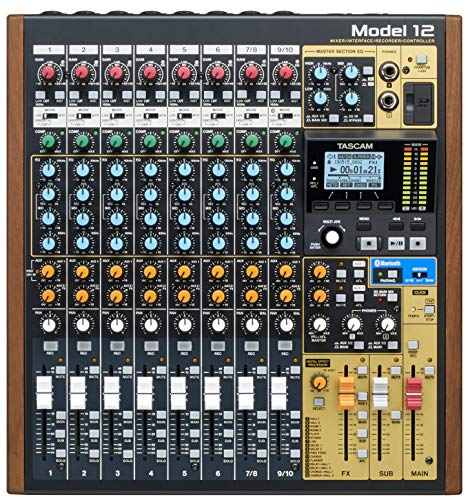
You’re not just setting up a studio-you’re building a command center, and the Tascam Model 12 All-in-One Recording Studio is the hub that keeps everything in sync. I use it as my mixer, 12-track recorder, USB audio interface, and DAW controller-all in one compact unit. It’s got 12 inputs, 10 outputs, and dual headphone jacks with separate volume and source controls, perfect for tracking bands or podcast guests. Each channel has a 1-knob compressor and 3-band EQ, so I shape tones fast. With USB connectivity, I record into my DAW and control it with built-in MIDI. The click output with tap tempo keeps overdubs tight.
Best For: Musicians, podcasters, and content creators who need an all-in-one recording, mixing, and DAW control solution in a compact form.
Pros:
- Combines a 12-track recorder, mixer, USB audio interface, and DAW controller in a single unit
- Offers 12 inputs and dual headphone outputs with independent controls, ideal for multi-person sessions
- Features built-in 1-knob compression and 3-band EQ on all channels for quick sound shaping
Cons:
- Limited to 12-track recording, which may not suit large-scale productions
- Onboard effects are basic and may not replace high-end external processors
- USB audio interface functionality may have latency issues on older computers
RM06 6-Channel Audio Mixer with Bluetooth
Packed with professional-grade features in a compact chassis, the RM06 6-Channel Audio Mixer with Bluetooth is a workhorse for solo performers and small ensembles who need flexible, high-resolution audio control on the go. I use its 4 XLR/6.35 mm combo inputs with 48V phantom power for mics, plus HI-Z on channel 1 for direct guitar or bass, and I love the 24-bit 192 kHz clarity. Bluetooth streams backing tracks wirelessly, while the USB-C doubles as a 24-bit 192 kHz audio interface with loopback for streaming. I run vocals through the 99 reverb effects and engage low-cut on channel 2 to reduce rumble. It’s solid for podcasts, live gigs, and church-small, powerful, and ready.
Best For: Solo performers, small bands, and content creators seeking a portable, high-resolution audio mixer with Bluetooth and USB audio interface functionality for live, studio, or streaming use.
Pros:
- Offers 4 XLR/6.35 mm combo inputs with 48V phantom power, ideal for microphones and instrument connectivity
- Built-in Bluetooth and USB playback/recording enable wireless streaming and local media integration
- High 24-bit 192 kHz audio resolution with loopback support via USB-C for professional podcasting and live streaming
Cons:
- Limited to 6 channels, which may restrict larger band or multi-input setups
- No built-in battery, requiring external power for portable use
- Effects limited to reverb (99 presets), lacking more diverse onboard processing like delay or compression
Factors to Consider When Choosing Studio Mixing Consoles
You’ll want to match the input channel count to your typical setup, whether it’s a solo streamer using 4 channels or a band needing 16+, so check how expandable the mixer is. Don’t overlook preamp quality-units like the Zoom LiveTrak L-8 include discrete Class-A preamps with 60dB of gain and low noise, which makes vocals and acoustic instruments sound clear and professional. Look for solid processing capabilities, useful connectivity like XLR, TRS, USB-C, and MIDI, and fader automation if you’re mixing live sessions or multitrack recordings regularly.
Input Channel Count
While planning your studio or live setup, the input channel count on a mixing console directly shapes how many mics, instruments, or external devices you can record at once, and choosing the right number guarantees smooth tracking without signal overload or workflow bottlenecks. You’ll want at least 4 to 16 inputs if you’re podcasting, recording solo acts, or working with small bands-plenty for vocals, guitar, and a drum overhead. But if you’re miking full drum kits, string sections, or live ensembles, aim for 32 channels or more. Many digital consoles, like the Yamaha TF-Rack or Allen & Heath dLive S Series, support expansion via stage boxes, letting you grow your count with AVB or Dante. Always pick a console with a few extra channels beyond your current needs-flexibility matters when adding guests, instruments, or streaming gear down the line.
Preamp Quality
When capturing every nuance of a vocal take or delicate acoustic performance, your console’s preamp quality makes or breaks the signal chain. You need clean gain with low noise, and top-tier preamps deliver EIN ratings below –125 dBu, ensuring silence between notes. They give you plenty of headroom while preserving the source’s true character, so you don’t color the sound unintentionally. Look for discrete or class-A circuitry-they’re more transparent and warmer than IC-based designs. Plus, you’ll want solid +48V phantom power for your condenser mics; it’s standard, but not all preamps regulate it well. The best ones stay consistent across gain stages, with flat frequency response and minimal distortion, even when cranked. Testers notice clearer transients, tighter bass, and smoother highs on consoles with premium preamps. Don’t sacrifice here-your recordings depend on it.
Processing Capabilities
Processing power shapes the sound and speed of your mix, and today’s digital consoles pack serious onboard muscle. You’ll find built-in DSP effects like reverb, delay, and compression, with up to 99 presets for real-time shaping. Every channel gives you compressor, gate, de-esser, and high-pass filter to lock in clean, controlled signals. Need tonal precision? Use 7-band state-space modeled EQ on every input and bus to sculpt with surgical accuracy. Some consoles include APHEX Aural Exciter and Big Bottom, adding harmonic richness and deep, optimized bass right in the signal path. Motorized faders and automated buses let you recall and tweak processing settings on the fly, making your sessions faster and more consistent. You’re not just mixing-you’re refining sound with pro-grade tools built right in. With this level of processing, you stay in the zone and deliver broadcast-ready results every time.
Connectivity Options
You’ll want to match your studio’s workflow with the right connectivity options, since modern mixers offer far more than just XLR inputs. You can record straight to your computer via USB with bidirectional 24-bit/192 kHz audio, perfect for high-res tracking without extra interfaces. If you need more channels or live streaming flexibility, mixers with Dante or AVB over Ethernet let you move dozens of audio tracks with low latency across rooms or stages. Bluetooth’s handy, too-stream backing tracks wirelessly from your phone up to 15 meters away using standard SBC or AAC codecs. Need analog gear? You’ve got XLR, TRS, and RCA for mics, instruments, and line-level devices, balanced or unbalanced. Some consoles even record directly to SD cards or USB drives, so you can capture stereo mixes or multitracks without a laptop. These options save time, reduce clutter, and keep your sessions moving.
Fader Automation
Modern studio consoles do more than just route audio-they shape your workflow, and with the right connectivity in place, the next step is mastering control through fader automation. You’ll want motorized faders, which move automatically to match recalled settings, so your mix stays accurate between sessions or scene changes. They’re essential when managing high-channel-count projects-some consoles support full automation of all faders at once, ensuring smooth shifts with total parameter recall. Automation modes like latching, touch, and mute groups give you flexibility based on how you work. Need precision during mix revisions? Fader moves can be recorded and played back exactly, every time. Plus, most digital consoles sync with your DAW via MCU or HUI protocols, locking fader levels to your project timeline. It’s not just convenient-it’s critical for efficient, repeatable mixes in both studio and live streaming setups.
Effects Integration
While not every mix demands elaborate effects, having them built right into your console saves time and elevates your sound with minimal setup. You’ll find consoles with built-in DSP offering up to 99 effects-reverb, delay, chorus, pitch shifting-all accessible in real time. Look for dedicated effects buses with stereo returns so multiple channels can share an effect while keeping individual control. Onboard processors often feature studio-grade algorithms like APHEX Aural Exciter and Big Bottom, adding clarity and rich low end instantly. You can blend internal processing with external hardware via SEND/RETURN jacks for flexible routing. Plus, with 24-bit/192 kHz audio interfaces, your processed signal stays pristine from input to recording. Testers consistently praise the reliability and fidelity, noting mixes sound polished without extra outboard gear. Choose smart integration, and you’re streamlining both tracking and live workflows.
Build And Durability
A well-built mixing console stands up to daily use in studios and on the road, so focus on construction that won’t let you down. You need a metal chassis-it’s tougher than plastic and handles constant operation without warping. Choose consoles with high-quality motorized faders rated for over 100,000 movements; they deliver smooth automation and last longer. Heavy-duty rotary knobs and sealed potentiometers resist dust and moisture, keeping your levels consistent. Look for reinforced I/O jacks, like gold-plated or locking connectors-they reduce wear, minimize signal loss, and survive frequent patching. If you tour or move gear often, go for rack-mountable models with edge protection and internal bracing; they handle the bumps and drops. Real-world tests show these features add years to your console’s life. Don’t skimp on durability-your console’s build directly affects performance, session time, and reliability.
Software Compatibility
You’ll want a mixing console that works seamlessly with your digital setup, so check for support of standard networking protocols like AVB or Dante-they let you route audio over Ethernet with low latency and tight sync across devices. Make sure it offers USB audio interface capabilities up to 24-bit/192 kHz for crisp, high-res recordings straight into your DAW. Look for native control surface support for Pro Tools, Logic, or Ableton via HUI or Mackie Control, so you can automate mixes with precision. A dedicated control app over Ethernet or Wi-Fi means you can adjust levels, save scenes, and manage inputs remotely-perfect for live streaming or studio tweaks. Always confirm the manufacturer delivers regular firmware and driver updates, so your console stays compatible with the latest OS and software releases. Smart integration means fewer headaches and more time creating.
Frequently Asked Questions
What Is the Best Mixer for Live Streaming Beginners?
You’ll want the Zoom LiveTrak L-12 if you’re starting out, it’s got built-in streaming tools, 12 inputs, and a USB interface for clear audio, plus physical faders make levels easy to tweak, testers consistently call it reliable, its 24-bit/48kHz recording captures detail, and the integrated click-track helps talent stay in sync, it’s simple to connect to OBS or Streamlabs, and the rugged build holds up after months of use, all under $600.
Are Digital Mixers More Reliable Than Analog Ones?
You’ll find digital mixers generally more reliable than analog ones because they include built-in backup, recallable settings, and firmware updates that prevent signal drift and hardware wear. Units like the Zoom L-12 or Behringer Wing offer 48V phantom power, 96 kHz sample rates, and multi-track USB recording, reducing cable clutter and single-point failures. Testers report fewer channel drops, consistent EQ curves, and quicker fault recovery, making digital smarter for live streaming where consistency matters most.
Can I Use a Podcast Mixer for Music Recording?
You can use a podcast mixer for music recording, but it’s not ideal. Most podcast mixers, like the Rode RodeCaster Pro, have limited mic preamps-usually two to four-and lower headroom, which risks distortion on dynamic instruments. They prioritize vocal clarity and quick routing, not musical nuance. While you’ll capture audio, you’ll lack EQ precision, insert points, and multitrack flexibility. For layered music, a dedicated audio interface or studio console gives cleaner preamps, 24-bit/48kHz+ resolution, and better signal-to-noise ratios.
Do I Need a Mixer With Built-In Effects?
You don’t need a mixer with built-in effects, but having them saves time and money. If you’re recording music or streaming, handy reverb, delay, or EQ lets you shape sound fast without plugins. Testers love the Mackie ProFX16v3’s 24-bit effects for vocal clarity, while the Soundcraft Signature 12 MTK offers studio-grade processing. For flexibility, go USB-enabled; you can always add external FX later. Built-ins are great for live work, but clean preamps and solid routing matter more.
How Important Is Mixer Portability for Studio Use?
You don’t need a portable mixer for studio work, since most setups are fixed, cables are managed, and gear stays in place. You prioritize I/O count, preamp quality, and routing over weight or size. But if you do move sessions-like podcasting on set or field recording-then a 1U, 8-channel unit under 15 lbs with solid knobs and locking connectors makes sense, and won’t sacrifice stability. Portability’s a bonus, not a requirement.