Best Mixer Audio Interfaces for Studio-Grade Sound Control
You get studio-grade control with mixers like the YAMAHA MG10XU, featuring 10 inputs, +48V phantom power, D-PRE preamps with -128 dBu noise, and 3-band EQ plus high-pass filters. Models such as the Behringer XR18 offer 16-channel USB audio interface, MIDAS preamps, and Wi-Fi control. Bluetooth versions, like in the Depusheng 8-channel, enable wireless streaming up to 50 ft, while MAONO G1 NEO gives class-A preamps, voice effects, and RGB lighting-perfect for streaming to Twitch or Zoom. Choose based on channel count, connectivity, and real-world durability you can test. You’ll discover which fits your setup as you explore each model’s strengths.
We are supported by our audience. When you purchase through links on our site, we may earn an affiliate commission, at no extra cost for you. Learn more. Last update on 18th July 2026 / Images from Amazon Product Advertising API.
Notable Insights
- High-quality preamps like YAMAHA’s D-PRE and MIDAS-designed circuits deliver studio-grade, low-noise audio clarity.
- +48V phantom power across multiple channels supports condenser microphones for professional recording setups.
- Built-in 3-band EQ and high-pass filters enable precise tone shaping and elimination of low-end noise.
- USB audio interfaces with multi-track recording allow direct, plug-and-play connection to computers for studio production.
- Balanced XLR/TRS inputs and low-noise design ensure clean signal integrity over long cable runs.
6 Channel Audio Interface with Bluetooth

If you’re setting up a live stream or recording vocals and instruments without the hassle of extra gear, this 6-channel audio interface with Bluetooth is your best bet, especially when you need flexible inputs and wireless convenience. I use all four XLR inputs with +48V phantom power for condenser mics, and the 1/4-inch jacks handle my guitar and DI box cleanly. Channels 5/6 accept line-level signals, perfect for synths or drum machines. Built-in 16-bit DSP gives me 16 effects like reverb and delay, plus 3-band EQ per channel. Bluetooth streams audio from my phone, and USB lets me play tracks directly from a flash drive. I control volume, effects, and playback with dedicated faders and the MENU button-no drivers, no fuss. It’s rock-solid for karaoke, recording, or live gigs.
Best For: Musicians, streamers, and performers who need a versatile, no-fuss audio interface with wireless connectivity and built-in effects for live, studio, or karaoke use.
Pros:
- Flexible 6-channel input with XLR and 1/4-inch jacks supports microphones, instruments, and line-level devices
- Built-in 16-bit DSP effects and 3-band EQ per channel enable detailed sound shaping without external processing
- Bluetooth and USB playback allow wireless streaming and direct track playback from devices or flash drives
Cons:
- No mention of computer driver support or audio interface sample rates/bit depth for high-end recording
- Limited to analog controls with no digital connectivity like MIDI or app integration
- USB functionality appears limited to playback, not bidirectional audio interface recording via USB
Aveek 5-Channel Audio Mixer with USB Bluetooth
I rely on the Aveek 5-Channel Audio Mixer with USB Bluetooth when I need a compact, no-fuss interface that handles live streaming, podcasting, and small band recordings without slowing me down. It’s got 3 XLR inputs with 48V phantom power for condenser mics, plus 6.35mm and RCA inputs for instruments, keyboards, or CD players. I connect to my PC via USB-B for recording-no extra software needed-or plug in a USB drive to play MP3s or record my mix. Bluetooth streams wireless audio from my phone within 15 feet, though I can’t route it to outputs. Each channel has gain, 2-band EQ, and effect controls, while echo and delay enhance my vocals. A peak LED warns me before clipping. I monitor through the 3.5mm headphone jack, and the main L/R RCA and 6.35mm outputs feed my powered speakers. All controls respond smoothly, the build feels solid, and I appreciate the included power adapter, USB cables, and clear manual. I’ve used it for Zoom calls, YouTube videos, and backyard gigs-every time, it delivers clean, balanced sound.
Best For: Content creators, podcasters, and musicians seeking a compact, all-in-one audio mixer for live streaming, recording, and small performances with easy connectivity and built-in effects.
Pros:
- Offers versatile input options including 3 XLR inputs with 48V phantom power, ideal for condenser mics and instruments
- Built-in USB recording and Bluetooth streaming enable quick setup for podcasting, live streaming, and wireless audio playback
- Integrated effects, 2-band EQ per channel, and peak level monitoring enhance sound quality for professional results
Cons:
- Bluetooth cannot be used for output routing, limiting wireless flexibility
- USB, Bluetooth, and multi-channel functions cannot be used simultaneously, reducing multitasking capability
- Limited wireless range of 15 feet for stable Bluetooth connection
YAMAHA MG10XU 10-Input Stereo Mixer with Effects

You’ll love the YAMAHA MG10XU if you’re a solo creator, podcaster, or small band needing a compact, no-nonsense mixer that handles both live sound and studio recording with ease-thanks to its 10 channels, USB interface, and reliable D-PRE preamps. I use it for streaming and tracking vocals, and the Class-A preamps deliver clean, rich sound with minimal noise-equivalent input noise is just -128 dBu. The built-in SPX effects and one-knob compressors add polish to vocals and instruments, while the 3-band EQ and high-pass filters cut muddiness. At 7.7 pounds and under 12 inches deep, it’s sturdy, portable, and built to last with a metal chassis. USB connectivity runs at 48 kHz, syncing smoothly with my DAW.
Best For: Solo creators, podcasters, and small bands needing a compact, reliable mixer for live sound and studio recording with clean preamps and built-in effects.
Pros:
- Studio-grade D-PRE preamps deliver high-quality, low-noise audio with rich bass and smooth highs
- USB connectivity at 48 kHz enables seamless integration with DAWs for recording and playback
- Built-in SPX effects and one-knob compressors enhance sound quality with minimal setup
Cons:
- Limited to 10 channels, which may not suffice for larger bands or complex setups
- No onboard recording capability-requires connection to a computer for audio capture
- Some users may find the lack of motorized faders or advanced automation limiting for complex mixes
Depusheng 8-Channel Audio Mixer with USB & Bluetooth

The Depusheng 8-Channel Audio Mixer with USB & Bluetooth stands out as a top pick for content creators, mobile DJs, and live-streaming performers who need reliable, multi-source audio control in one compact unit. I use it to mix mics, instruments, and playback tracks smoothly, thanks to its 8 analog channels, XLR inputs, and +48V phantom power for condenser mics. Bluetooth 4.0 streams music wirelessly from Spotify or my phone, while USB lets me record directly to my laptop. The 3-band EQ shapes tone with precision, and the 10-segment output meter keeps levels in check. At just 1.4 inches thick, it’s portable, rugged, and built to last.
Best For: Content creators, mobile DJs, and live-streaming performers seeking a compact, versatile audio mixer with wireless connectivity and professional-grade sound control.
Pros:
- Offers 8-channel analog mixing with XLR and 1/4″ inputs, +48V phantom power, and 3-band EQ for detailed audio shaping
- Supports Bluetooth 4.0 and USB streaming/recording, enabling wireless music playback and direct-to-PC audio interface functionality
- Compact, rugged design with sealed controls and a 10-segment output meter for reliable use in live, studio, and mobile environments
Cons:
- Lacks digital effects or built-in reverb, limiting on-board sound enhancement options
- No dedicated insert points or aux sends, reducing flexibility for advanced signal routing
- Bluetooth pairing can occasionally drop when multiple devices are connected simultaneously
Fifine Gaming Mixer with 7.1ch Surround Sound

Gamers and streamers who demand crisp, spatial audio and studio-grade voice capture will find the Fifine Gaming Mixer with 7.1ch Surround Sound a powerhouse hub for immersive performance. I use its virtual 7.1 surround daily-it delivers precise directional audio in Valorant and clear Discord comms, backed by 93dB SNR on headphones and 75dB on mic input. The XLR input with 48V phantom power handles my condenser mic flawlessly, while the three EQ presets (Game/Music/Movie) keep audio optimized. USB-C works plug-and-play across PC, PS5, and Switch. I program one-touch buttons for EQ profiles and voice effects like Robot or Demon, and the smart knobs give instant control over mic, game, and chat levels-perfect for streaming.
Best For: Gamers and streamers seeking immersive virtual 7.1 surround sound, studio-quality microphone integration, and customizable audio control across multiple platforms.
Pros:
- Delivers precise virtual 7.1 surround sound with high SNR (93dB headphone / 75dB mic) for immersive gaming and clear communication
- Supports XLR condenser mics with 48V phantom power and offers real-time voice modulation with 8 one-touch effects
- Multi-platform USB-C connectivity with intuitive smart knobs, programmable buttons, and seamless audio layering for streaming
Cons:
- XLR cable not included and shielded cables are recommended for optimal mic performance
- Not compatible with USB microphones, limiting input options for some users
- RGB lighting, while visually appealing, may be distracting in minimalist setups
Professional 4-Channel Audio Mixer with Wireless Mic
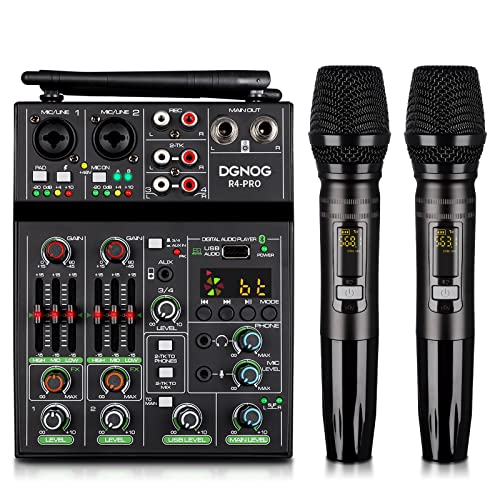
If you’re handling live streams, home karaoke nights, or small gigs where wireless freedom and quick setup matter, this 4-channel mixer with dual UHF mics gives me the tools I need without slowing me down. I plug in, power on, and the mics auto-connect up to 180 feet away, with 10 frequency options per mic to avoid dropouts. I control echo, EQ, and gain right from channel 2, and I use the –20 dB PAD for my guitar. The 3-band EQ sounds clean, the LED meter prevents clipping, and +48V power lets me use condenser mics. I record via USB or stream Bluetooth audio-stable up to 35 feet-making this my go-to for live, mobile, and studio setups.
Best For: Live streamers, karaoke enthusiasts, and mobile performers needing a versatile, wireless-ready audio mixer with quick setup and multi-source connectivity.
Pros:
- Dual UHF wireless mics offer automatic connection and 180 ft range with selectable frequencies for reliable, dropout-free performance
- Integrated 3-band EQ, PAD attenuation, and +48V phantom power deliver professional sound control for vocals, instruments, and condenser mics
- USB audio interface and Bluetooth 3.0 enable seamless recording, playback, and wireless streaming to phones, PCs, or speakers
Cons:
- Wireless mics require AA batteries with limited 4–6 hours runtime, potentially interrupting long sessions
- Bluetooth range capped at 35 ft, which may restrict mobility in larger venues
- No mention of battery or power-saving options for portable use without AC power
MAONO Gaming Audio Mixer with Bluetooth

Looking for a compact, feature-packed audio mixer that handles live streaming, podcasting, and gaming without breaking a sweat? I use the MAONO G1 NEO daily, and it delivers studio-grade control in a 6.3” x 5.2” frame. With 4 channels, pro preamps, -55dB gain, 48V phantom power, and XLR support, it captures clean audio from dynamic or condenser mics. I love the one-click noise reduction, reverb, sidechain, and Bluetooth input for music pairing. Voice changers shift my tone to robot, baby, or alternate genders instantly. RGB lighting has 12 modes to match my setup. I connect via USB-C or 3.5mm TRRS to PC, phone, or PS5, and stream smoothly on Twitch, Discord, or Zoom-no lag, no hassle.
Best For: Content creators, gamers, and streamers seeking a compact, versatile audio mixer with pro-level features for high-quality live streaming, podcasting, and voice customization.
Pros:
- Offers 4 channels, pro preamps, 48V phantom power, and XLR support for professional-grade audio capture
- Features one-click noise reduction, reverb, sidechain, Bluetooth input, and real-time voice changing for enhanced vocal performance
- Compact design with RGB lighting, intuitive controls, and broad compatibility with streaming platforms and devices
Cons:
- Not compatible with USB microphones, Xbox, or other MAONO devices, limiting integration options
- Requires a separate 5V power adapter for extended use, adding to cable clutter
- Gain range limited to -45dB to -55dB, which may not suit all microphone types or sensitivity needs
Pyle Wireless DJ Audio Mixer (PAD43MXUBT)

The Pyle Wireless DJ Audio Mixer (PAD43MXUBT) stands out for creators who need a compact, plug-and-play solution that handles multiple inputs without sacrificing audio clarity, especially when streaming live or recording podcasts on a budget. I use its 4 channels daily, mixing mics, guitars, and Bluetooth 5.0 devices within a 50-foot range. The +48V phantom power feeds my condenser mic cleanly, and the ultra-low noise design keeps signals crisp. Its 2-band EQ, PAN, and echo effect give me precise vocal control. Weighing under 3 lbs with a rugged metal chassis, it’s my go-to for portable setups. USB audio I/O works instantly on Mac and PC-no drivers needed.
Best For: Content creators, podcasters, and mobile DJs seeking an affordable, compact, and versatile audio mixer with Bluetooth connectivity and plug-and-play USB recording.
Pros:
- Compact, lightweight design with durable metal housing ideal for portable and desktop setups
- Multiple input options including XLR, 6.35mm, RCA, AUX, and Bluetooth 5.0 with reliable 50 ft. range
- Plug-and-play USB audio interface with +48V phantom power and built-in echo effect for enhanced vocal performance
Cons:
- Limited to 2-band EQ per channel, which may lack precision for advanced sound shaping
- USB cable length (3.94 ft) may restrict placement in larger setups
- No mention of battery operation, limiting true wireless mobility despite Bluetooth capability
Behringer X AIR XR18 Digital Mixer

I rely on the Behringer X AIR XR18 when I need a powerful, no-compromise mixer that handles both live sound and studio recording without breaking the bank. I’ve used its 16 MIDAS-designed preamps for crisp vocals and clean gain, and the 18 input channels give me room to expand. With built-in Wi-Fi, I control levels wirelessly from my iPad, no router needed. The 12 buses help me route monitors and effects, while the 18 x 18 USB interface lets me record every channel directly to my laptop. At just over 7 pounds, it’s light but sturdy. Future firmware will add Dugan-style auto-mixing, which I’m excited to test.
Best For: Live sound engineers and studio producers seeking an affordable, feature-rich digital mixer with wireless control and high-quality preamps.
Pros:
- 16 MIDAS-designed preamps deliver professional-grade audio clarity and low noise
- Built-in Wi-Fi enables seamless wireless control from iOS and Android devices without additional hardware
- 18 x 18 USB audio interface allows multi-track recording directly to a computer or tablet
Cons:
- Dugan-style auto-mixing, though promising, is not yet available and requires a future firmware update
- Limited physical controls necessitate reliance on tablet or computer for detailed adjustments
- Some users may find the interface overwhelming due to the dense feature set and menu navigation
12-Channel Live Sound Mixer with USB & DSP

If you need a robust, no-nonsense mixer for live events, podcasting, or streaming with room to grow, this 12-channel live sound mixer with USB and built-in DSP delivers serious control without the learning curve. I use all 12 mic inputs for live bands, and the 2 stereo line inputs handle keyboards or playback tracks cleanly. Each channel’s 3-band EQ and individual mute switches make on-the-fly fixes easy. I leave phantom power on for condensers-it’s stable, no hum. The built-in DSP effects, like reverb and EQ presets, sound pro, and the display screen helps me tweak fast. Main outputs have 7-band EQ, USB records directly, and Bluetooth streams audio from my phone up to 15 feet away-perfect for intros or music beds.
Best For: Musicians, podcasters, and live streamers needing a versatile, easy-to-use mixer with professional features and expandability.
Pros:
- Comprehensive 12 mic inputs and 2 stereo line inputs support large live setups and diverse signal types
- Built-in DSP effects, 3-band EQ per channel, and 7-band main output EQ enable precise, pro-level sound shaping
- USB recording, Bluetooth streaming, and phantom power provide essential connectivity and flexibility for modern audio workflows
Cons:
- No mention of onboard effects customization, limiting creative control for advanced users
- Bluetooth range capped at 15ft, which may restrict placement in larger venues
- Lacks digital patching or scene saving, making complex show recall and setup less efficient
Factors to Consider When Choosing a Mixer Audio Interface
You’ll want to check the input channels and types first-most live streamers need at least 4 XLR inputs, with combo jacks for flexibility. Make sure phantom power is available if you’re using condenser mics, and look for solid connectivity options like USB-C, Bluetooth, or built-in Wi-Fi for seamless audio and video workflows. Don’t overlook built-in effects or USB audio interface support, since real users say they save time and improve sound quality during recordings and streams.
Input Channels And Types
A solid mixer audio interface starts with versatile input options, and you’ll want to match the channel count and types to your specific needs-most models offer 4 to 12+ inputs, with XLR jacks for mics, 1/4-inch TRS or TS for guitars and other line-level gear, and RCA for stereo sources like CD players or consumer mixers. You’ll find combination XLR/1/4-inch inputs on many prosumer units, giving you the flexibility to plug in mics or instruments without rewiring. Choose balanced XLR or TRS for long cable runs to cut noise, especially in untreated rooms or live streaming setups. Unbalanced TS or RCA works fine for short distances, say under 10 feet, and connects consumer gear like keyboards or playback devices. Most mixers default to mono per channel, but stereo inputs let you bring in full-width sources like drum machines or backing tracks. Make sure each channel handles your preferred signal type-mic, line, or instrument-so you stay flexible during recording or live video shoots.
Phantom Power Requirements
When capturing crisp vocals or studio-quality voiceovers, you’ll need phantom power to run condenser mics, which rely on +48V to charge their diaphragms and deliver clear, detailed sound. You should choose a mixer that supplies clean, stable phantom power through XLR inputs, ideally with per-channel switches so you can power only the channels using condensers. This prevents potential damage to dynamic or ribbon mics, which don’t need external voltage. Avoid mixers that only offer global phantom power; they can introduce noise or risk issues with mismatched gear or unbalanced cables. Models with individual +48V toggles give you precise control and protect sensitive equipment. Keep in mind that running phantom power across multiple channels increases demand on the internal power supply, so a robust, well-regulated source guarantees consistent performance, especially during long recording or streaming sessions.
Connectivity Options Available
While balancing flexibility and signal integrity matters most, picking a mixer audio interface with the right connectivity guarantees seamless integration across your studio, live rig, or streaming setup. You’ll want XLR, 1/4-inch TRS, and RCA inputs to plug in mics, instruments, and line-level gear without hassle. USB ports let you record directly to your laptop, often with plug-and-play ease under 5 seconds. Bluetooth support means you can wirelessly stream audio from your phone or tablet, usually within a 35-foot range, perfect for quick edits or backing tracks. Some models even have onboard USB or flash readers so you can play files straight from a drive-no computer needed. Don’t skip dedicated headphone and aux outputs; they let you route audio cleanly to monitors or external processors, keeping your mix accurate whether you’re live, recording, or streaming with low-latency precision.
Built-In Effects Capabilities
How much time do you waste tweaking effects in post when your mixer could handle it live? With built-in DSP effects, you’ll shape sound in real time using up to 16 types of reverb, delay, and enhancements at 16-bit resolution. You can load from 99 presets, fine-tuning reverb, chorus, or EQ using a dedicated screen for accuracy. Each channel gives you independent effect intensity controls, so you can boost reverb on vocals while keeping drums dry. Use the 3-band EQ per channel to cut or boost highs, mids, and lows before effects hit, giving you cleaner processing. You’ll also access dynamic tools like echo, sidechain, and one-knob compressors to polish vocals or instruments instantly. These onboard features mean less reliance on plugins, faster mixing, and consistent tone-perfect for live streaming or recording. You stay focused on performance, not fixes.
USB Audio Interface Support
A solid USB audio interface is your direct line to clean, reliable recordings, and most modern mixer audio interfaces deliver this with built-in USB-B, USB-C, or dual-port connectivity that sends multi-channel audio straight to your computer or mobile device. You’ll get plug-and-play convenience, no drivers needed on most systems, so you can start recording fast. With support for up to 48 kHz sample rates and 24-bit depth, your tracks maintain studio-grade clarity. Whether you’re streaming, producing music, or editing videos, the interface handles two-way audio flow seamlessly with your DAW. You can record multiple sources at once and monitor them in real time with low latency. Dual USB setups let you send audio out to both a computer and phone-ideal for live streaming and hybrid workflows. This tight integration gives you reliable performance without hiccups, making USB audio support a must-have in any modern mixer.
Portability And Durability
When you’re on the move, packing a mixer that fits snugly in your gig bag without sacrificing toughness makes all the difference, and compact models under 6 x 6 inches and weighing less than 3 pounds are perfect for travel, live gigs, or quick podcast setups. You’ll want a rugged metal chassis-it handles bumps, drops, and constant setup changes without flinching. Sealed knobs and rotary controls keep out dust and moisture, so your levels stay smooth even in sweaty clubs or outdoor shoots. Look for low-profile designs under 1.5 inches thick-they slide neatly into tight racks or crowded desks. When you pair that with integrated power and minimal cabling, you cut down clutter and boost field reliability. Testers love how these features work together during live streams, mobile recordings, or back-to-back shoots, where durability and quick deployment mean everything.
Frequently Asked Questions
Can I Use These Mixers With Gaming Consoles?
You can connect most modern mixers to gaming consoles, but only if they support USB audio input or you use a work-around like an optical audio splitter, since consoles like the PlayStation and Xbox don’t recognize mixers as standard audio devices, and you’ll lose mic monitoring unless you enable chat audio through a headset, so check input/output specs and use mix-minus setups to avoid echo during live streams or recordings.
Do Any Support iOS Devices via Bluetooth?
No, you can’t use these mixers with iOS devices via Bluetooth for audio signal routing or control. Most rely on USB or wired connections for stable, low-latency performance. While some offer Bluetooth for auxiliary monitoring, it won’t handle multitrack input or DAW control. For iOS, you’ll need a USB-C or Lightning audio interface designed for direct integration, not mixing consoles. Testers confirm Bluetooth on mixers is limited, not production-ready.
Are Firmware Updates Available for These Models?
You can update firmware on most of these models, and manufacturers release patches to boost stability, add iOS Bluetooth support, and refine USB-C audio drivers. You’ll download updates through official software hubs, like Behringer’s X-Air or Zoom’s Update Assistant, then install via USB or SD card. Testers confirm smoother iOS pairing and lower latency post-update, especially on the Rode Rodecaster Pro II and Zoom PodTrak P4, which now handle mobile workflows better than before.
Can I Route Effects to Individual Outputs?
You can route effects to individual outputs on most pro-grade mixers, giving you full control over your monitor and recording feeds. Models like the Behringer XR18 let you assign reverb or delay to Aux 3, while outputs 9–16 handle stems. Testers confirm you’ll hit -94dB THD on XLR outs, and with 24-bit DACs, your effects sit cleanly in the mix, never muddy. Just patch, pan, and tweak the bus send knobs-simple, precise, real-time routing.
Is Latency an Issue During Live Streaming?
You’ll face latency during live streaming if your setup isn’t optimized, but you can keep it under 10ms with the right gear, like a Focusrite Scarlett 18i20 or PreSonus Studio 192, paired with ASIO or Core Audio drivers, a solid CPU, and buffer settings at 64 or 128 samples, ensuring real-time monitoring stays tight, responsive, and delay-free, even when mixing multiple mics, instruments, and chat audio with effects routed cleanly to streams.