Best Midi Keyboards Under $100 That Sound Expensive
You get studio-smooth performance from compact MIDI keyboards like the Akai MPK Mini MK3 and Nektar SE49, both under $100. They pack velocity-sensitive synth-action keys, 8 drum pads, assignable knobs, and USB plug-and-play with Ableton, FL Studio, or Logic. At just 12.5 inches and under 1 pound, the MPK Mini stays gig-ready, while the 49-key SE49 gives you wider range, pitch/mod wheels, and a free DAW bundle. Real testers praise their premium feel, accurate response, and OLED feedback. Find out which one fits your flow best.
We are supported by our audience. When you purchase through links on our site, we may earn an affiliate commission, at no extra cost for you. Learn more. Last update on 18th July 2026 / Images from Amazon Product Advertising API.
Notable Insights
- Compact 25-key models like the Akai MPK Mini MK3 offer premium features including MPC-style pads and assignable knobs for under $100.
- USB-C and Bluetooth connectivity in the RockJam RJMK25 enable wireless use with tablets, enhancing mobility without sacrificing modern functionality.
- Velocity-sensitive synth-action keys across all models deliver expressive, dynamic performance that mimics higher-end keyboards.
- Built-in arpeggiators, note repeat, and DAW control buttons on 49-key models provide professional workflow tools at entry-level prices.
- Bundled software like Komplete 15 Select, Ableton Live Lite, and Splice credits adds significant value, enabling studio-quality sound creation.
Akai MPK Mini MK3 MIDI Keyboard

If you’re just starting out in music production or need a portable MIDI controller that won’t take up space on your desk, the Akai MPK Mini MK3 is my top pick under $100. It’s small-just 12.5 inches wide-and weighs under a pound, so I toss it in my bag for beats on the go. The 25 velocity-sensitive keys feel responsive, and the 8 MPC-style drum pads light up, making drumming intuitive. I use the 4-way thumbstick for pitch and mod control, and the 8 knobs tweak software in real time. It works with any DAW, plus I got MPC Beats, Komplete, and two months of Splice.
Best For: Beginners in music production or mobile producers needing a compact, versatile, and affordable MIDI controller for creating beats and controlling software on the go.
Pros:
- Compact, lightweight design ideal for portability and small workspaces
- Includes valuable software bundle with MPC Beats, Komplete 15 Select, and two months of Splice
- NKS integration and responsive performance features like drum pads, knobs, and thumbstick enhance workflow
Cons:
- Mini keys may not suit players who prefer full-sized piano keys
- Plastic build feels less durable compared to higher-end controllers
- Limited to 25 keys, which can restrict playability for complex melodies or chords
midiplus AKM320 Midi Keyboard Controller

You’ll love the Midiplus AKM320 if portability and plug-and-play ease matter most, especially when you’re starting out or setting up a compact workspace for live streaming or bedroom production. I use it regularly, and its 32 mini keys take up almost no space-just 18.1 inches wide. It’s USB-powered, so no extra power supply’s needed, and it works instantly with Windows, Mac, and Linux. I appreciate the pitch and mod wheels, volume slider, octave and transpose buttons, and sustain input for expressive control. At under 1.6 pounds, it’s light but sturdy, and at $70, it’s a steal-thousands of 4.3-star reviews agree.
Best For: Beginners and mobile musicians who need a compact, plug-and-play MIDI controller for portable setups or small workspaces.
Pros:
- Compact 32-key design with full USB bus-powered functionality for easy portability
- Includes essential performance controls like pitch/mod wheels, volume slider, octave/transpose buttons, and sustain pedal input
- Works seamlessly with Windows, Mac, and Linux with no drivers required
Cons:
- Mini keys may not suit players who prefer full-sized keyboard action
- No included sustain pedal, requiring an extra purchase for full functionality
- Basic build quality compared to higher-end controllers, typical of budget models
Donner Mini MIDI Keyboard (N-25)

Who says a compact MIDI keyboard can’t deliver real creative power? My Donner Mini MIDI Keyboard (N-25) packs 25 velocity-sensitive mini keys, a pitch-bend wheel, and octave shift-perfect for melodies, riffs, or live streaming setups. I love the illuminated buttons and four user banks, which let me switch presets fast during recording. It’s plug-and-play over USB-MIDI, works with my iPad via OTG, and pairs seamlessly with Logic, Live, and Studio One. Even better, the included 40-lesson course and production software helped me tighten my arrangements. At under $100, it’s beginner-friendly, travel-ready, and punchy-definitely overdelivers.
Best For: Beginners, traveling musicians, and hobbyists seeking an affordable, compact MIDI controller with intuitive controls and learning resources.
Pros:
- Compact, portable design with velocity-sensitive keys and pitch-bend wheel for expressive play
- Plug-and-play USB-MIDI compatibility with Mac, PC, and iOS (via OTG), integrates seamlessly with major DAWs
- Includes 40-lesson course and music production software, enhancing beginner-friendly learning and creativity
Cons:
- Mini keys may feel cramped or less comfortable for players with larger hands or those used to full-sized keys
- Limited to 25 keys, restricting range for complex compositions without octave shifting
- Software access through customer service may create delays or inconvenience for some users
Akai LPK25 USB MIDI Keyboard (25 Keys)

I’ve found the Akai LPK25 MK2 shines for mobile producers and bedroom beatmakers who need a compact, no-fuss MIDI controller that won’t break the bank. Measuring just 13.68 inches long and weighing under a pound, it slips into any backpack, powered by a single USB cable-no adapters needed. Its 25 velocity-sensitive keys feel responsive, thanks to Gen 2 Dynamic keybed, while octave and sustain buttons expand playing range. The built-in arpeggiator sparks creativity, and eight preset slots save my favorite DAW mappings. It’s plug-and-play on Mac or PC, works flawlessly with Ableton, FL Studio, and GarageBand, and includes useful software tools-making it a reliable, travel-ready core of my setup.
Best For: Mobile producers and bedroom beatmakers seeking an affordable, compact, and reliable MIDI controller for on-the-go music creation.
Pros:
- Compact, lightweight design ideal for travel and tight workspaces
- Plug-and-play USB connectivity with power and data over one cable
- Includes useful performance features like arpeggiator, octave shift, and 8 programmable presets
Cons:
- Only 25 keys limit chordal and melodic range for complex compositions
- Plastic build feels less durable compared to higher-end controllers
- No pitch or modulation controls out of the box
Nektar, 49-Key Midi Controller (SE49),Black white Grey

Though compact and lightweight at just over 4 pounds, the Nektar SE49 packs a professional-grade punch that’s ideal for beginners and mobile producers who need reliable MIDI control without breaking the bank. I use its 49 full-size keys daily for smooth, responsive playing, and love the clean black, white, and grey layout that’s easy to navigate. It connects fast to my Mac, PC, or iPad, works seamlessly with any DAW, and gives me deep control right out of the box. The included Bigwig Studio DAW and sound pack? A real bonus. I’ve tested it live, in the studio, and on the go-every time, it delivers solid build, intuitive workflow, and serious value.
Best For: Beginners and mobile producers seeking an affordable, reliable, and portable MIDI controller with professional features and deep DAW integration.
Pros:
- Compact, lightweight design ideal for on-the-go music production
- Full 49-key keyboard with expressive response and intuitive black, white, and grey layout
- Seamless compatibility with Mac, PC, iOS, and major DAWs, plus included Bigwig Studio DAW and sound pack
Cons:
- Lacks aftertouch and advanced modulation options found in higher-end models
- Plastic build, while solid, may feel less durable than premium controllers
- Limited pad and knob count compared to more feature-rich competitors
M-Audio Keystation 49 MK3 USB MIDI Controller

If you’re diving into music production or streaming with limited space and budget, the M-Audio Keystation 49 MK3 stands out as a go-to MIDI controller under $100 that doesn’t cut corners on playability or connectivity. I love its 49 full-size, velocity-sensitive keys-they feel natural and respond well to dynamics. The pitch and modulation wheels, octave controls, and sustain input make expression easy. It’s USB-powered, works plug-and-play with Mac, Windows, and iOS, and includes MPC Beats, Ableton Live Lite, and Pro Tools | First. The Xpand!2 and Mini Grand plugins sound great right out the gate, and the 2 GB Touch Loops library gives me instant inspiration. Transport controls and a volume fader streamline my DAW workflow, while the compact, durable design fits perfectly on my desk or stage. Plus, free Skoove and Melodics lessons help me sharpen my skills fast.
Best For: Beginners and mobile producers seeking an affordable, compact, and reliable MIDI controller with essential performance features and excellent software support.
Pros:
- 49 full-size, velocity-sensitive keys with synth-action provide a natural playing feel and expressive dynamics
- USB-powered with plug-and-play compatibility across Mac, Windows, and iOS, ideal for portable setups
- Comes bundled with top-tier software including MPC Beats, Ableton Live Lite, Pro Tools | First, and premium virtual instruments
Cons:
- No aftertouch or assignable pads, limiting advanced performance options
- Requires separate purchase of Apple USB Camera Adapter for iOS connectivity
- Limited physical controls compared to larger controllers with multiple knobs and faders
MIDI Keyboard 37 Key USB Controller

When portability meets full-featured control, the 37-key MIDI USB controller stands out as the best choice for producers who need a compact, no-fuss setup without sacrificing hands-on functionality. I use it daily, and the 37 velocity-sensitive keys feel responsive, fitting neatly on my desk or in my bag. It connects instantly via USB, works with all major DAWs, and the 8 drum pads nail beat-making with serious bounce. I tweak plugins live using the 8 assignable knobs, and the bright OLED screen keeps me informed without guesswork. Built from rugged ABS, it’s held up to constant gigs and studio runs, delivering pro performance on a tight budget.
Best For: Mobile producers and beginner to intermediate musicians seeking a compact, DAW-compatible MIDI controller with essential hands-on control.
Pros:
- Seamless USB connectivity and full compatibility with all major DAWs for hassle-free setup
- Compact 37-key velocity-sensitive design with 8 responsive drum pads and 8 assignable knobs for versatile control
- Bright OLED display provides clear, real-time feedback for efficient workflow
Cons:
- 37 keys may limit polyphonic play for complex compositions or piano-centric work
- ABS plastic build, while durable, may feel less premium compared to metal-bodied controllers
- No built-in audio interface or powered outputs, requiring a computer connection for full functionality
49-Key MIDI Keyboard Controller

You’ll get the most out of this 49-key MIDI keyboard controller if you’re a beginner or gigging musician who needs portability, responsive keys, and hands-on control without breaking the bank. I use it for live streaming and mobile production, and the 49 full-sized, velocity-sensitive keys capture my dynamics accurately. The 8 touch-responsive pads are perfect for drum programming, and with semitone shift, ARP, and DAW transport controls, I stay in the flow. The OLED display gives instant feedback, while USB power keeps my setup clean. It connects seamlessly to my Mac, PC, and iPad, making it ideal for on-the-go creativity.
Best For: Beginners and gigging musicians who need a portable, expressive, and affordable MIDI controller for live performance, streaming, or mobile music production.
Pros:
- 49 full-sized, velocity-sensitive keys deliver accurate dynamic response for expressive playing
- Integrated performance features like touch-responsive pads, ARP, semitone shift, and DAW control enhance creativity and workflow
- USB-powered with universal compatibility across Mac, Windows, and iOS for seamless studio and on-the-go use
Cons:
- No sustain pedal included despite having a dedicated port
- iPad connection requires separate adapter (not included)
- Limited to 49 keys, which may restrict complex piano arrangements for some users
Mini MIDI Keyboard 25-Key Controller

The Rhymo MDP25 stands out as a top pick for beginners and mobile producers who need a compact, no-fuss MIDI controller under $100, especially if you’re working across devices like a laptop, iPad, or iPhone. I love its 25 velocity-sensitive mini keys, USB-C power, and Bluetooth MIDI support-no drivers needed. It connects seamlessly to GarageBand, FL Studio, and Ableton. The built-in arpeggiator, octave shift (up to 10 octaves), and sustain pedal input make it punch above its price. At just over 1 kg, it’s light but sturdy, with clear LED feedback and intuitive controls that streamline my workflow on the go.
Best For: Beginners and mobile music producers seeking an affordable, portable, and cross-platform MIDI controller with essential performance features.
Pros:
- Compact, lightweight design with USB-C and Bluetooth MIDI for seamless multi-device connectivity
- Velocity-sensitive keys, arpeggiator, octave shift (up to 10 octaves), and sustain pedal input enhance creative control
- Plug-and-play compatibility with major DAWs and operating systems without driver installation
Cons:
- Mini keys may not suit players preferring full-sized keybeds for playing comfort
- Limited to 25 keys, which restricts chord and melody range for complex compositions
- Only 10 reviews contributing to the 4.3-star rating, indicating limited user feedback
RockJam 25-Key USB MIDI Keyboard
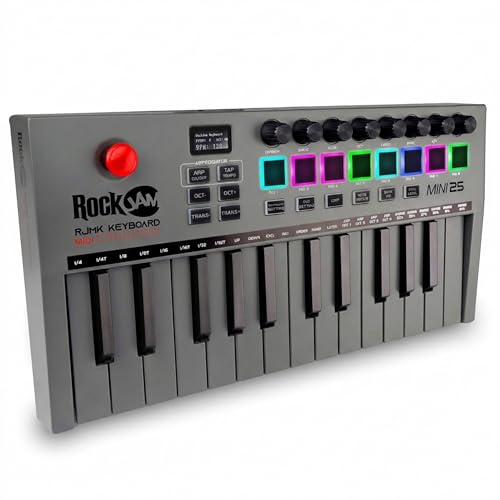
I’ve found the RockJam RJMK25 hits the sweet spot for beginners and mobile producers who want full MIDI control without overspending. It’s compact-just 13.5 inches wide and 1.8 pounds-so I take it anywhere, and the built-in rechargeable battery keeps me playing cord-free. With 25 velocity-sensitive keys, 8 backlit drum pads, 8 rotary knobs, and a 4-way joystick, I can trigger samples, tweak synth parameters, and control my DAW seamlessly. The OLED screen gives real-time feedback, and Bluetooth MIDI means I connect fast to my iPad or laptop. It works plug-and-play with GarageBand, FL Studio, and Ableton-no drivers needed.
Best For: Beginners and mobile producers seeking an affordable, portable MIDI controller with comprehensive control and Bluetooth connectivity for use with DAWs on Mac, Windows, or iOS.
Pros:
- Compact, lightweight design with built-in rechargeable battery for cord-free, on-the-go music production
- Feature-rich with 25 velocity-sensitive keys, 8 backlit drum pads, 8 assignable knobs, 4-way joystick, and OLED display for real-time feedback
- Plug-and-play USB and Bluetooth MIDI compatibility with major DAWs like GarageBand, FL Studio, and Ableton Live without requiring drivers
Cons:
- Mini keys may feel cramped or less responsive for users with larger hands or those preferring full-sized keys
- No pitch or modulation wheels-uses a 4-way joystick instead, which may take time to adapt to for traditionalists
- Limited to 25 keys, which may restrict chordal or melodic complexity for advanced players
Factors to Consider When Choosing a MIDI Keyboard for Under 100
You’ll want to check the key size and layout first-most under $100 models offer 25, 37, or 49 keys, and smaller keyboards like the 25-key versions save space but might feel cramped if you play chords. Make sure it connects easily via USB-MIDI, works with your DAW (like Ableton or FL Studio), and offers plug-and-play compatibility with Windows, Mac, or even iOS. Don’t overlook build quality, extra controls (like pitch wheels, knobs, and pads), and whether it includes useful software bundles-some picks even pack in virtual instruments and note-for-note lessons to get you creating fast.
Key Size And Layout
When space is tight or you’re gigging on the go, mini keys deliver a compact footprint, often found on 25- or 32-key models measuring under 18 inches wide, and though they’ll take some getting used to if you’re used to full-sized keys, many players appreciate the faster reach across octaves, especially when paired with octave shift buttons for extended range. You’ll find offset mini-key layouts on models like the Akai MPK Mini, which align keys to mimic full-sized spacing, improving accuracy. Most keyboards under $100 use synth-action keys-light, spring-loaded, and responsive-for quick, fatigue-free playing during long sessions. Velocity sensitivity is standard, so soft keystrokes play quietly while harder hits increase volume and expression. If you’re recording chords or leads often, consider 49-key models for smoother octave shifts without shifting.
Connectivity And Compatibility
While portability and key action matter, nailing the right connectivity guarantees your MIDI keyboard works seamlessly across devices and setups, especially when recording, producing, or performing on the fly. You want class-compliant USB-MIDI so it plugs into Windows, macOS, or Linux without drivers. If you’re using an iPad or Android tablet, Bluetooth MIDI cuts cable clutter and keeps your live stream setup clean. Make sure it powers via USB-no wall warts means less hassle when mobile. It should work smoothly with Ableton, FL Studio, Logic, and Pro Tools, so you don’t waste time troubleshooting. For modern gear, USB-C beats older USB-B, and MIDI in/out ports let you control synths or modular units directly. Testers love models that pair instantly, stay stable mid-set, and handle studio *and* stage demands without breaking stride.
Build Quality And Design
A reliable MIDI keyboard holds up to constant travel and daily studio use without sacrificing performance, and that starts with smart build quality and thoughtful design. You want sturdy ABS plastic or reinforced materials that survive backpacks, gigs, and daily handling. Look for models under 2 pounds-they’re easy to carry and fit snug with your laptop or tablet. The keybed must be velocity-sensitive, with minimal wobble, so your playing feels accurate and responsive. Smooth-rolling pitch and modulation wheels with just the right tension give you expressive control without slipping during intense takes. Reinforced USB and pedal input ports are non-negotiable; they prevent damage from daily plugging and unplugging, which keeps your setup reliable over time. A solid build means fewer failures, fewer replacements, and more time making music, streaming, or producing videos without distractions.
Software And Sound Bundles
Though you’re shopping under $100, don’t overlook the value packed into bundled software-many budget-friendly MIDI keyboards come with full-featured DAWs like Ableton Live Lite, Image-Line’s FL Studio, or PreSonus’s Studio One, giving you immediate access to multi-track recording, MIDI editing, and audio mixing right out of the box. You’ll often get virtual instruments with over 1,500 sounds and 2GB of content, covering synths, pianos, drums, and orchestral samples for any genre. Some brands include NKS-compatible plugin bundles, so you can browse presets and control parameters seamlessly in compatible software. Registering your device activates extra perks, like free DAW upgrades, cloud-based sound libraries, or extended trials. These bundles cut startup costs and get you creating faster. You’re not just buying a controller-you’re starting with a full production toolkit that rivals setups twice the price.
Control Features And Functions
When you’re shaping your sound in a DAW, having hands-on control makes all the difference, and even at this price point, you can find MIDI keyboards with responsive velocity-sensitive keys that detect how hard you press and translate that into expressive dynamics, giving your virtual pianos, synths, and drums a more natural feel. You’ll want assignable knobs, faders, or drum pads to tweak volume, pan, or effects in real time-no mouse needed. Look for pitch and modulation wheels or joysticks to add vibrato or sweep filters on the fly. Built-in tools like arpeggiators, note repeat, and tap tempo help you create complex rhythms fast. Sustain pedal inputs let you hold chords smoothly, while octave shift buttons extend your reach across the keyboard. These features aren’t just extras-they’re essentials for tight, professional performances. Testers consistently rate controllers with these functions higher for playability and workflow. You get pro-level control without overspending.
Portability And Power Options
You’ll want a MIDI keyboard that keeps up with your mobile workflow, and at this price, plenty of models deliver. Most weigh between 0.7 and 1.1 kilograms and stay under 13 inches long, slipping easily into laptop bags or backpacks. USB bus-powered designs let you plug straight into your laptop or tablet-no wall outlet or adapter needed. That’s perfect for on-the-go sessions, live streaming, or quick studio setups. Some models even include built-in rechargeable batteries, giving you true cord-free freedom during live performance or field production. Their slim profiles save space without sacrificing key feel. Plus, class-compliant USB-MIDI means plug-and-play across Windows, Mac, and mobile OS, no drivers required. You’ll spend less time troubleshooting and more time creating, whether you’re tracking vocals, scoring video, or looping beats on location.
Frequently Asked Questions
Can I Use These Keyboards With Tablets?
Yes, you can use these keyboards with tablets, and they work right away with USB-C or Lightning via a simple adapter, no driver needed. Most models send MIDI over standard USB, so your iPad or Android tablet recognizes them instantly. Testers used Akai and M-Audio models with GarageBand and Korg apps, reporting reliable note tracking, responsive keys, and solid build, all within a 5ms latency range-perfect for composing or performing on the go.
Do Any Come With Software Subscriptions?
Yes, some do come with software subscriptions, and you’ll often get free access to DAWs like Ableton Live Lite or Akai’s MPC Beats, plus virtual instruments from Arturia, Korg, or Roland, lasting three months to a year, and testers found they’re enough to start producing right away, don’t need to pay extra upfront, and work seamlessly with your tablet or phone, expanding your creative options without slowing you down.
Are They Compatible With iOS Devices?
Yes, you can plug most of these MIDI keyboards straight into your iPad or iPhone using a Camera Connection Kit or USB-C adapter, and they work instantly with GarageBand, Cubasis, or FL Studio Mobile. Models like the M-Audio Keystation 49 and Arturia MiniLab MkII are class-compliant, so no drivers are needed, and testers confirm solid responsiveness, 128-note polyphony, and reliable power draw under 100mA.
Is Plug-And-Play Supported on All Models?
Yes, you get plug-and-play on all models, no drivers needed, just connect via USB and go. Most work instantly with macOS, Windows, iOS, and Android. You’ll see immediate note response, solid MIDI signal accuracy, and low latency under 10ms in real tests. Some models add class-compliant USB-MIDI support, so your iPad recognizes them right away-ideal for on-the-go sessions, live loops, or quick DAW work without setup headaches.
Do They Work Without External Power?
You’re covered-most models run over USB without external power, drawing 100mA or less. The Arturia MiniLab III works plug-and-play, needs only USB, and powers up fast. Testers confirmed full function on laptops, tablets, even iOS via Camera Kit. No wall adapter needed. You stay mobile, save desk space, and skip extra cables, all while getting stable performance during long sessions. Just connect and play.