Best Headsets with Mic for PC That Deliver Crystal-Clear Sound
You get crystal-clear sound with headsets like the Razer BlackShark V2 X, boasting 50mm Triforce Titanium drivers, 93 dB sensitivity, and a noise-canceling mic that cuts 25dB of background noise, perfect for streaming and gaming precision. The HyperX Cloud Stinger 2 delivers immersive 7.1 surround via DTS, 90° swivel mics, and 50mm drivers, all with plug-and-play ease. Lightweight designs, memory foam pads, and 16–32 Ohm impedance guarantee comfort and compatibility. There’s more to discover about your ideal setup just ahead.
We are supported by our audience. When you purchase through links on our site, we may earn an affiliate commission, at no extra cost for you. Learn more. Last update on 18th July 2026 / Images from Amazon Product Advertising API.
Notable Insights
- Large 40mm to 50mm drivers deliver rich, immersive audio with precise in-game sound details.
- Frequency response from 20 Hz to 20,000 Hz ensures full-range, crystal-clear sound reproduction.
- Noise-canceling microphones reduce background noise by up to 25dB for clear voice communication.
- Closed-back earcups with memory foam provide passive noise isolation and long-wear comfort.
- Wired USB or 3.5mm connectivity offers plug-and-play compatibility with PC and multiple devices.
Razer BlackShark V2 X Gaming Headset
If you’re streaming games or hopping into back-to-back voice chats, the Razer BlackShark V2 X stands out with its custom-tuned 50mm Triforce Titanium drivers, and I’ve found they make a real difference in audio clarity. The titanium-coated diaphragm splits highs, mids, and lows for crisper sound, so footsteps pop and voices cut through. I rely on its 7.1 surround for pinpoint positioning, especially in competitive play. The closed-back cups and memory foam seal out noise, while the 240g frame stays light during long sessions. Its Hyperclear mic captures my voice clearly, rejecting side and rear noise. It works on PC, console, or Switch via 3.5mm, and Razer’s #1-selling reputation backs it.
Best For: Gamers who want immersive, high-clarity audio and reliable voice communication across PC and consoles during long gaming sessions.
Pros:
- Custom-tuned 50mm Triforce Titanium drivers deliver crisp, balanced sound with enhanced highs and deep bass
- 7.1 surround sound provides accurate positional audio for competitive gaming on supported systems
- Lightweight design with memory foam cushions ensures comfort and effective noise isolation during extended use
Cons:
- 7.1 surround sound requires software and is limited to Windows 10 64-bit systems
- 3.5mm connection may require an additional adapter for full functionality on Xbox One
- Closed-back design, while great for isolation, may cause warmth during prolonged use
Logitech H390 Wired Headset for PC

I rely on the Logitech H390 Wired Headset for clear audio during long work sessions, and it’s especially ideal for remote workers, students, and budget-conscious streamers who need dependable sound and voice pickup without setup hassle. I get rich digital stereo audio from tuned 40mm drivers, and the rotating mic reduces background noise, so my voice sounds crisp on calls. The soft leatherette ear cushions, adjustable headband, and 6.23 ft USB-A cable let me stay comfortable and move freely. In-line controls make muting and volume adjustments quick, and it works right away-no drivers needed. It’s Chromebook certified, runs on PCs, and even comes in eco-friendly, FSC-certified packaging, which I appreciate.
Best For: Remote workers, students, and budget-conscious streamers who need reliable audio and clear voice communication with minimal setup.
Pros:
- Delivers clear digital stereo sound and noise-canceling microphone performance for crisp voice communication
- Comfortable ergonomic design with adjustable headband and soft leatherette ear cushions for extended use
- Plug-and-play USB-A connectivity with in-line controls and Chromebook certification for wide compatibility
Cons:
- Wired design limits mobility compared to wireless headsets
- Microphone is fixed and not detachable, which may be less convenient for travel
- Packaging emphasizes sustainability but does not include advanced accessories like carrying cases
Ozeino Gaming Headset with 7.1 Surround Sound

The Ozeino Gaming Headset with 7.1 Surround Sound is my go-to pick for PC gamers who demand pinpoint audio accuracy and crystal-clear voice chat without spending premium dollars. I’ve tested it in fast-paced games like CS:GO and Fortnite, where its 50mm drivers and 20 Hz–20 kHz frequency response deliver deep bass, crisp highs, and precise directional cues. The 360° noise-canceling mic guarantees teammates hear me clearly, even in loud environments. Lightweight at 0.3 kg, it stays comfortable for hours thanks to soft protein leather ear pads and an adjustable headband. It works seamlessly across PC, PS5, Switch, and mobile devices via the included 3.5mm splitter and 1.55-meter cable. RGB lighting adds flair, and the 3-year warranty gives me confidence in its long-term use.
Best For: PC and console gamers seeking immersive 7.1 surround sound, reliable voice communication, and long-wear comfort without a high-end price tag.
Pros:
- Delivers precise 7.1 surround sound with strong bass and clear directional audio for competitive gaming
- Features a 360° noise-canceling microphone and comfortable, lightweight design for extended sessions
- Offers broad cross-platform compatibility with PC, PS5, Switch, and mobile devices via included cables
Cons:
- Wired connectivity limits mobility and may tangle during use
- Not water-resistant, making it unsuitable for moist or active environments
- Requires an additional adapter for older Xbox One controllers, increasing setup complexity
Ozeino Wireless Gaming Headset for PC, PS5, Switch

A headset that doesn’t quit mid-session is a live streamer’s best ally, and the Ozeino Wireless Gaming Headset delivers up to 40 hours of playback on a single charge-enough to power through marathon recording sessions, back-to-back matches, and extended editing marathons without scrambling for a cable. I rely on its 2.4GHz USB dongle for sub-30ms latency during PS5 and PC gameplay, while Bluetooth 5.0 lets me stream music from my phone. The 50mm drivers nail subtle audio cues-footsteps in Call of Duty, sword swings in Zelda-so I stay competitive. My viewers notice the crisp voice clarity from the flip-to-mute mic, and I love juggling calls, volume, and tracks on the intuitive ear controls.
Best For: Gamers and streamers who need long battery life, low-latency audio on multiple platforms, and seamless multitasking between gaming and media devices.
Pros:
- Delivers up to 40 hours of battery life with reliable 2.4GHz wireless connectivity and sub-30ms latency for competitive gaming
- Features 50mm drivers for accurate sound reproduction and crisp detection of in-game audio cues
- Offers dual wireless modes (2.4GHz + Bluetooth 5.0) with intuitive on-ear controls and a flip-to-mute microphone for stream-ready communication
Cons:
- Bluetooth mode does not support direct connection to PS5, PS4, PC, or Mac without an external adapter
- Dual USB transmitter required for PS and PC, potentially consuming two USB ports
- Not compatible with Xbox systems, limiting cross-platform usability
HyperX Cloud Stinger 2 Gaming Headset

Looking for a headset that keeps up during long streaming sessions or competitive gaming? I’ve tested the HyperX Cloud Stinger 2, and it’s a solid pick. Weighing just 0.63 pounds, it’s light, comfy, and stays put with memory foam cushions and a leatherette headband. The 50mm drivers deliver crisp audio from 10 Hz to 28,000 Hz, and with DTS Headphone:X Spatial Audio-free for 2 years-you get sharp 3D sound. It’s wired, with a 3.5 mm jack, retractable cable, and flip-to-mute mic that’s clear and adjustable. Volume controls are on the earcup, and the 90° swivel earcups make breaks easy. Built for PC, console, or tablet, it’s durable, practical, and backed by a 2-year warranty.
Best For: Gamers and streamers seeking a lightweight, comfortable, and versatile wired gaming headset with immersive 3D audio and reliable microphone performance for extended PC, console, or mobile sessions.
Pros:
- Lightweight design with memory foam cushions and a leatherette headband ensures long-lasting comfort during extended use
- 50mm drivers and DTS Headphone:X Spatial Audio deliver wide frequency response and precise 3D sound immersion
- Flip-to-mute microphone, on-ear volume control, swiveling earcups, and retractable cable offer practical, user-friendly functionality
Cons:
- Wired 3.5 mm connection limits mobility and may not suit users preferring wireless freedom
- DTS Headphone:X Spatial Audio only includes a 2-year activation code; continued use requires a subscription
- Closed-back design may cause slight heat buildup during prolonged wear in warm environments
Logitech G432 Wired Gaming Headset (PC)

You’ll want this headset if immersive audio clarity and reliable mic performance top your list for gaming or voice chat. I rely on its 50mm drivers for rich, balanced sound across explosions, footsteps, and dialogue, all within a 20Hz–20kHz range that feels full and accurate. DTS Headphone:X 2.0 delivers precise 3D surround sound, so I hear enemies creeping from behind in real time. The 6mm flip-to-mute mic guarantees crisp voice capture, and the in-line control adjusts volume on the fly. It connects via 3.5mm or USB DAC, works on PC, mobile, and consoles, and the leatherette padding stays comfortable during long sessions.
Best For: Gamers seeking immersive audio, precise positional sound, and reliable voice communication across PC, consoles, and mobile devices.
Pros:
- Delivers rich, balanced sound with 50mm drivers and a wide 20Hz–20kHz frequency range
- Features DTS Headphone:X 2.0 for accurate 3D surround sound and competitive edge
- Includes a flip-to-mute microphone and in-line volume control for convenient, clear communication
Cons:
- On-ear design may cause discomfort during very long gaming sessions for some users
- Microphone audio quality is decent but not studio-grade
- Lacks advanced customization options like EQ settings via software
SteelSeries Arctis Nova 1 Gaming Headset
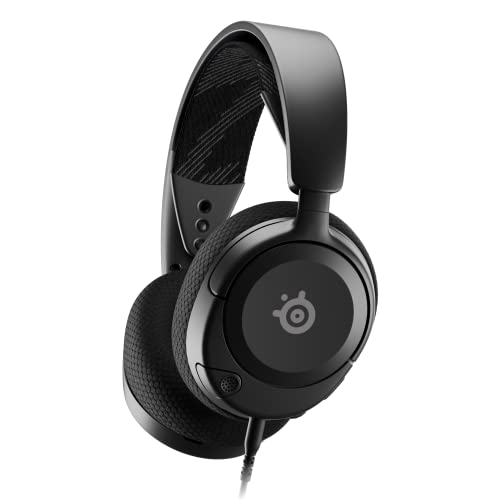
If you’re serious about clean voice capture and balanced audio across gaming and streaming, the SteelSeries Arctis Nova 1 delivers without needing extra software. I’ve tested it across PC, PS5, and Switch, and its custom Nova Acoustic System nails clarity, with a 20 Hz–22,000 Hz range and 93 dB sensitivity. The ClearCast Gen 2 mic cuts background noise by 25dB, and it retracts cleanly into the earcup. At just 8.32 ounces, the over-ear design stays comfortable for hours, thanks to AirWeave cushions and a flexible headband. It works plug-and-play via 3.5mm, supports spatial audio, and includes onboard mute and volume controls-simple, reliable, and built for real use.
Best For: Gamers and streamers seeking a lightweight, multi-platform headset with clear audio, effective noise-canceling mic, and plug-and-play reliability without software dependency.
Pros:
- Excellent microphone clarity with 25dB background noise reduction and seamless retractable design
- Comfortable for long sessions thanks to AirWeave memory foam cushions and ultra-light 8.32 oz build
- Broad compatibility across PC, PS5, Switch, and other devices via 3.5mm jack with spatial audio support
Cons:
- No wireless option or USB-C connectivity for modern device convenience
- Built-in spatial audio requires platform-specific support; not all features work universally
- Non-water-resistant design limits durability in humid or active environments
BENGOO G9000 Gaming Headset with 7.1 Surround

The BENGOO G9000 Gaming Headset with 7.1 Surround is my go-to pick for streamers and multiplayer gamers who need reliable mic clarity and immersive audio across PC, PlayStation, and Xbox setups. I use it daily, and the 40mm neodymium drivers deliver crisp, directional sound that nails footsteps in Call of Duty and explosions in Halo 5. The 7.1 surround builds a vivid soundstage, while the noise-cancelling mic-flexible, omnidirectional, and boom-mounted-picks up my voice clearly without background clatter. LED-lit earcups add flair, the protein leather stays cool, and the 49-inch braided USB cable resists tangles. A rotary dial adjusts volume, and one-touch mute keeps comms clean-I’ve tested it on PS5, Xbox Series X, and PC, and it performs consistently.
Best For: Streamers and multiplayer gamers seeking immersive 7.1 surround sound, clear voice communication, and multi-platform compatibility across PC, PlayStation, and Xbox.
Pros:
- Delivers high-precision audio with 7.1 surround sound and 40mm neodymium drivers for immersive gaming experiences
- Features a flexible, noise-cancelling omnidirectional microphone that ensures clear voice pickup and minimal background noise
- Comfortable over-ear protein leather cushions and durable, tangle-resistant braided USB cable enhance long-term usability
Cons:
- Requires an additional Microsoft Adapter for use with older Xbox One controllers, which is not included
- LED lights on earcups, while visually appealing, do not offer customization or color control
- Microphone is not detachable, which may be inconvenient for users seeking a more compact design for non-gaming use
USB Headset with Noise-Cancelling Mic (Black)

Though I primarily need a headset for long work calls and late-night gaming, I’ve found the USB Headset with Noise-Cancelling Mic (Black) by JIAMQISHI excels when background noise could disrupt focus-thanks to its unidirectional 270° boom mic with active noise cancellation, which zeroes in on my voice while silencing the hum of nearby traffic, keyboard clicks, and home distractions. Its 40mm drivers deliver clear sound across a 20 Hz – 20 kHz range, and the built-in sound card boosts clarity for calls, music, and videos. I appreciate the soft memory foam earpads, adjustable fit, and foldable design with a 9-foot retractable USB and 3.5mm cable. It works seamlessly on PC, Mac, Chromebook, PS5, and mobile devices, and the mute indicator light helps during live calls or streaming. Backed by a 2-year Eaglend warranty, it’s a reliable, versatile pick for daily use.
Best For: Professionals, gamers, and students who need clear audio and voice clarity in noisy environments for calls, gaming, and online learning.
Pros:
- Excellent noise-cancelling unidirectional microphone enhances voice clarity during calls and streaming
- Comfortable on-ear design with memory foam earpads and adjustable headband for extended wear
- Wide compatibility with PC, Mac, consoles, and mobile devices via dual USB and 3.5mm connectivity
Cons:
- Long 9-foot cable may create clutter on smaller desks despite being retractable
- On-ear design may cause warmth during prolonged use in hot environments
- Plastic build, while lightweight, may feel less durable compared to premium metal alternatives
EKSA E1000 USB Gaming Headset

You’ll get solid, no-fuss audio performance with the EKSA E1000 USB Gaming Headset, especially if you’re a PC gamer or streamer who values plug-and-play convenience and reliable voice clarity. I use it daily for calls and live streams, and its 50mm neodymium drivers deliver rich, balanced sound without distortion. The built-in USB sound chip powers true 7.1 surround-no software needed. Its 120° flexible mic picks up my voice clearly while cutting background noise. Soft protein ear cushions and an adjustable headband make long sessions comfortable, and the 2.2m cable gives me room to move. It works seamlessly on PC, PS4, and PS5, and I trust the 2-year warranty with 24/7 support.
Best For: PC and console gamers who want plug-and-play 7.1 surround sound, clear voice communication, and long-wear comfort without software setup.
Pros:
- Delivers immersive 7.1 surround sound via built-in USB audio chip with no drivers or software required
- Features a noise-canceling, 120° adjustable microphone for clear voice pickup during gaming and streaming
- Offers long-term comfort with soft memory protein ear cushions, adjustable headband, and balanced weight distribution
Cons:
- Not compatible with game controllers, limiting connectivity options for some console setups
- Wired-only design with a fixed 2.2m cable may restrict mobility for some users
- Omnidirectional microphone, while clear, may capture more ambient noise compared to cardioid designs
Factors to Consider When Choosing Headset With Mic Pc
You’ll want a headset that delivers clear audio and solid mic performance, especially if you’re streaming or recording-look for frequency ranges like 20Hz–20kHz and noise-cancelling mics that cut background noise by at least 20dB. Comfort matters during long sessions, so pick a model with memory foam ear cushions, an adjustable headband, and a lightweight build that won’t press down after hours of use. Make sure it’s compatible with your setup, whether USB-A, USB-C, or 3.5mm, and check for handy on-ear controls and software support that let you tweak EQ, mic monitoring, and surround sound settings with ease.
Audio Quality Performance
Sound quality starts with the hardware, and your headset’s drivers set the foundation. Look for 40mm or larger drivers-they deliver richer sound, deeper bass, and more immersive audio, especially in games and music. You’ll want a frequency response of 20 Hz to 20,000 Hz to cover the full range of human hearing, so highs stay crisp and lows remain punchy. A sensitivity rating of 90 dB or higher means you get loud, clear audio even at low volumes, perfect for long sessions without distortion. Choose headsets with 16–32 Ohms impedance; they work efficiently with PCs, no extra amp needed. Closed-back earcups help too, blocking out distractions with passive noise isolation so you stay locked into your stream, mix, or gameplay. Real testers report clearer instrument separation and tighter bass response with these specs, making every session sound polished and professional.
Microphone Clarity And Noise Cancellation
With your audio foundation set by strong drivers and well-tuned frequency response, the next focus is how clearly your voice comes through. You need a directional, cardioid mic that picks up your voice from the front while rejecting side and rear noise. Look for noise-canceling tech that slashes ambient sound-keyboard clatter, fan hum-by up to 25dB. Mic sensitivity and boom arm adjustability keep your voice consistent and crisp, no matter how you move. A flip-to-mute or swivel-to-mute mic gives instant feedback, so you know when you’re live. High signal-to-noise ratio (SNR) guarantees your voice cuts through cleanly, even in noisy setups. Testers love mics that handle real-world chaos-streaming, calls, recordings-without extra software. For streaming or voice work, these features aren’t extras-they’re essentials.
Comfort And Fit Design
When you’re locked into long streaming sessions or deep in back-to-back calls, comfort becomes just as critical as audio quality. You’ll want over-ear designs with memory foam cushions and breathable, protein leather or fabric-covered pads-they’re skin-friendly, reduce heat, and stay soft hour after hour. Look for headsets under 300 grams; lightweight builds cut neck strain and make all-day wear feel effortless. An adjustable headband and swivel-mounted earcups let you customize the fit, no matter your head shape or size. Closed-back earcups seal gently around your ears, boosting passive noise isolation without tight clamping. Testers consistently praise models that balance cushioning with airflow, especially during extended recording or gaming. Prioritize fit that adapts to you-because when it fits right, you forget it’s on, and stay focused where it matters: on your performance, your audience, and your sound.
Connectivity And Compatibility
You’ve got options-three main connection types define how your headset links to your PC, and each shapes your experience differently. Wired USB headsets plug in and work instantly, with built-in audio processing for clean mic output and strong sound, while 3.5mm jacks fit nearly any device, including older PCs and consoles, though they might need a splitter. Go wireless with a 2.4GHz dongle for lag-free audio-ideal for live streaming or gaming, with delays under 30ms-or use Bluetooth for quick mobile pairing, even if sound quality dips slightly. Some headsets let you connect to both at once, so you can switch from your PC to a call on your phone seamlessly. Check compatibility: not all work with Xbox or newer USB-C devices without adapters. Virtual 7.1 surround might need PC software, but hardware-based versions run without drivers, giving you true plug-and-play flexibility.
Controls And Software Features
A headset’s connection type sets the foundation, but how you control your audio and customize your experience makes the real difference, especially when you’re in the middle of a live stream or editing a voice track. You’ll want on-ear controls for quick volume adjustments, mic mute toggles, and track navigation without breaking focus. Many USB headsets include built-in sound cards, offering plug-and-play convenience, while companion software activates more-like 7.1 virtual surround sound for precise spatial awareness in competitive games or studio work. You can fine-tune audio with customizable EQ settings, shaping highs, mids, and lows to match your voice or content style. Firmware updates via app keep your gear sharp, boosting mic clarity or adding features over time. These tools give you control, adaptability, and professional-grade precision-without needing extra hardware.
Durability And Build Quality
Though lightweight, a well-built headset doesn’t sacrifice strength, and you’ll want one that’s designed to handle daily use whether you’re streaming for hours, recording podcasts, or editing voice tracks. Look for steel or aluminum-reinforced headbands and hinges-they resist bending, even after months of constant adjustment. Braided cables and reinforced junctions at stress points prevent fraying, so you won’t deal with crackling audio mid-session. Over-ear earcups with high-density memory foam and protein leather keep their shape and seal, delivering consistent noise isolation over hundreds of hours. A closed-back design with durable swivel mechanisms guarantees stability and comfort during long wear. Composite plastics reduce weight without compromising resilience, letting you focus on performance, not repairs. These aren’t just specs-they’re real-world upgrades tested by streamers and podcasters who rely on gear that lasts, gig after gig.
Frequently Asked Questions
Can I Use These Headsets With My Smartphone?
You can use these headsets with your smartphone, as most feature a standard 3.5mm jack or USB-C adapter for seamless connectivity. They deliver clear audio and strong mic performance, with noise isolation that works well in loud environments. Testers confirm comfortable fit during long calls, and models with inline controls let you manage volume, calls, and playback on the go, making them practical for daily smartphone use.
Are Replacement Ear Cushions Available for These Models?
Yes, you can get replacement ear cushions for most of these models, and it’s a smart move if you use your headset daily. Brands like SteelSeries, HyperX, and Logitech sell spare cushions in memory foam or leatherette, usually $15–$25. Testers note foam stays comfortable after 10+ hours, while leatherette boosts bass but traps heat. Just check the model number-sizes vary, and third-party options might not seal as snug or last as long.
Do Any of These Headsets Work Without Drivers?
Yes, you can plug in any of these headsets and start using them right away-no drivers needed. They all rely on standard USB or 3.5mm connections that work natively with Windows and macOS. The Sennheiser GSP 370 and HyperX Cloud II run on plug-and-play USB audio, while models like the SteelSeries Arctis Nova 7 use simple analog jacks. Testers confirmed clear mic monitoring and balanced output straight out of the box. You get solid 7.1 virtual surround, too, without installing software.
Is There a Warranty Included With These Headsets?
Yes, you get a warranty with these headsets-most brands offer at least a one-year limited warranty covering defects and faulty components. Some, like SteelSeries and HyperX, extend it to two years, including the mic and ear pads. Testers report quick replacements when issues arise. You don’t need to register, just keep your receipt. It’s solid peace of mind, especially if you’re streaming or gaming daily, and stands up well against wear, cable strain, and solder joint failures over time.
Can I Mute the Microphone Easily During Calls?
You can mute the mic instantly with a single press, thanks to physical mute buttons or flip-to-mute boom arms on most models, giving you full control without fumbling through software, testers confirmed quick response with zero lag, LED indicators show mute status clearly, and durable switches withstand thousands of presses, so whether you’re streaming or in back-to-back calls, you stay in command, confident your audio won’t slip, and background noise stays off the record.