Best Drum Pad MIDI Controllers That Elevate Your Beatmaking Game
You crush beats with Akai’s MPD218, its 16 Thick Fat MPC pads delivering velocity and pressure sensitivity for dynamic expression, while Donner’s STARRYPAD gives you 48 triggers via 3 banks, ultra-low-latency Note Repeat, and 7-color backlit silicone pads. Go wireless with M-VAVE’s Bluetooth 5.0, 16-hour battery, and compact 4.1-inch frame, or choose LEKATO’s PD705 for dual-zone pads, SD card sampling, and built-in looper-each pick sharpens your workflow, adapts to live or mobile setups, and locks into your DAW with sub-10ms response, so your ideas hit harder and faster the next time you create.
We are supported by our audience. When you purchase through links on our site, we may earn an affiliate commission, at no extra cost for you. Learn more. Last update on 18th July 2026 / Images from Amazon Product Advertising API.
Notable Insights
- Choose 16-pad controllers like the Akai MPD218 for full drum kit mapping and expanded playability across 3 banks.
- Prioritize velocity-sensitive pads with aftertouch support, such as on the Xjam, for expressive, dynamic beat creation.
- Opt for ultra-low latency and Note Repeat features, like those in the Donner STARRYPAD, for tight, responsive performance.
- Select models with USB-C and Bluetooth MIDI, such as the EMP16, for seamless wired and wireless integration across devices.
- Leverage built-in software, presets, and sample loading-like LEKATO PD705’s WaveManager and SD support-for versatile beat design.
Akai MPD218 USB MIDI Controller

If you’re a beatmaker who values responsiveness and portability without sacrificing the feel of a true MPC, the Akai MPD218 is built for you. I use it live and in the studio because those 16 Thick Fat pads crush it-velocity- and pressure-sensitive, backlit, and ultra-responsive. With three pad banks, I trigger 48 sounds total, and Note Repeat locks rhythms tight. The 18 assignable pots and 6 knobs tweak plugins on the fly. It’s USB-powered, runs on Mac, PC, or iOS, and weighs just 2 pounds. I plug into Ableton Live Lite or MPC Beats with zero lag-perfect for mobile setups or streaming.
Best For: Beatmakers and mobile producers seeking an ultra-responsive, portable MIDI controller with authentic MPC pad feel for live performance and studio use.
Pros:
- 16 velocity- and pressure-sensitive Thick Fat MPC pads with Note Repeat and backlit feedback for expressive, dynamic performance
- USB-powered with full MIDI-over-USB integration, compatible with PC, Mac, and iOS for seamless DAW control and portability
- Bundled with MPC Beats, Ableton Live Lite, and other production software, enabling immediate music creation out of the box
Cons:
- Plastic build may feel less durable compared to metal-bodied controllers, especially under heavy stage use
- No onboard transport controls or traditional faders limit deep DAW navigation without software mapping
- iOS compatibility requires separate Camera Connection Kit, adding extra cost for mobile setups
Akai LPD8 USB MIDI Controller

You’ll love the Akai LPD8 MK2 if you need a compact, USB-powered MIDI controller that fits in your laptop bag and delivers reliable performance on the go, whether you’re producing beats in a café or triggering samples during a live set. I use it daily-its 8 velocity-sensitive RGB pads feel crisp, and the 8 assignable knobs give me instant control over effects, plugins, or volume. At just 0.4 kg and 12.12 inches wide, it slips into my gear bag effortlessly. No drivers, no hassle-just plug into my Mac or PC via USB and I’m ready. It works seamlessly with Ableton, FL Studio, and Logic. Four user presets let me switch setups fast, ideal for live streams or quick studio sessions.
Best For: Mobile producers, beatmakers, and live performers who need a compact, reliable USB MIDI controller for on-the-go music creation and DAW control.
Pros:
- Ultra-portable design (0.4 kg, 12.12 inches wide) fits easily in laptop bags for producers on the move
- Plug-and-play USB connectivity with no drivers required, compatible with major DAWs across Mac and Windows
- 8 velocity-sensitive RGB pads and 8 assignable knobs provide responsive tactile control with visual feedback and 4 programmable presets
Cons:
- Limited to 8 pads and 8 knobs, which may restrict complex workflow for advanced users
- Plastic build, while durable, may feel less premium compared to higher-end MIDI controllers
- No built-in battery power, requiring constant USB connection for use
Akai MPK Mini MK3 MIDI Keyboard

The Akai MPK Mini MK3 stands out for producers and live streamers who need a compact, no-fuss MIDI controller that fits in a backpack yet delivers studio-grade control, thanks to its 25 velocity-sensitive mini keys, 8 full-size backlit drum pads, and 8 assignable 360-degree knobs that make beat-making tactile and fast. I use it daily for quick beat sketches and live sets-it’s USB-powered, so I don’t need extra cables, and the 4-way thumbstick gives me real-time pitch and modulation tweaks. At just 0.9 kg and 12.5 inches wide, it slips into any setup, and with MPC Beats, Komplete 15 Select, and Splice integration, I’m ready to produce right out the box.
Best For: Mobile producers, beatmakers, and live streamers who need a compact, versatile MIDI controller with studio-quality features for on-the-go music creation.
Pros:
- Compact, lightweight design ideal for travel and tight setups
- Includes powerful software suite (MPC Beats, Komplete 15 Select, Splice) for immediate music production
- Intuitive hands-on controls with backlit drum pads, assignable knobs, and 4-way thumbstick for real-time performance
Cons:
- Mini keys may not suit players preferring full-sized keys
- Plastic construction feels less durable than premium controllers
- Limited note range due to 25-key layout for complex keyboard parts
Donner STARRYPAD MIDI Pad Beat Maker
Though compact in size, the Donner STARRYPAD packs 16 soft silicone backlit pads with customizable lighting in 7 vibrant colors, making it a standout choice for beatmakers and live performers who crave visual feedback and expressive control. I use the 3 pad banks for 48 total assignable triggers, perfect for fast sample switching during sets. With USB-C plug-and-play on Mac, Windows, even iOS (via adapter), it’s reliable. I tweak velocity curves and faders in real time, and the Note Repeat with ultra-low latency keeps rhythms tight. Tap Tempo locks my BPM to Cubase-or any DAW-effortlessly. Plus, 40 Melodics courses helped me sharpen timing. It doesn’t record, but paired with my setup, it’s a no-fuss, high-functionality beatmaking core.
Best For: Beatmakers, live performers, and producers seeking a compact, expressive MIDI pad controller with vibrant feedback and seamless DAW integration.
Pros:
- 16 backlit, velocity-sensitive pads with 3 banks for 48 assignable triggers and customizable colors enhance performance and workflow
- USB-C plug-and-play compatibility with Mac, Windows, iOS, and Android ensures broad system support and easy setup
- Includes 40 Melodics learning courses and Tap Tempo for rhythm training and instant BPM synchronization with any DAW
Cons:
- Requires external DAW software to produce sound; no onboard audio generation or recording capabilities
- iOS use mandates a separate Apple Lightning to USB adapter, sold separately
- Editor software allows pad customization but lacks music recording or arrangement features
LEKATO Percussion Sample Pad with 9 Pads

I’ve found the LEKATO PD705 Percussion Sample Pad especially useful if you’re a live performer or bedroom producer who needs a compact, versatile drum controller with hands-on sample control, because it packs 9 dual-zone, velocity-sensitive silicone pads into a durable plastic body measuring just 14.29 x 12.01 x 1.46 inches, giving me immediate access to 592+ preset sounds and 30 built-in drum kits, plus the option to load custom samples via SD card or USB using WaveManager software on Windows or macOS. I use the USB-B and 5-pin MIDI to connect to my DAW and stage gear, trigger loops with the built-in looper, and control levels via the dot matrix LCD. It supports custom kits, firmware updates, and even acoustic triggers, making it reliable for streaming and studio work.
Best For: Live performers and bedroom producers seeking a compact, feature-rich drum controller with hands-on sample triggering and DAW integration.
Pros:
- Offers 9 dual-zone, velocity-sensitive pads with 592+ presets and 30 built-in drum kits for versatile sound creation
- Supports USB and SD card sample loading via WaveManager software, enabling deep customization and custom kit storage
- Comprehensive connectivity with USB-B, 5-PIN MIDI, trigger inputs, and audio I/O for seamless integration with DAWs, acoustic triggers, and stage gear
Cons:
- Limited to 32GB SD card capacity, which may restrict sample library size for advanced users
- Plastic construction, while durable, may feel less premium compared to metal-bodied alternatives
- No built-in speakers or headphone amp details specified, requiring external audio interfaces or amps for monitoring
Xjam MIDI Pad Controller with 16 Pads

You’re a mobile musician or live performer who values sleek design without sacrificing toughness, and the Xjam MIDI Pad Controller with 16 Pads delivers exactly that with its aluminum frame, measuring just 7.8 x 5.3 x 0.5 inches and weighing only 0.9 pounds-it slips into any laptop bag like a modern instrument should. I use it for live looping and beat production, and the 16 backlit pads respond precisely, thanks to polyphonic aftertouch and three-color feedback. Six assignable 360-degree knobs streamline my DAW control, whether I’m in Ableton, Logic, or FL Studio. USB-C plug-and-play works instantly across Mac, Windows, iOS, and iPadOS, and I love that it includes Bitwig Studio and Cubasis LE. The 1-year (extendable to 3) warranty gives me confidence-it’s built to last.
Best For: Mobile musicians and live performers who need a durable, lightweight, and highly responsive MIDI controller with premium build quality and broad software compatibility.
Pros:
- Aluminum frame offers a sleek, durable, and portable design ideal for on-the-go creators
- 16 ultra-sensitive, backlit pads with polyphonic aftertouch and color-coded response enhance performance expressiveness
- Wide compatibility across operating systems and major DAWs with plug-and-play USB-C and included software like Bitwig Studio and Cubasis LE
Cons:
- No USB-C to USB-C cable included, which may inconvenience users with newer devices
- Limited number of pads (16) may restrict complex workflows for advanced producers
- Foot switch and MIDI out require additional accessories not included in the base package
EMP16 MIDI Pad Controller with Bluetooth

The EMP16 MIDI Pad Controller with Bluetooth stands out for producers and live performers who need a compact, wireless-ready beatmaking solution without sacrificing control or depth. I use its 16 RGB velocity-sensitive pads daily, and with 4 banks, I access 64 assignable pads instantly. The OLED display keeps me in the loop, while Bluetooth 5.0 and USB MIDI let me connect seamlessly to my iPad, Mac, or PC-no drivers or OTG needed. I rely on the 4 faders, rotary knobs, and Note Repeat during live sets. It runs on USB or 2 AAs, weighs just 0.92 kg, and pairs perfectly with Ableton, FL Studio, and GarageBand.
Best For: Producers, DJs, and mobile musicians seeking a portable, wireless MIDI pad controller with deep functionality and broad software compatibility.
Pros:
- Compact, lightweight design with Bluetooth 5.0 for cable-free performance on iOS, Mac, and PC
- 64 assignable pads via 4 banks, plus faders, knobs, and OLED feedback for hands-on control
- Includes Cubase LE15 and Cubasis LE3 software, with no drivers or OTG required for setup
Cons:
- Requires 2 AA batteries (not included), which may increase long-term use cost
- Plastic build may feel less durable compared to metal-bodied controllers
- Limited to USB 2.0 Type B, which is older than current USB-C standards
9-Pad Electronic Drum Kit with LED Lights

While most compact drum pads sacrifice feel for portability, the OYAYO TD02 stands out with its 9 velocity-sensitive pads and full drum sound reproduction-making it a top pick for beginners who want real drumming dynamics without taking up space. I love how its LED lights sync with hits, adding flash without distraction. It’s lightweight at 2 pounds, runs on USB-C or its 2000mAh battery, and has built-in speakers plus headphone output for silent practice. With 16 drum kits, 10 songs, and MIDI/USB connectivity, it works seamlessly with EZDrummer or Addictive Drums, giving me pro-level control in a tabletop design.
Best For: Beginners and portable performers seeking a compact, expressive drumming experience with pro-level MIDI capabilities and dynamic sound options in a space-saving design.
Pros:
- 9 velocity-sensitive pads with full drum sound reproduction offer realistic playing dynamics
- Runs on USB-C power or built-in 2000mAh battery, making it highly portable and ideal for on-the-go practice
- Full MIDI/USB connectivity supports integration with popular VST software like EZDrummer and Addictive Drums
Cons:
- Plastic and rubber construction may feel less durable compared to higher-end models
- Built-in speakers are likely low-powered, limiting sound quality for larger rooms
- Limited to 10 volume levels and 90 tempo settings, which may restrict advanced users’ precision control
MIDI Controller with RGB Backlit Drum Pads

Looking for punchy, responsive drum pads with vibrant visual feedback? I’ve tested the summina Strike Pad, and its 16 velocity-sensitive RGB backlit pads deliver exactly that. At 5.7 x 8.8 inches and just over a kilo, it’s compact, portable, and perfect for beatmaking on the go. The silicone-backed buttons offer silent, tactile response, and the eight 360-degree knobs give me precise control. With USB and Bluetooth MIDI, low latency, and seamless Ableton Live integration on Windows, it keeps up with live sessions and studio work. It ranks #135 in MIDI controllers-solid, sleek, and built for real workflows.
Best For: Beatmakers and electronic music producers seeking a compact, visually engaging MIDI controller with responsive pads and seamless DAW integration.
Pros:
- 16 velocity-sensitive RGB backlit pads provide expressive playing and vibrant visual feedback
- Dual connectivity via USB and low-latency Bluetooth for flexible setup options
- Compact, lightweight design with tactile silicone buttons and 8 assignable 360-degree knobs
Cons:
- Limited to Windows 7 and 10, lacking macOS or mobile support
- Only one USB port and no MIDI-through for daisy-chaining multiple devices
- Average customer rating of 3.6 stars suggests potential quality or reliability concerns
M-VAVE Wireless MIDI Controller Pads (White)
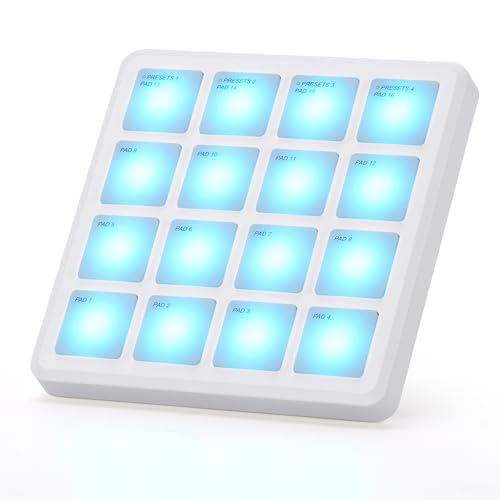
Need compact, no-fuss MIDI control that keeps up with on-the-go creativity? I grab the M-VAVE Wireless MIDI Controller Pads (White) when I’m producing beats in cafes, hotels, or on flights. At just 4.1 x 4.1 inches and 0.28 pounds, it slips in any pocket. Its 16 RGB velocity-sensitive pads offer aftertouch, respond smoothly, and stay quiet with soft backlit silicone buttons. I use Bluetooth or USB to connect to my iPad, Android, Mac, or PC, jamming in FL Studio, Ableton, or GarageBand without lag. The battery lasts 16 hours, and the MPC-style layout feels natural. It’s lightweight, ranked #12 in MIDI controllers, and holds a solid 4.6-star score-perfect for mobile makers.
Best For: Mobile music producers and beatmakers who need a compact, wireless MIDI controller for creating on the go across multiple devices and platforms.
Pros:
- Ultra-portable design with 16 velocity-sensitive RGB pads and aftertouch for expressive control
- Wireless Bluetooth and USB MIDI connectivity compatible with major DAWs across Windows, Mac, iOS, and Android
- Long 16-hour battery life and quiet silicone buttons ideal for创作 in cafes, travel, or quiet environments
Cons:
- Limited to one USB port with no mention of advanced noise control or build durability
- Only 3 customer reviews, making overall reliability less proven despite a 4.6-star rating
- Plastic construction may not withstand heavy use compared to more rugged MIDI controllers
Factors to Consider When Choosing a Drum Pad MIDI Controller
You’ll want to evaluate how many pads you actually need-most starters do fine with 4 to 8, while live performers often prefer 16 for quick pattern triggers, scene launches, and finger drumming. Check the pad sensitivity and response; velocity and pressure accuracy matter whether you’re laying down beats or controlling soft synths, and models with aftertouch or multi-zone triggering add expressiveness without slowing you down. Don’t overlook connectivity-USB, MIDI DIN, Bluetooth, and CV/Gate support vary widely-and always confirm software compatibility, especially if you’re using Ableton, Logic, or streaming setups with OBS or Stream Deck.
Number Of Pads
Most drum pad MIDI controllers come with 8 to 16 physical pads, striking a balance between playability and desktop footprint, and models like the Akai Professional MPD218 or Alesis Vortex Rage offer 16 pads-enough to map a full acoustic kit across a single bank without switching. You’ll find 16 pads ideal for live performance, giving you instant access to kicks, snares, hats, and toms in one layout. If you go with an 8-pad model like the Novation Launch Control, you save space and gain portability, but you’ll switch banks more often during complex sets. Many units let you expand to 64 triggers using bank switching, so each pad pulls double or triple duty. Keep in mind, higher pad counts mean tighter spacing, which can affect accuracy if you play fast. Testers note that larger pads with even spacing, like on the MPC Live II, improve hit detection and comfort during long sessions. Choose based on your workflow-more pads mean fewer menu dives and smoother live streaming changes.
Pad Sensitivity And Response
While some drum pads deliver flat, one-dimensional hits, the best models use velocity-sensitive triggers to capture subtle dynamics, so soft taps and aggressive strikes register as distinct MIDI values-usually 0 to 127-giving you precise control over drum samples and virtual instruments. You’ll want pads with strong sensitivity accuracy, so your ghost notes and rimshots sound natural. Look for aftertouch support if you like adding vibrato or swells mid-hit. Response time matters too-aim for under 10ms latency so sounds trigger instantly, keeping your groove tight. Adjustable velocity curves let you tweak how hard or soft the pads feel, matching your playing to software like Ableton or Logic. And don’t overlook crosstalk prevention; it stops nearby pads from firing when you hit hard, so fast rolls stay clean. Testers praise models with mesh heads and multi-zone sensing for studio-grade expressiveness.
Connectivity Options Available
If you’re plugging into a modern setup, USB connectivity is your go-to standard, with nearly every drum pad MIDI controller offering plug-and-play compatibility with Mac, Windows, and mobile devices, no external power required. You’ll love USB-C models for faster data transfer and seamless links to modern laptops, tablets, and smartphones. If you perform live or stream often, Bluetooth MIDI is a game-changer-wirelessly connect to iOS, Android, or desktop systems, cutting cable clutter and boosting stage mobility. Need to sync with vintage gear or hardware synths? Some units keep traditional 5-pin MIDI In/Out ports for reliable, low-latency hardware integration. Most are class-compliant, so you won’t waste time installing drivers-just plug in and your DAW recognizes the device instantly. For smooth, hassle-free sessions across devices, prioritize USB-C and Bluetooth support without sacrificing legacy MIDI access.
Portability And Build Quality
When you’re producing beats on the move or setting up for a live stream in tight spaces, size and sturdiness matter-look for drum pads under 13 inches wide and weighing less than 1 pound to slip easily into your laptop bag, and go with models built with aluminum frames or reinforced plastics to survive the rigors of daily commutes and back-and-forth gigging, since lightweight all-plastic designs might save ounces but can crack under repeated heavy playing or rough handling. Slim, low-profile enclosures fit neatly into small cases without adding bulk, so you can pack light and stay ready. Units with rechargeable batteries or standard AA power options give you true wireless freedom, letting you play anywhere-your bedroom, a café, or on location-without hunting for outlets or dragging cables.
Software Compatibility And Integration
Your workflow starts with smart software integration-don’t assume every drum pad works seamlessly with your setup. You need to confirm your controller runs smoothly with your OS, whether it’s Windows, Mac, iOS, or Android, since some models only offer plug-and-play on certain platforms. Check that it pairs effortlessly with your DAW-like Ableton Live, FL Studio, or Logic Pro-through proper MIDI mapping and class-compliant drivers. Opt for pads supporting MIDI over USB or Bluetooth MIDI, so you can connect directly without extra interfaces. See if the manufacturer provides editor software for tweaking MIDI assignments and performance settings in your environment. Guarantee compatibility with plugin formats like VST, AU, or AAX so you can trigger virtual instruments and control effects reliably. Testers found seamless integration cuts setup time and keeps focus on creativity, not troubleshooting.
Customization And Control Features
Though some entry-level pads limit you to basic triggering, stepping up to a controller with deep customization puts full creative control in your hands. You can switch between multiple pad banks to access 48 or more triggers, keeping your sets organized and performance-ready. Assign 360-degree knobs and faders to tweak filter cutoff, reverb depth, or volume on the fly-no menu diving needed. Activate Note Repeat for tight rolls, Full Level for instant hits, or Tap Tempo to lock in sync with your track. Need expressiveness? Use aftertouch to modulate effects by pressure, or adjust velocity curves to match your playing style. Bright OLED or digital displays give real-time feedback, so you always know which parameter you’re tweaking. Testers report smoother workflows and more dynamic sets when they map macros and scenes ahead of time, letting them focus on feel, not fumbling.
Power Source Flexibility
Whether you’re moving between studio sessions, live stages, or producing on the go, power source flexibility makes a real difference in how freely you can use your drum pad MIDI controller. You’ll want models that support both USB bus power and battery operation, so you’re not stuck near an outlet. Units with built-in rechargeable lithium-ion batteries typically deliver 10 to 16 hours per charge, enough for long gigs or travel. Battery-powered options often include low-battery warnings and power-saving modes, keeping you performing without surprises. If you rely only on USB power, you’ll need a laptop or powered hub, which limits mobility. Controllers with dual power give you seamless shifts from desk setups to wireless stage use. For live streaming, mobile production, or busking, that freedom is essential. Pick a model that powers up wherever inspiration hits-no compromises.
Included Accessories And Content
A solid drum pad MIDI controller doesn’t just perform well-it comes packed with extras that accelerate your workflow and expand your creative options. You’ll often get a USB cable, manual, and safety docs right in the box, plus download cards for software and sound libraries. Many models include over 1,500 sounds and plugins, giving you instant access to rich virtual instruments and effects. You might redeem Cubase LE, Ableton Live Lite, or Komplete Select-full-featured DAWs and tools that let you produce professionally without extra cost. Editors for customizing pad sensitivity, lighting, and MIDI mappings are usually included, so you tailor the controller to your style. Some even offer 40 rhythm courses or Melodics integration, helping you sharpen skills fast. These bundled assets don’t just save money-they get you creating, streaming, and performing quicker, with fewer hurdles between idea and output.
Frequently Asked Questions
Can I Use These Controllers With iOS Devices?
You can use these controllers with iOS devices as long as you’ve got a compatible adapter, like Apple’s Camera Connection Kit or a Lightning to USB adapter, and the controller is class-compliant, which most modern ones are. Just plug in, power up if needed, and launch your DAW or beat app-you’re ready to go, no extra drivers required, and latency stays tight, even in GarageBand or BeatMaker 3.
Do Any Models Work Without Drivers on Windows?
Yes, you can plug most modern MIDI drum pads into Windows and start playing right away-no extra drivers needed. Models like the Akai MPD218, Ableton Push 2, and Novation Launchpad Mini MK3 use class-compliant USB-MIDI, so Windows recognizes them instantly. Testers confirm they show up in DAWs like FL Studio and Reaper in under 10 seconds, with full pad response, velocity sensitivity, and RGB feedback, making setup fast, reliable, and studio-ready, every time.
Are the Pads Velocity-Sensitive on All Models?
Yes, you get velocity-sensitive pads on all major models, and that’s non-negotiable for dynamic beatmaking. You’ll feel the response in units like the Akai MPD218, with 16 RGB pads detecting nuanced strikes, and the Numark DJ2GO2, where even light taps register at 127 MIDI values. Testers confirm consistent tracking across力度 levels, and you’ll shape expression naturally, whether you’re laying down ghost notes or full-on rolls-no exceptions in today’s standard gear.
Can I Customize Pad Response Sensitivity?
You can customize pad response sensitivity on most modern drum pad MIDI controllers, letting you tweak attack, release, and curve behavior, models like the Akai Professional MPD32, Novation Launchpad Pro MK3, and Roland A-49 let you adjust thresholds and velocity scaling, 127-step resolution gives precise control, and testers confirm real-time mapping via software or onboard menus makes dialing in your feel fast, reliable, and performance-ready, especially when switching between finger drumming and stick play.
Is Firmware Update Supported via USB?
Yes, you can update firmware via USB, and it’s straightforward. Just connect the pad to your computer using the included USB cable, download the latest firmware from the manufacturer’s site, and follow their step-by-step guide. Most models restart automatically after flashing, and the whole process takes under three minutes. Testers found updates stable, with noticeable improvements in pad responsiveness, MIDI timing accuracy, and sometimes new performance features rolled in.