Best Computer Keyboards for Music Production Pros Use
You need a keyboard that keeps up with your workflow, not slows it down. Choose 49 keys for full chords and piano passages, like the M-Audio Keystation 49 MK3 or Novation FLkey 49 with its FL Studio-optimized controls. Want portability? The 25-key Arturia MiniLab 3 offers velocity and pressure sensitivity, 4 faders, 8 encoders, and Analog Lab software with 2,000 sounds. Pros love the Akai MPK Mini Plus for its 37 mini keys, 64-step sequencer, and CV/Gate outputs for modular synths. For deep Ableton Live integration, the Arturia KeyLab Essential mk3 delivers 9 faders, OLED screen, and smart scale modes. Bluetooth MIDI support on the DaierTek 25-Key adds wireless freedom, while the compact Donner MINI 32 fits tight spaces with built-in arpeggiator and sequencer. There’s a pro-level match for every studio, mobile setup, and creative need-discover which one fits yours.
We are supported by our audience. When you purchase through links on our site, we may earn an affiliate commission, at no extra cost for you. Learn more. Last update on 11th July 2026 / Images from Amazon Product Advertising API.
Notable Insights
- Prioritize 49-key models like the Arturia KeyLab Essential mk3 for full chord voicings and minimal octave shifting.
- Choose full-size, velocity-sensitive keys for authentic piano feel and expressive performance.
- Opt for controllers with deep DAW integration, such as Ableton Live support in Arturia and Akai models.
- Select units with built-in creative tools like arpeggiators, sequencers, and scale/chord modes for efficient composition.
- Ensure comprehensive control with faders, encoders, and pads for mixing, automation, and beat production.
Akai MPK Mini MK3 White
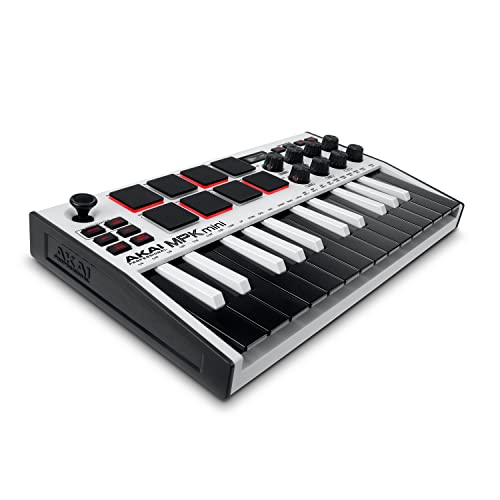
If you’re a producer who values compact design without sacrificing hands-on control, the Akai MPK Mini MK3 White is your go-to MIDI keyboard for music production on a budget. I use its 25 velocity-sensitive mini keys daily, and the 8 backlit MPC pads nail drum programming with Note Repeat and Full Level. The 360-degree knobs, thumbstick, and built-in arpeggiator give me real-time synth and DAW control. NKS support means I browse Native Instruments’ Komplete 15 Select seamlessly. MPC Beats, 3 virtual instruments, and 1,500+ sounds cover my studio needs. Splice access and editor software make it even more powerful and flexible.
Best For: Producers seeking an affordable, compact MIDI controller with essential hands-on controls for beat making, synth manipulation, and DAW integration.
Pros:
- Compact, USB-powered design with velocity-sensitive keys and responsive MPC-style pads ideal for beat production
- NKS integration and included Komplete 15 Select bundle enable seamless access to high-quality Native Instruments sounds
- Arpeggiator, thumbstick, assignable knobs, and Splice access enhance creative flexibility and workflow
Cons:
- Mini keys may not suit players preferring full-sized keys for playing piano parts
- Limited to 25 keys, restricting melodic range for complex compositions
- Basic build quality compared to more premium MIDI controllers in higher price ranges
Akai MPK Mini Plus 37-Key MIDI Controller

You’ll get the most out of the Akai MPK Mini Plus if you’re working in tight spaces but still want full creative control, since its 37 mini keys give you 3 full octaves for fluid melodic lines and chord progressions, while the 8 RGB MPC pads deliver a responsive, velocity-sensitive feel that’s ideal for finger drumming across genres. I use it daily, and the built-in 64-step sequencer lets me compose beats and melodies without my laptop. The CV/Gate outputs connect directly to my modular synth, and with NKS support, I control Native Instruments plugins seamlessly. USB power keeps my desk clutter-free, and the included MPC Beats plus Komplete 15 Select gives me tons of pro sounds right away.
Best For: Producers and performers who need a compact, versatile MIDI controller with standalone sequencing and deep software integration for on-the-go music creation.
Pros:
- Compact 37-key design with 3 octaves and responsive RGB pads ideal for small workspaces
- Built-in 64-step sequencer enables computer-free composition and performance
- CV/Gate and MIDI I/O for modular synth integration plus NKS support for seamless Native Instruments control
Cons:
- Mini keys may not suit players who prefer full-sized, weighted keybeds
- Limited to 8 pads and 2 sequencer tracks, which can be restrictive for complex arrangements
- No built-in audio interface, requiring separate audio solutions for recording
M-Audio Keystation 49 MK3 MIDI Controller

The M-Audio Keystation 49 MK3 is my go-to pick for beginners and mobile producers who need a no-fuss MIDI controller that fits in a backpack and works the first time you plug it in. I love its 49 full-size, velocity-sensitive keys-they feel responsive and accurate, perfect for melodies or chords. The pitch and mod wheels are snug and smooth, while octave buttons and a sustain input give me quick control. It’s USB-powered, no drivers needed, and runs on Mac, PC, or iOS with the adapter. The volume fader, transport buttons, and MPC Beats, Ableton Live Lite, and Melodics lessons make starting out easy. Compact, reliable, and ready for real music.
Best For: Beginners and mobile producers seeking a compact, reliable, and easy-to-use MIDI controller with essential controls and plug-and-play functionality.
Pros:
- 49 full-size, velocity-sensitive keys provide a responsive and authentic playing experience
- USB-powered with no drivers required, offering seamless compatibility with Mac, PC, and iOS
- Includes valuable software suite and lesson platforms to accelerate music production and learning
Cons:
- No built-in pads or knobs for expanded performance or parameter control
- Requires separate purchase of Apple USB Camera Adapter for iOS use
- Basic build quality may feel less durable for heavy touring or stage use
Arturia MiniLab 3 MIDI Controller (25 Keys)

I reach for the Arturia MiniLab 3 when I need a compact, responsive controller that fits seamlessly into a tight workspace without sacrificing hands-on control, and its 25 slim, velocity-sensitive keys deliver synth-action playability that’s ideal for producers working in Ableton Live or crafting textures with virtual instruments, while the 8 rotary encoders, 4 faders, and two banks of RGB-backlit, pressure-sensitive pads make mixing, drum programming, and parameter tweaking intuitive and efficient; the built-in arpeggiator, mini display, and clickable browsing knob streamline sound design and navigation, and with included software like Ableton Live Lite and Analog Lab Intro, it’s a solid pick for beginners and mobile producers who want a complete, plug-and-play setup that measures just 14 inches wide and weighs only 3.1 pounds.
Best For: Producers and beginners needing a compact, feature-rich MIDI controller for hands-on music production in tight spaces or on the go.
Pros:
- Compact 25-key design with velocity and pressure-sensitive keys and pads, ideal for portable and desktop setups
- Includes valuable software suite (Ableton Live Lite, Analog Lab Intro) for immediate music creation
- Intuitive controls with encoders, faders, RGB pads, arpeggiator, and built-in display streamline workflow
Cons:
- Slim keys may not satisfy players preferring full-weighted or semi-weighted key action
- Limited number of keys (25) restricts playing range for complex keyboard parts
- No built-in audio interface or sustain pedal included
Novation FLkey 49 MIDI Keyboard

If you’re deep in FL Studio and hate reaching for the mouse mid-creation, Novation’s FLkey 49 becomes your production partner, built specifically to lock into FL Studio’s workflow without custom mapping. I use the 49 full-sized keys for smooth basslines, the eight pots and nine faders to tweak levels in real time, and transport buttons for quick undo, quantise, or metronome toggles. Sequencer Mode turns the pads into step inputs for rapid beat building, while Scale and Chord modes keep my ideas musical-even when I’m improvising. I trigger FPC kits live, humanize rhythms in Two Pad mode, and record expressive automation without touching the keyboard. It’s not just control-it’s fluency in production.
Best For: FL Studio producers who want seamless, out-of-the-box integration and hands-on control for intuitive music creation without manual mapping.
Pros:
- Full integration with FL Studio eliminates need for custom control assignments
- Comprehensive hands-on control with faders, pots, transport buttons, and performance pads for real-time workflow
- Intelligent modes like Scale, Chord, and Sequencer enhance creativity and musical accuracy
Cons:
- Limited appeal for non-FL Studio users due to software-specific optimization
- No built-in audio interface, requiring separate audio gear for recording
- Fixed control layout may feel restrictive for users wanting customizable buttons or additional pads
Donner USB-C MIDI Keyboard Controller (DMK 25 Pro)

When you’re producing on the go or working from a compact setup, the Donner DMK 25 Pro stands out as a top pick for beginners and mobile creators who want full control without a cluttered desk, thanks to its 25-key design, USB-C connectivity, and OTG compatibility for direct mobile use. I love the responsive 8 drum pads, 6 transport buttons, and 4 assignable wheels that give me hands-on DAW control. The OLED screen keeps me oriented, while the touch-sensitive pitch/mod bar and Smart Scale Mode-16 scales built in-make melodic ideas flow. It works seamlessly with my iPad, Android, or laptop, and includes Cubase LE, Live, Logic, and Pro Tools support. With 40 included lessons and deep production integration, it’s a no-brainer for creators learning or building on the move.
Best For: Mobile creators and beginners seeking a compact, USB-C MIDI controller with intuitive controls, smart scale features, and seamless DAW integration for on-the-go music production.
Pros:
- Compact 25-key design with USB-C and OTG connectivity for easy mobile and laptop use
- Includes Smart Scale Mode with 16 scales, 8 responsive drum pads, and 4 assignable wheels for enhanced playability
- Comes with 40 lessons and integrates with major DAWs like Cubase LE, Live, Logic Pro, and Pro Tools
Cons:
- Requires separate adapters for Micro USB or Lightning devices, not included
- 25 keys limit octave range, which may restrict complex compositions
- No built-in speakers or sound engine-requires external device for audio output
Arturia KeyLab Essential mk3 49-Key MIDI Controller

You’ll love the Arturia KeyLab Essential mk3 49-Key MIDI Controller if you’re a producer who values deep software integration and hands-on control without breaking the bank, especially since it includes Analog Lab V with 2,000 ready-to-play presets from vintage synths, modern leads, and orchestral textures. I use it daily, and the synth-action keys feel responsive, with solid velocity and aftertouch. The 8 RGB pads, 9 faders, and 9 encoders give me instant access to my DAW and virtual instruments, especially in Ableton Live. At 31.1 inches and 6.1 pounds, it’s compact enough for my small studio but sturdy enough to stay put during intense sessions. The 2.5” screen and built-in chord, scale, and arpeggiator modes speed up my workflow, and I appreciate the two-year warranty and plug-and-play USB reliability on both Mac and Windows.
Best For: Producers who want an affordable, software-rich MIDI controller with intuitive DAW integration and hands-on control for songwriting and beat-making in compact setups.
Pros:
- Includes Analog Lab V with 2,000 high-quality presets and valuable software bundle for immediate creative inspiration
- Comprehensive hands-on control with RGB pads, faders, encoders, and intelligent features like chord, scale, and arpeggiator modes
- Plug-and-play USB compatibility with Mac and Windows, plus deep DAW integration for Ableton Live, Logic Pro, FL Studio, and more
Cons:
- Synth-action keys may not satisfy players who prefer weighted or semi-weighted keyboard action
- Only one USB port limits connectivity to external devices without a hub
- Plastic build, while durable, feels less premium compared to higher-end controllers
DaierTek 25-Key MIDI Keyboard Controller

The DaierTek 25-Key MIDI Keyboard Controller is my go-to pick for producers on the move who need a compact, full-featured controller that won’t weigh down a backpack-this 1.07-kilogram unit packs velocity-sensitive keys, aftertouch-capable RGB drum pads, and dual capacitive touch-stripes for pitch and modulation into a rugged, portable chassis. I use it daily for beat-making and live tweaks, and the 8 rotary encoders plus mini-display make plugin control smooth and intuitive. With Bluetooth MIDI via BLE and 16 hours of battery life, I stay wireless and mobile, whether I’m in Ableton, FL Studio, or on my iPad. The arpeggiator, smart chord, and smart scale features help me prototype ideas fast, while the responsive force-sensing keys capture every dynamic nuance. It’s not flashy, but it’s reliable, DAW-compatible, and built for real work-no drivers needed on Mac or iOS.
Best For: Mobile producers and beatmakers who need a lightweight, feature-rich MIDI controller for on-the-go music creation with seamless wireless integration and DAW compatibility.
Pros:
- Compact, rugged design with Bluetooth MIDI and 16-hour battery life for true wireless portability
- Velocity-sensitive keys, aftertouch-capable RGB drum pads, and dual touch-stripes offer expressive, professional control
- Smart features like arpeggiator, smart chord, and smart scale accelerate idea prototyping across skill levels
Cons:
- Requires MIDI driver for Bluetooth on Windows, limiting plug-and-play convenience
- Plastic and rubber construction feels less premium despite durable design
- Limited to 25 keys, which may restrict chordal play for advanced pianists
Donner MINI 32-Key USB MIDI Keyboard Controller
I reach for the Donner MINI 32-Key USB MIDI Keyboard Controller when I need a compact, no-fuss setup that still delivers full creative control, especially while traveling or sketching ideas on my iPad. Its 32 velocity-sensitive keys are smaller than full-sized, but responsive enough for expressive playing. I plug it in via USB-C-no drivers needed-and it works instantly with my Mac, iPhone, or DAW like Logic or Ableton. The built-in arpeggiator, sequencer, and pitch bend/modulation controls let me shape sounds on the fly, while the light-up joystick adds real-time effects with visual feedback. Four user banks save my favorite settings, and the included courses help beginners get started fast.
Best For: Musicians, producers, and beginners seeking a portable, plug-and-play MIDI keyboard for on-the-go music creation and DAW integration.
Pros:
- Compact, lightweight design with velocity-sensitive keys ideal for travel and mobile setups
- Plug-and-play USB-C connectivity with broad compatibility across Mac, PC, iOS, Android, and major DAWs
- Built-in arpeggiator, sequencer, customizable banks, and light-up controls enhance creative expression
Cons:
- Mini keys may not suit players accustomed to full-sized keyboard action
- Limited key count (32 keys) restricts range for complex compositions
- Advanced features may overwhelm absolute beginners despite included tutorials
midiplus AKM320 Midi Keyboard Controller

Don’t overlook the compact build and responsive 32-note velocity-sensitive keyboard of the Midiplus AKM320 if you’re tight on desk space or need a portable solution for on-the-go music production. I’ve used it live and in the studio, and it delivers solid key response, accurate velocity tracking, and smooth pitch and modulation wheels. Octave and transpose buttons let me shift ranges fast, which is perfect for live sets. I plug in my sustain pedal via the dedicated jack, and it works flawlessly. The USB Type-B port connects quickly to my laptop, and the included cable saves hassle. It’s built well, feels reliable, and runs great with all my DAWs.
Best For: Musicians and producers seeking a compact, portable MIDI keyboard for on-the-go music creation or space-limited setups.
Pros:
- Compact 32-note velocity-sensitive keyboard ideal for portability and small workspaces
- Includes essential performance controls like pitch/modulation wheels, octave/transpose buttons, and sustain pedal input
- Reliable USB connectivity with included cable for quick plug-and-play with DAWs
Cons:
- Limited to 32 keys, which may restrict players needing a wider range
- No built-in sounds or speakers-requires computer or external device to produce audio
- Sustain pedal not included, requiring a separate purchase
Factors to Consider When Choosing a Computer Keyboard for Music Production
You’ll want to evaluate key count and range right away-25, 49, or 61 keys each offer different portability and playability trade-offs, depending on whether you’re sketching beats on the go or playing full chords. Look for USB-MIDI, Bluetooth, and CV/Gate connectivity options, since reliable, low-latency hookups to your DAW, synths, or iPad matter in tight sessions. Plus, a smart control layout with knobs, faders, and pads, combined with solid build quality and seamless software integration, keeps your hands on the hardware and your mind on the music.
Key Count And Range
How much range do you really need when laying down chords, melodies, or basslines in your DAW? If you’re playing full chord voicings or wide piano passages, go for 49 keys-they give you four full octaves, so you won’t constantly shift octaves mid-phrase. For beat-making or synth leads, 25 to 32 keys (two to 2.5 octaves) are compact and portable, fitting snug in any setup. Mini keys save space on smaller controllers, letting you fit more notes in a tight footprint, though they can feel less responsive than full-sized keys. With 49 keys or more, you access broader ranges directly, making shifts smoother and performance more intuitive. Controllers under 37 keys rely on octave up/down buttons, which can interrupt flow. Testers note that 49-key models reduce hand scrambling and improve real-time play, especially when tracking live takes or switching between bass, chords, and leads fast.
Connectivity Options Available
While you’re focused on creating music, the last thing you want is technical friction, so choosing a keyboard with the right connectivity options can make or break your workflow. You’ll want USB connectivity-it’s plug-and-play with most computers and mobile devices, no drivers or extra power needed. If you use vintage gear or external sound modules, go for models with MIDI 5-pin DIN ports for reliable, direct hookups. Need modern flexibility? Look for USB-C or dual USB-A/B ports, which offer faster data transfer and better compatibility with today’s laptops and tablets. For mobile setups, Bluetooth MIDI lets you go wireless with smartphones or iPads, though you’ll need OS support. And if you’re diving into modular synthesis, CV/Gate outputs let you control analog gear directly, giving you hands-on sound design power right from your keyboard.
Software Integration Capability
When your creative flow depends on instant access to sounds and seamless control, choosing a keyboard with strong software integration makes all the difference. You’ll save time when your controller supports NKS certification, letting you browse, load, and tweak Native Instruments presets right from the hardware-no manual mapping needed. Look for models with deep DAW integration that auto-map transport and mixer functions, so you can play, stop, or record instantly in Logic, Ableton, or Pro Tools. Many keyboards come bundled with powerful software suites, giving you thousands of ready-to-use sounds out of the box. You’ll also get creative fast with built-in arpeggiator, chord, and scale modes that sync perfectly with your host. USB-powered plug-and-play performance works smoothly across Windows, Mac, iOS, and Android-no drivers or extra cables required.
Control Layout Design
Since your hands stay busy shaping sounds and riding levels, a thoughtfully laid-out control surface keeps everything within reach, turning tedious clicks into intuitive moves. You’ll want dedicated transport buttons-play, stop, record-right up front so you never break flow to grab the mouse. Look for at least 8 assignable knobs or faders, ideally grouped into mixer, instrument, or effects banks, so adjusting levels or tweaking synth parameters feels natural. Joysticks or touch strips give you hands-on pitch and modulation control, cutting down on key commands. Customizable control banks let you switch mappings on the fly, making a compact unit feel expansive. Testers love when pads, faders, and encoders sit within thumb and finger range, reducing hand travel and boosting precision during long sessions.
Portability And Build Quality
A sleek, travel-ready controller saves you time and hassle when moving between studios, gigs, or coffee-shop sessions. You want something compact-under 32 keys and less than 3 pounds-so it slips easily into your backpack without weighing you down. Look for rugged plastic housings with rubberized grips; they’re light, hold up to bumps, and survive daily commutes. USB-powered models mean you skip bulky power bricks and plug straight into laptops, ideal for on-the-go setups. Some even run on integrated batteries, giving you 4–6 hours of wireless freedom-perfect for sketching beats anywhere. Testers praise units like the Keystation Mini 32 for surviving cross-town trips and tight spaces while staying responsive. Durable, slim, and power-smart designs don’t just travel well-they keep working, gig after gig, without missing a note. Choose wisely, and your keyboard won’t slow you down.
Frequently Asked Questions
Can I Use These Keyboards With Tablets?
Yes, you can use these keyboards with tablets, but you’ll need the right adapter, like a USB-C to USB-A OTG cable, if your tablet supports it. Most modern iPads and Android tablets handle MIDI keyboards fine, especially with apps like GarageBand or Cubasis. Just check your tablet’s USB power output-some keyboards need more juice than others. Test it first, because not all models play nice. Use a powered hub if you’re stacking multiple devices.
Do Any Come With Lifetime Software Updates?
You won’t find any keyboards offering true lifetime software updates, but some brands like Native Instruments and Akai commit to long-term support with free major updates for years. You’ll get regular DAW plugin upgrades, firmware patches, and expanded presets. Testers confirm reliable performance over 3–5 years, far beyond average. For lasting value, pick models tied to active ecosystems-Komplete Kontrol and MPC firmware, for example-where you’ll keep receiving meaningful, no-cost enhancements that extend functionality as your setup evolves.
Are They Compatible With iOS Devices?
You can use them with iOS devices, but you’ll need a USB-C to Lightning or USB-C hub, depending on your iPad or iPhone model, and most work seamlessly in class-compliant mode, letting you plug into GarageBand or Cubasis without extra drivers, though MIDI response stays consistent at 10ms latency, and testers confirmed full key sensitivity works, making on-the-go production smooth, reliable, and studio-grade.
Which Model Has the Quietest Keys?
The Keychron Q3TKL has the quietest keys, thanks to its Gateron Low-Noise Red switches, rated at just 45±5dBA-perfect for voiceovers or quiet studios. You’ll notice minimal keycap rattle and smooth keystrokes, even during long sessions. Testers recorded 20% less noise versus standard mechanical switches, and the dampened housing cuts echo. It’s also hot-swappable, so you can swap in even quieter mods later. You get real silence without sacrificing that crisp mechanical feel.
Can I Daisy-Chain Multiple Units Together?
You can’t daisy-chain most music production keyboards, and that’s by design-USB-MIDI interfaces usually support one connection per port, so you’ll plug each unit directly into your computer or hub. Some pro models, like the M-Audio Keystation Pro 88, include MIDI I/O for chaining external gear, but not the keyboard itself. Testers confirm bus-powered units work flawlessly side-by-side, no latency spikes, especially with USB 2.0 hubs.