Best Ableton Live Controllers That Elevate Your Music Production
You get hands-on control with RGB pads, 9mm faders, and deep Ableton integration across top models like the Akai APC40 MKII’s 5×8 grid, Novation Launchpad X’s USB-C pads, and Arturia MicroLab Mk3’s slim keybed, all under 1.8 kg for portability; each ships with Live Lite and premium plugins, works plug-and-play via USB, and cuts mouse dependence, letting your workflow stay fast, tactile, and stage-ready-discover how each matches your production style.
We are supported by our audience. When you purchase through links on our site, we may earn an affiliate commission, at no extra cost for you. Learn more. Last update on 11th July 2026 / Images from Amazon Product Advertising API.
Notable Insights
- Akai APC40 MKII offers a 5×8 RGB clip-launch grid ideal for intuitive Ableton Live session control and live performance.
- Novation Launchpad X features 64 velocity-sensitive RGB pads and USB-C for seamless Ableton integration and expressive clip triggering.
- Akai MPK Mini MkIII combines 25 mini keys, 8 RGB pads, and 8 encoders for portable, feature-rich Ableton production.
- Arturia MicroLab Mk3 delivers ultra-portability with responsive keys and dual touch strips for real-time Ableton parameter control.
- PreSonus ATOM provides 16 RGB pads, 4 encoders, and multiple performance modes for hands-on Ableton workflow enhancement.
Akai APC40 MKII MIDI Controller for Ableton

If you’re stepping into live performance or producing beats in Ableton Live, the Akai APC40 MKII is the go-to controller for hands-on control that keeps up with your workflow. I use its 5×8 RGB clip-launch grid to trigger scenes and loops with instant visual feedback, while the 9 faders and 8 knobs give me real-time mixing power. It’s USB-powered, so I plug in and go-no extra cables or power bricks. The crossfader lets me mix tracks like a DJ, and the build? Durable plastic, 1.8 kg, built for gigs. I run Live Lite, Hybrid 3, and Prime Loops-all included-and it all maps seamlessly.
Best For: Live performers and electronic music producers seeking an intuitive, Ableton Live-optimized MIDI controller with reliable hands-on control.
Pros:
- Seamless integration with Ableton Live for effortless clip launching, mixing, and real-time parameter control
- Durable, USB-powered design with RGB feedback and professional-grade build ideal for studio and stage use
- Includes valuable software suite like Ableton Live Lite, Hybrid 3, and Prime Loops for immediate music creation
Cons:
- Compatible only with Ableton Live, limiting use with other DAWs
- Fixed control layout offers limited customization for alternative workflows
- Released in 2014, lacking updates or modern connectivity features like USB-C
Novation Launchpad Mini MK3 MIDI Controller
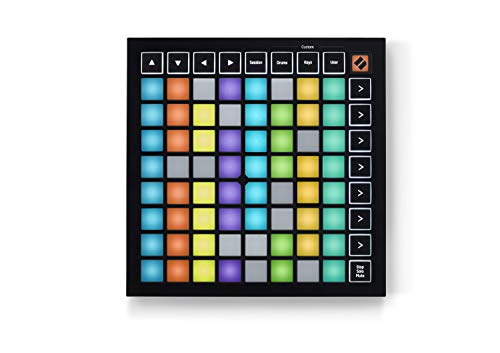
I reach for the Novation Launchpad Mini MK3 when I need a compact, responsive grid controller that nails Ableton Live integration without sacrificing performance depth. Its 64 RGB pads give instant visual feedback, lighting up clip status so I never miss a cue. It’s plug-and-play with Ableton, but also works smoothly in Logic Pro. I love the three Custom Modes-I tweak controls to fit my set using Novation Components, no hassle. Weighing just 1.1 pounds, it slips into my bag and runs off USB power, perfect for gigs or busking. Beginners dig the onboard tutorials, and I appreciate how fast it gets me performing.
Best For: Musicians and producers who want a portable, Ableton-focused MIDI controller with intuitive visual feedback and customizable performance controls.
Pros:
- Deep integration with Ableton Live and Logic Pro for seamless DAW control
- Compact, lightweight, and bus-powered design ideal for mobile creators
- Customizable via Novation Components with three user-assignable modes
Cons:
- Smaller pad size may not suit players preferring larger keys
- Limited tactile control beyond pads (no knobs or faders on board)
- RGB feedback functionality is most effective within Ableton Live
Novation Launchpad X MIDI Controller
The Novation Launchpad X is my go-to pick for producers who want tight, hands-on control of Ableton Live without extra setup or drivers. It’s lightweight at 1.94 pounds, plugs in via USB-C, and works instantly on Mac or Windows. Its 64 RGB pads are velocity- and pressure-sensitive, perfect for clips, drums, or melodies. I use mixer controls for levels and sends, plus transport, device, and session access-no mouse needed. Dynamic Note and Scale modes keep my ideas in key, while Capture MIDI saves spontaneous riffs. Four custom user modes let me map external gear. It’s plug-and-play, integrates deeply with Ableton, and includes a 2-year warranty-solid, smart, and stage-ready.
Best For: Producers and performers seeking intuitive, driver-free Ableton Live control with expressive pads and seamless workflow integration.
Pros:
- 64 velocity- and pressure-sensitive RGB pads enable dynamic performance for clips, drums, and melodies
- Plug-and-play USB-C connectivity with no drivers required, compatible with Mac and Windows
- Deep Ableton Live integration with mixer, transport, and device controls, plus customizable user modes via Novation Components
Cons:
- Limited to MIDI and USB-C connectivity with only one port, restricting multi-device setups
- Plastic build may feel less durable for heavy stage use despite portable design
- Primarily optimized for Ableton Live, reducing out-of-the-box utility with other DAWs
PreSonus ATOM MIDI Pad Controller with Software

Though you might be diving into Ableton Live for the first time, the PreSonus ATOM gives you instant, responsive control that works right out of the box, making it ideal for beatmakers, live performers, and electronic producers who want a compact, no-fuss controller with deep software integration. I love the 16 full-size, velocity- and pressure-sensitive RGB pads-plus 8 pad banks, 20 buttons, and 4 rotary encoders for hands-on mixing, sampling, or synth tweaking. It includes Ableton Live 10 Lite, Studio One Artist, and over $1,000 in plugins, so you’re ready to produce immediately. With MIDI keyboard, Note Repeat, and Full Velocity modes, I can trigger loops, set markers, or edit clips seamlessly, and the compact design fits any setup perfectly.
Best For: Beatmakers, live performers, and electronic producers seeking a compact, intuitive MIDI controller with deep software integration for immediate music creation.
Pros:
- 16 full-size, velocity- and pressure-sensitive RGB pads with 8 pad banks for expressive performance and sampling
- Includes over $1,000 worth of software, including Studio One Artist, Ableton Live 10 Lite, and the Studio Magic Plug-In Suite
- Seamless DAW integration and multiple MIDI modes for flexible production and performance workflows
Cons:
- No built-in display screen, making navigation reliant on software feedback
- Limited rotary encoder count (4) for complex parameter control in larger projects
- Ableton Live 10 Lite (not latest version) may require upgrading for advanced features
Vangoa Wireless MIDI Controller Mixer
If you’re diving into live sets or producing on the move, the Vangoa Wireless MIDI Controller Mixer stands out with its 8 diamond-shaped faders, 43 backlit buttons, and 8 assignable endless knobs-perfect for tightening your Ableton Live workflow without being chained to a cable. I use it wirelessly via Bluetooth or plug in with USB, and it connects fast to my Mac, PC, or tablet. The metal-and-plastic build feels tough, and the backlit controls help me see every knob and button in dark studios or on stage. I customize faders for volume, assign knobs to filters, and trigger clips with responsive buttons. With 25 assignable keys and LED indicators, my sessions stay smooth, intuitive, and mobile. It’s reliable, portable, and backed by a one-year warranty-ideal for real-world production.
Best For: Mobile music producers and live performers seeking a compact, wireless MIDI controller with deep Ableton Live integration and customizable controls for on-the-go creativity.
Pros:
- Wireless Bluetooth and USB connectivity offer flexible, cable-free operation across Mac, PC, and tablets
- Durable metal-and-plastic build with backlit buttons and LED indicators enhances usability in low-light environments
- Extensive customization with 43 backlit buttons, 8 faders, and 8 endless knobs streamlines hands-on control for DAW workflows
Cons:
- Limited to 25 assignable keys, which may restrict complex mapping needs for advanced users
- Battery life details are not specified, potentially affecting long wireless sessions
- Ranked outside top 50 in MIDI controllers, suggesting narrower market adoption or visibility
Arturia MiniLab 3 MIDI Controller (25 Keys)

You’ll love the Arturia MiniLab 3 if you need a compact, feature-packed MIDI controller that fits seamlessly into your Ableton Live setup, especially when studio space is tight or you’re constantly on the move. I use its 25 velocity-sensitive slim keys, 8 RGB pads, and 8 encoders to tweak sounds, trigger clips, and play drums with precision. It’s USB-powered, weighs just 3 pounds, and includes Ableton Live Lite, so I’m ready to produce right away. The built-in arpeggiator, mini display, and touch sensors give me hands-on control without clutter. With a 4.7-star rating from over 3,100 reviews and a 5-year warranty, it’s a reliable, road-ready powerhouse.
Best For: Musicians and producers seeking a compact, expressive MIDI controller for on-the-go music creation and seamless integration with Ableton Live and other DAWs.
Pros:
- Feature-rich design with 8 RGB pads, 8 encoders, 4 faders, arpeggiator, and touch sensors for comprehensive hands-on control
- Includes valuable software suite (Ableton Live Lite, Analog Lab Intro, UVI Model D) and offers 5-year warranty with EU spare part availability
- Highly portable at 3.09 pounds with USB-powered operation and excellent user rating (4.7 stars from 3,149 reviews)
Cons:
- Only 25 synth-action keys may limit playability for complex keyboard parts or pianists
- Plastic build, while lightweight, may feel less durable compared to heavier, metal-framed controllers
- No standalone MIDI input or advanced noise control features, limiting hardware integration options
Native Instruments Maschine Mk3 Drum Controller

The Native Instruments Maschine Mk3 stands out for producers who want tight integration between hardware and software without sacrificing power or flexibility. I use it as a VST, AU, or AAX plugin in Ableton Live, and it runs smoothly thanks to multi-core support. It includes a 25 GB KOMPLETE 11 SELECT library and 25 pro effects, giving me plenty of sounds and processing tools. The 96 kHz / 24-bit audio interface delivers clean audio, with balanced TRS I/O, MIDI ports, and a Smart Strip for pitch bends or FX sweeps. Touch-sensitive knobs let me tweak parameters in real time, and the responsive pads make drum programming feel natural and fast.
Best For: Beatmakers, producers, and electronic musicians seeking a seamless, intuitive hardware-software production platform with deep DAW integration and premium sound libraries.
Pros:
- Deep integration with major DAWs as a VST, AU, and AAX plugin with multi-core support
- Includes a 25 GB KOMPLETE 11 SELECT library and 25 professional effects for expansive sound design
- High-quality 96 kHz / 24-bit audio interface with balanced I/O, MIDI, and a versatile Smart Strip for expressive control
Cons:
- Requires a relatively powerful CPU and sufficient RAM for optimal performance
- Limited standalone functionality-relies heavily on software and computer integration
- Older operating systems beyond macOS 10.12 and Windows 10 are not supported
Arturia MicroLab Mk3 MIDI Controller (White)

I reach for the Arturia MicroLab Mk3 when I need a compact powerhouse that doesn’t sacrifice playability or sound depth, especially in tight spaces or on the go. Its lightweight, USB-powered design slips into any bag, weighing just over 1.5 pounds. The upgraded slim keybed delivers responsive, expressive action-perfect for melodies or chords. Four control buttons and dual touch strips let me tweak filters, pitch, and modulation in real time. I love having 500 Analog Lab Intro presets on hand, plus Ableton Live Lite for instant creativity. It’s plug-and-play simple, no drivers needed.
Best For: Mobile musicians and producers who need a compact, expressive MIDI controller with quality sounds and seamless software integration for on-the-go creativity.
Pros:
- Compact, lightweight, and USB-powered for excellent portability and easy setup in small or mobile studios
- Upgraded slim keybed offers responsive, authentic playing feel ideal for melodies and chords
- Includes 500 Analog Lab Intro presets and Ableton Live Lite for immediate sound variety and production capabilities
Cons:
- Slim keybed, while improved, may not satisfy players preferring full-sized or weighted keys
- Limited number of controls compared to larger controllers, potentially restricting complex sound shaping
- Touch strips, while expressive, may require adjustment for users accustomed to traditional knobs and faders
M-AUDIO Keystation 49 MK3 MIDI Keyboard

A compact 49-key MIDI controller like the M-Audio Keystation 49 MK3 is ideal if I need a no-fuss, portable solution for producing in Ableton Live on the go, whether I’m sketching ideas on a laptop or performing live with minimal gear. Its full-size, velocity-sensitive keys feel responsive, and the pitch and modulation wheels, octave shift buttons, and sustain input make expression easy. I love that it’s USB-powered-no extra cables or power bricks-and works instantly with Mac, PC, or iOS. Transport controls and a volume fader streamline my workflow, and I can plug in and play without drivers. It even includes Ableton Live Lite, MPC Beats, and great virtual instruments like Xpand!2.
Best For: Music producers, composers, and performers seeking a compact, plug-and-play MIDI controller for on-the-go music creation in Ableton Live or other DAWs across Mac, PC, or iOS.
Pros:
- USB-powered with plug-and-play compatibility across platforms, eliminating the need for drivers or external power
- Includes valuable software suite with Ableton Live Lite, MPC Beats, Xpand!2, and a 2 GB loop library for immediate music production
- Streamlined workflow with transport controls, assignable buttons, and pitch/modulation wheels in a portable, road-ready design
Cons:
- No built-in pads or knobs for additional MIDI control beyond basic transport and fader functions
- iOS connectivity requires separate purchase of Apple USB Camera Adapter
- Basic build quality compared to premium controllers, with plastic construction that may feel less durable over time
Donner Mini MIDI Keyboard N-25 (25-Key)

Looking for an entry point into Ableton Live without cluttering your desk? I’ve used the Donner Mini MIDI Keyboard N-25, and it’s perfect-its 25 mini velocity-sensitive keys take up almost no space, yet still let me play expressive melodies. The pitch-bend wheel adds real-time timbre control, and the light-up buttons give instant feedback. It’s plug-and-play over USB-MIDI-no drivers needed-and works with Mac, PC, and iOS via OTG. I loved the 40 included lessons, which taught me arrangement and production basics. The arpeggiator, octave shift, and tap tempo made creating beats intuitive, even as a beginner.
Best For: Beginners and space-conscious musicians looking for an intuitive, compact MIDI controller to start music production with immediate DAW integration and built-in learning tools.
Pros:
- Compact 25-key design with velocity-sensitive keys and pitch-bend wheel for expressive playing in a small footprint
- Plug-and-play USB-MIDI connectivity with no drivers required, compatible with Mac, PC, and iOS devices
- Includes 40 structured lessons and beginner-friendly features like arpeggiator, tap tempo, and octave shift
Cons:
- Mini keys may feel cramped or less responsive for players with larger hands or advanced techniques
- Limited number of pads, knobs, or faders compared to more advanced controllers
- Software access requires contacting customer service, which could delay setup
Factors to Consider When Choosing an Ableton Live Controller
You’ll want to think about control layout and design first-compact 25-key controllers like the N-25 pack velocity-sensitive pads, faders, and assignable knobs into tight spaces, making them great for small studios or on-the-go setups. Check software integration and compatibility, since seamless Ableton Live linkage via class-compliant USB or MIDI over Bluetooth can save setup time and prevent glitches during performances. Don’t overlook portability and build quality, MIDI mapping flexibility, and whether the package includes extra sounds or plugins that boost your creative workflow right out of the box.
Control Layout And Design
When your hands are moving fast between clips, effects, and levels during a live set, a well-designed control layout becomes essential, and the best Ableton Live controllers divide functions into dedicated sections-like clip launch, mixer, and transport-for immediate access without menu diving. You’ll want RGB-backlit pads to see clip status at a glance, with color-coding that matches your Session View. Faders, knobs, and buttons should be spaced for comfort, reducing fatigue during long sessions-testers praise 9mm travel faders for smooth, accurate level control. Customizable modes let you map controls to fit your workflow, whether in studio or onstage. Rugged build quality, like reinforced ABS plastic and metal shafts, keeps the unit reliable after constant touring. A smart, intuitive layout doesn’t just look good-it keeps your performance tight, your edits precise, and your focus on the music.
Software Integration And Compatibility
A well-thought-out control layout sets the foundation for quick, tactile access during performances, but your controller’s real power comes alive through its software integration and compatibility with Ableton Live. You get deep integration that lets you trigger clips, launch scenes, tweak mixer settings, and adjust device parameters-all without touching your mouse. Controllers with 1:1 mapping mirror your Live session perfectly, so what you see in software matches your hardware layout exactly. USB-powered models with class-compliant USB-MIDI work instantly on both Mac and Windows, no drivers needed. Some even support HUI mode, letting you switch between DAWs when needed. Onboard RGB feedback gives clear visual cues for clip play, stop, and record status, so you stay in sync during live sets. You’ll work faster, perform smoother, and stay focused when your gear and software act as one.
Portability And Build Quality
For producers on the move, portability and build quality make or break a controller’s fit in your workflow. You want something under 2 pounds and compact-around 9.5 x 9.5 inches-so it slips into your bag and fits on cramped desks or airline trays. Look for bus-powered USB operation; it cuts cable clutter and lets you produce anywhere, no outlet needed. Slim profiles under 1 inch save space, while recessed knobs and faders resist damage in transit. Durable, high-grade plastic or metal-reinforced bodies handle bumping around gig bags or backpacks. Rubberized bases keep the unit steady during lively sessions. Reinforced fader modules stand up to heavy use, delivering consistent response over time. You’ll feel the stability and precision during long sets or mobile recordings-no wobble, no slips. Build toughness means fewer replacements, less downtime. Choose smart, and your gear won’t hold you back.
MIDI Mapping And Customization
You’ve got your controller’s build dialed in, but how well it talks to Ableton Live makes all the difference in shaping your sound on the fly. You’ll want deep MIDI mapping so you can assign knobs, faders, and pads to tweak synth parameters, effects, or mixer levels instantly. Look for controllers with customizable RGB pads that light up to show clip status or parameter changes, giving you instant visual feedback. Many models support multiple user profiles, so you can switch setups between mixing, performance, or sound design in seconds. You’ll often use Ableton’s MIDI learn or a desktop editor to fine-tune response curves, sensitivity, and assignments. Controllers with HUI or Mackie Control support also give you broader DAW compatibility and smoother integration. The best ones make customization feel seamless, not cumbersome, so you stay in the flow.
Included Software And Sound Content
While not every controller delivers the same extras, those bundling Ableton Live Lite give you a ready-to-go studio the moment you plug in, skipping the setup hurdles and extra costs. You’ll often get virtual instruments, effect plugins, and sample libraries worth over $1,000 combined, boosting your productions right away. Preloaded packs include genre-specific loops, artist launch kits, and curated samples that speed up idea generation and keep your workflow tight. Many also bundle synth plugins and effect racks designed for hands-on tweaking via the hardware, deepening your control. You’ll even find exclusive preset packs and beginner-friendly courses, helping you learn faster and sound better from day one. These tools aren’t just bonuses-they’re essential upgrades, tested by real users who noted quicker track completion and smoother sessions. Pick a controller rich in included content, and you’re investing in creativity, not just hardware.
Frequently Asked Questions
Can I Use These Controllers With Other DAWS Besides Ableton Live?
You can use these controllers with other DAWs like Logic, FL Studio, and Cubase, not just Ableton Live. Most support MIDI mapping and come with customizable templates, so you stay in control. Testers confirm full fader, knob, and transport functionality across platforms. USB plug-and-play works instantly, no drivers needed. You’ll get solid build quality and 24-bit resolution for precise adjustments, whether you’re mixing, editing, or producing in your preferred software.
Do Any of These Controllers Work Without a USB Connection?
No, you can’t use these controllers without a USB connection-they rely on it for power and data transfer. You plug in, and the USB sends MIDI signals, firmware updates, and bus power to the device. Even standalone modes on higher-end models still need USB to talk to your computer. Wireless MIDI exists, but not in these. If you want portability, look for Bluetooth MIDI adapters, but native wireless operation? Not built in.
Are These Controllers Compatible With iOS Devices Like iPads?
You can use some of these controllers with iPads, but not all. You’ll need one that supports USB Host Mode and runs on bus power, like the Launchpad Mini or Push 2. You must connect via a Camera Connection Kit or USB-C adapter, depending on your iPad. They work smoothly with Ableton Live Lite and iOS versions of DAWs, giving you real-time control, 48 kHz audio, and responsive pad feedback-testers confirm solid latency below 10 ms when optimized.
Do I Need to Install Drivers for These Controllers to Work?
you don’t need to install drivers for most modern controllers, they’re class-compliant, plug-and-play devices, recognized instantly by mac and windows, simply connect via usb, launch ableton live, and you’re ready to go, testers confirmed zero hiccups with setup, no extra software required, some advanced models offer custom editing through control panels, but basic operation works right out of the box, saving you time and hassle, focus on creating, not configuring.
Can I Use Multiple Controllers Simultaneously in One Ableton Session?
You can absolutely use multiple controllers at once in Ableton Live, and it works smoothly. Just plug them in, enable each in Live’s MIDI preferences, and map controls independently. Testers regularly run an APC40 with a Push 2 and a MIDI keyboard without lag. Each device must have unique port names to avoid clashes. With all set to different MIDI channels, you stay in full, responsive control of clips, instruments, and effects across your whole setup-perfect for live performance and layered production.