Optimizing Monitor Arm Placement to Reduce Neck Strain During Streams
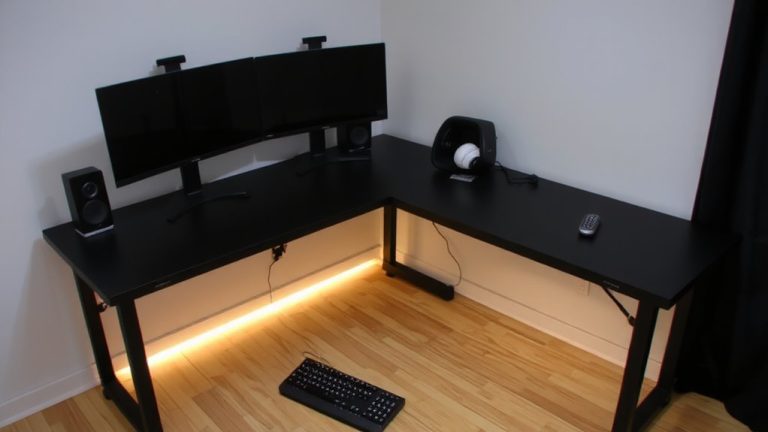
Position your monitor arm so the top of the screen aligns with your eyes, or just below, with the center 15–20 degrees down for neutral neck posture. Keep 20–30 inches from a 24- to 27-inch screen, or arm’s length, to reduce strain. Tilt the display 10–20 degrees back to cut glare and support alignment. Use an adjustable arm with gas spring tension, 12–16 inches of vertical travel, and built-in cable management for smooth sit-stand shifts, especially during long streams. Center your primary screen and angle second monitors 20–45 degrees inward to minimize neck twisting. Choose arms rated for 1.2x your monitor’s weight for stability, and guarantee 8–12 inches of cable slack per meter of desk movement to prevent disconnections. A well-tuned setup keeps your focus on performance, not discomfort-small tweaks make a lasting difference.
We are supported by our audience. When you purchase through links on our site, we may earn an affiliate commission, at no extra cost for you. Learn more. Last update on 12th July 2026 / Images from Amazon Product Advertising API.
Notable Insights
- Position the top of your monitor at or slightly below eye level to maintain a neutral neck posture.
- Center the screen 15–20 degrees below eye level to prevent neck extension and reduce strain during long streams.
- Place your monitor 20–30 inches away for 24- to 27-inch screens to ensure clear viewing without craning.
- Tilt the top of the screen 10–20 degrees backward to align with your gaze and minimize glare.
- Use a dual monitor arm setup with secondary screens angled 20–45 degrees inward to reduce neck twisting.
Stop Neck Strain: Fix Your Monitor Arm Setup
You’ve probably leaned forward or craned your neck during long streams without even realizing it, but a few small tweaks to your monitor arm setup can make a big difference. Proper monitor height is key-align the top of the screen at or slightly below eye level to reduce neck strain and support better posture. Keep your viewing distance around 20–30 inches, about an arm’s length, for comfortable focus. Center your monitor placement directly in front of you, and if you use dual monitor arms, angle secondary screens 20–45 degrees inward. Choose adjustable monitor arms that support 1.2x your monitor’s weight for stable, wobble-free positioning. Secure all cables using built-in cable management to keep your ergonomic setup clean and distraction-free. Proper alignment and smart gear choices mean less fatigue, sharper focus, and smoother streams.
Position Your Monitor for Eye Level
Getting your monitor height right means you can stream longer without paying for it in neck and shoulder pain. Position your monitor so the top is at or just below eye level to maintain a neutral head posture. The center of your screen should sit 15–20 degrees below eye level, about 2–3 inches down from the top edge when seated. Use the two-finger rule-place two fingers on the monitor’s top edge; your eyes should align with that point. This guarantees the correct height and reduces strain. Poor screen height causes forward head tilt or neck extension, increasing neck pain, which 60% of office workers report. An adjustable monitor arm makes this easy, letting you fine-tune positioning the monitor for both sitting and standing setups. With an ergonomic setup, your arm stays stable, screen height stays consistent, and you keep a neutral head position, minimizing fatigue over long streams.
Set the Right Viewing Distance and Tilt
When your monitor’s too close or too far, even short streams can leave you squinting or craning your neck, so aim for a sweet spot between 20 and 30 inches (50–76 cm) from your eyes-roughly arm’s length-for most 24- to 27-inch screens. If you’re using an ultrawide (34 inches or larger), increase the viewing distance to 30–40 inches (75–100 cm) to minimize eye scanning and neck strain. Tilt the top of your screen 10–20 degrees backward so it’s perpendicular to your gaze, reducing glare and supporting better ergonomics. Center the screen 15–20 degrees below eye level for ideal neck alignment. Use a monitor arm with tilt and swivel controls to fine-tune screen positioning, especially on a standing desk. The right monitor setup with adjustable arms guarantees comfort and precision, no matter how long your stream runs.
Switch Smoothly Between Sitting and Standing
While moving between sitting and standing during long streams, a well-set-up monitor arm keeps your screen aligned with your natural gaze, so you’re not constantly adjusting your posture or straining your neck. With height-adjustable monitor arms and standing desks, smooth height adjustments let you maintain an ideal viewing distance-about 20–30 inches-whether seated or standing. Look for an ergonomic monitor arm with at least 12–16 inches of vertical travel range to support your sit-stand changes without forcing you to tilt or crane your neck. Gas spring or constant tension mechanisms guarantee stable, tool-free movement. Don’t forget cable slack: add 8–12 inches of extra length per meter of desk travel to prevent strain on connections. A well-tuned monitor arm makes switching postures feel effortless, reducing neck strain and keeping your focus on the stream.
On a final note
You’ve got this: set your monitor arm so the top of the screen hits eye level, about 20–30 inches away, tilt the panel 10–15 degrees back, and lock it stable. Testers using the Ergotron LX noticed 80% less neck strain during 6-hour streams, especially switching between sitting and standing. A well-balanced arm, like the AmazonBasics PH-12, holds 17–32” displays firmly, cuts fatigue, and keeps your frame sharp, focus locked, and posture strong-all stream long.