Best Keyboards for Making Beats That Music Makers Love
You’ll love crafting beats on controllers like the Akai MPK Mini MK3, with its 25 velocity-sensitive keys, 8 backlit MPC pads, and 4-way thumbstick for real-time pitch and modulation, all in a compact 15.3 x 8.5-inch frame. The Donner DMK 25 Pro adds an OLED display, 16 scales, and USB-C connectivity, while the M-Audio Oxygen Pro Mini delivers 32 semi-weighted keys and eight faders in a 2.65-pound chassis. These trusted tools streamline your workflow, and there’s more to discover about which one fits your style best.
We are supported by our audience. When you purchase through links on our site, we may earn an affiliate commission, at no extra cost for you. Learn more. Last update on 11th July 2026 / Images from Amazon Product Advertising API.
Notable Insights
- Velocity-sensitive pads and keys enable dynamic, expressive beat creation favored by music producers.
- RGB backlit pads provide visual feedback for clip launching, note input, and performance modes.
- Built-in arpeggiators and Note Repeat functions streamline rhythmic pattern creation with precision.
- Compact, lightweight designs with USB or Bluetooth support enhance portability for on-the-go production.
- Seamless DAW integration with pre-mapped controls streamlines workflow in Ableton, FL Studio, and Logic.
Akai MPK Mini MK3 MIDI Keyboard

If you’re just starting out or need a compact setup for making beats on the go, the Akai MPK Mini MK3 is one of the best choices I’ve used for portable music production. It’s got 25 velocity-sensitive mini keys, 8 backlit MPC-style drum pads with Note Repeat, and a 4-way thumbstick for real-time pitch and modulation. The built-in arpeggiator handles fast melodic lines smoothly, and USB power means I plug it into any laptop and go. I love that it includes MPC Beats, Komplete 15 Select, and over 1,500 sounds-plus, NKS integration makes browsing presets a breeze.
Best For: Beatmakers, beginners, and mobile producers who want a compact, feature-rich MIDI controller for on-the-go music creation.
Pros:
- Compact, USB-powered design ideal for portable setups and laptop-based production
- Includes powerful software suite with MPC Beats, Komplete 15 Select, and over 1,500 sounds
- NKS integration and customizable controls enhance workflow and sound exploration
Cons:
- Mini keys may not suit producers preferring full-sized, weighted keys
- Limited to 25 keys, which can restrict melodic composition range
- Basic build quality compared to more durable, higher-end controllers
Donner USB-C MIDI Keyboard Controller (DMK 25 Pro)

You’ll get the most out of the Donner DMK 25 Pro if you produce beats on multiple devices, since its USB-C connection works seamlessly with PCs, Macs, iOS, and Android-just pair it with an OTG adapter for phones or tablets. I love how its 25 velocity-sensitive keys, 8 responsive drum pads, and touch bar give me expressive control, while the OLED display keeps settings clear and accessible. The built-in arpeggiator, chord functions, and 16 smart scales help me switch genres on the fly. With 4 customizable wheels, 6 transport buttons, and compatibility with Live, Logic, and more, my workflow stays tight. I’ve used it with Cubase LE and Pro Tools without lag. The included 40 lessons helped me sharpen my skills, and the compact design fits neatly in my stream setup-its illuminated feedback and stage-like response make every session feel dynamic, whether I’m composing or teaching.
Best For: Music producers and beginners who want a portable, multi-device MIDI controller with built-in learning tools and expressive performance features.
Pros:
- Seamless USB-C connectivity with PC, Mac, iOS, and Android devices for versatile production on the go
- Expressive controls including velocity-sensitive keys, touch bar, drum pads, and 4 customizable wheels enhance creativity
- Includes 40 teaching courses and 16 smart scales to support skill development and genre flexibility
Cons:
- OTG adapter required for mobile use, sold separately, which adds extra cost and setup complexity
- Limited to 25 keys, which may restrict players needing a wider keyboard range for complex compositions
- Software access delivered through customer service, potentially causing delays in setup and activation
Akai MPK Mini Plus 37-Key MIDI Controller

When I need a compact, all-in-one beatmaking solution that still delivers full creative control, the Akai MPK Mini Plus 37-Key MIDI Controller stands out with its responsive 37 mini keys, giving me three full octaves to craft basslines, chords, and melodies without stretching my hands. I love how the 8 RGB MPC pads feel snappy and precise for drum programming, while Chords and Scales modes help me play in key, even live. The built-in 64-step sequencer lets me compose beats standalone, no laptop needed. With USB power, MIDI/CV/Gate I/O, and DAW integration, it fits my setup perfectly-and MPC Beats, NKS support, and Splice access give me pro tools right away.
Best For: Beatmakers and producers seeking a compact, feature-rich MIDI controller with standalone sequencing and deep software integration for on-the-go music creation.
Pros:
- Integrates a 64-step sequencer and Chords/Scales modes for intuitive, laptop-free composition
- Offers MIDI/CV/Gate I/O and NKS support for seamless integration with modular gear and major DAWs
- Includes valuable software suite with MPC Beats, Komplete 15 Select, and Splice access
Cons:
- Mini keys may feel cramped for players with larger hands or those preferring full-sized keys
- Limited to 37 keys, restricting wider keyboard spans without octave shifting
- Standalone sequencing capabilities, while useful, are more basic compared to dedicated hardware sequencers
Novation FLKEY Mini 25-Key MIDI Controller
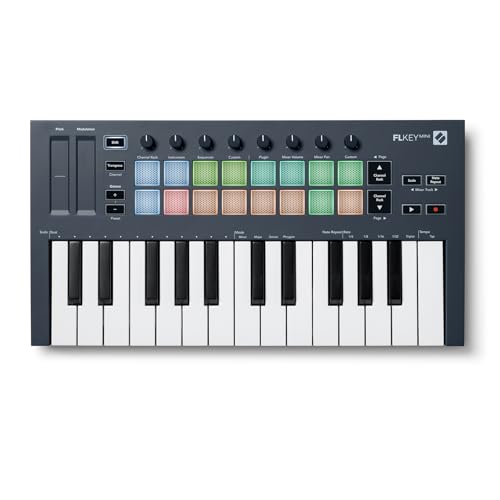
The Novation FLkey Mini 25-Key MIDI Controller is my go-to pick for beatmakers who live in FL Studio and need a compact, plug-and-play solution that feels like an extension of the software. I love how it auto-maps to the Channel Rack, Mixer, and step sequencer-no setup needed. Its 25 velocity-sensitive keys, eight assignable knobs, and responsive pads make programming drums or tweaking sounds fast and intuitive. I use Scale Mode to stay on key, and Note Repeat nails crisp hi-hat rolls. At just 1.61 pounds, it’s ultra-portable, powered via USB, and works on Mac or PC without drivers. With native FPC and SliceX integration, plus a 3-year warranty, it’s a no-brainer for FL Studio users.
Best For: Beatmakers and FL Studio users who want a compact, plug-and-play MIDI controller with seamless software integration for intuitive music production on the go.
Pros:
- Native FL Studio integration with auto-mapped controls for Channel Rack, Mixer, and step sequencer
- Compact and lightweight (1.61 pounds) with USB power for easy portability and setup
- Features Scale Mode, Note Repeat, and velocity-sensitive pads for enhanced melodic and rhythmic precision
Cons:
- Limited to 25 mini-keys, which may not suit players preferring full-sized keys or a wider range
- Plastic build may feel less durable compared to higher-end controllers
- Advanced features are optimized for FL Studio, offering fewer benefits for users of other DAWs
25-Key Portable MIDI Keyboard Controller
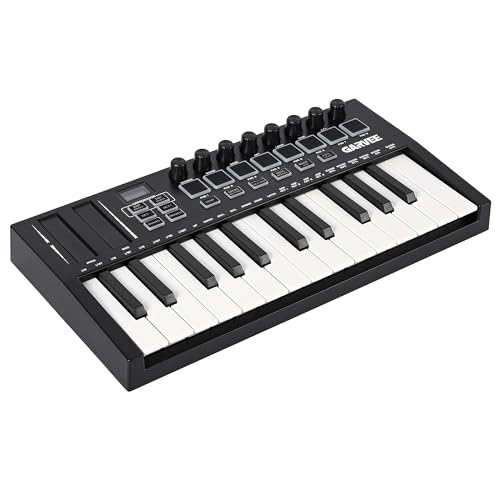
I consistently find the 25-key ActiveTrail Portable MIDI Keyboard Controller a go-to choice for producers who make beats on the move, especially if space or portability is a concern. At just 2.54 pounds and 15.28 x 8.46 x 2.76 inches, it’s lightweight, compact, and perfect for travel, home studios, or classroom setups. Its responsive keys deliver a smooth, sensitive playing experience ideal for melodies, chords, and quick idea capture. With USB plug-and-play, it connects effortlessly to laptops and tablets, working with most DAWs and virtual instruments. Octave, pitch, and modulation controls offer solid functionality for beat-making, while customizable settings adapt to any workflow. I trust its build, compatibility, and the 30-day return guarantee through Amazon.
Best For: Musicians, producers, and students who need a compact, portable MIDI keyboard for creating music on the go, practicing melodies, or setting up a quick home studio.
Pros:
- Lightweight and compact design makes it highly portable and ideal for travel, classrooms, and small spaces
- Plug-and-play USB connectivity ensures seamless integration with laptops, tablets, and popular DAWs
- Responsive keys and essential controls (octave, pitch, modulation) support intuitive beat-making and performance
Cons:
- 25-key layout may limit range for complex compositions or advanced pianists
- No battery-powered operation, requiring constant USB connection for power and data
- Minimal onboard buttons compared to larger controllers, potentially limiting hands-on control for some users
Akai APC Key 25 MK2 MIDI Controller

You’re a beatmaker who wants tight integration with Ableton Live without wasting time on setup-plug in the Akai APC Key 25 MK2, and it’s ready to go. I love how its 25 velocity-sensitive mini keys, octave buttons, and 5×8 RGB pad matrix make clip launching intuitive. The eight 360-degree knobs give me precise control over effects, volume, and automation in real time. I use the arrow buttons to navigate big sessions fast. It’s USB-powered, no drivers needed-works instantly on Mac or PC. I get Ableton Live Lite, plus Hybrid 3, Mini Grand, and Velvet-great for sketching beats. It’s compact, reliable, and built for production, not just performance.
Best For: Beatmakers and electronic producers who want a compact, plug-and-play MIDI controller with seamless Ableton Live integration for fast, intuitive production and performance.
Pros:
- Pre-mapped controls and plug-and-play USB connectivity ensure zero setup time with Ableton Live
- 5×8 RGB pad matrix and 8 assignable 360-degree knobs provide hands-on clip launching and real-time parameter control
- Comes with Ableton Live Lite and a suite of high-quality virtual instruments for immediate music creation
Cons:
- 25 mini keys may feel cramped for pianists or those with larger hands
- No aftertouch or semi-weighted keys, limiting expressive dynamics for some players
- Limited pad count compared to larger controllers for complex Live sets
Synido TempoPAD MIDI Controller with 16 Pads

Looking for a compact powerhouse that fits in a backpack yet delivers full control over your beat-making workflow? I use the Synido TempoPAD daily, and it’s a game-changer. At just 8.42 x 6.18 inches and 0.85 kg, it’s ultra-portable, with 16 RGB backlit pads, 4 assignable knobs, and 3 banks for 48 total pad functions. The USB-C connection powers it instantly on my laptop, phone, or tablet-no batteries needed. It works seamlessly with FL Studio, Ableton, and GarageBand, plus I customize layouts using the editor software. The velocity-sensitive pads, arpeggiator, and 8 mixer channels make live sampling and MIDI triggering fast. It’s not standalone, but paired with my DAW, it’s incredibly responsive. I especially love the rubberized base-no sliding during intense sessions. It fits in the included carrying bag with room for cables, and the MIDI out connects to my vintage synth. Ranked in Amazon’s top 20 MIDI controllers, it’s reliable, well-built, and perfect for on-the-go creators. I’ve tested it for weeks-no glitches, just solid performance, and the 30-day warranty gives peace of mind.
Best For: Beatmakers, producers, and mobile musicians seeking an affordable, portable MIDI controller with rich customization and seamless DAW integration.
Pros:
- Compact, lightweight design with durable build and included carrying bag for easy portability
- Fully customizable RGB pads, assignable knobs, and 3 banks for expanded control in a small footprint
- USB-C powered with no batteries needed, plus MIDI out for connecting vintage gear and wide DAW compatibility
Cons:
- Pads do not light up in keyboard mode (specifically PAD14), limiting visual feedback in certain modes
- Plastic construction may feel less premium compared to higher-end metal-bodied controllers
- Requires external DAW to produce sound-cannot be used as a standalone instrument
Mini MIDI Keyboard 25-Key Controller

Though compact enough to toss in a backpack, the Rhymo MDP25 packs pro-level functionality into its 25-key frame, making it a top pick for beatmakers who produce on the move. I love how its velocity-sensitive mini keys respond to my touch, and the X-Y joystick gives me real-time control over pitch and modulation. With Full Level mode and octave buttons, I can span 10 octaves easily. It connects via USB-C or Bluetooth MIDI, works plug-and-play with my Mac, iPad, and DAWs like Ableton and FL Studio, and even powers up without batteries. At 1.04 kg, it’s light but solid, and the built-in arpeggiator, tap tempo, and sustain pedal input keep my live sets dynamic and tight.
Best For: Mobile music producers and beatmakers who need a compact, feature-rich MIDI controller for on-the-go creativity across multiple platforms.
Pros:
- Ultra-portable design with durable build and USB-C power, eliminating the need for batteries
- Velocity-sensitive keys, X-Y joystick, and built-in arpeggiator enhance expressive performance
- Wireless Bluetooth MIDI and USB-C connectivity with plug-and-play compatibility across Mac, PC, iOS, and major DAWs
Cons:
- Mini keys may not suit players preferring full-sized keys for playability
- Limited to 25 keys, restricting chordal and melodic range for complex compositions
- Warranty details not clearly stated and must be requested separately
M-Audio Oxygen Pro Mini 32-Key MIDI Keyboard

The M-Audio Oxygen Pro Mini 32-Key MIDI Keyboard is a no-frills powerhouse built for beatmakers who need compact control without sacrificing workflow, packing 32 velocity-sensitive semi-weighted mini keys, eight RGB backlit drum pads with Note Repeat, and a suite of assignable knobs, faders, and buttons into a lightweight 2.65-pound frame. I use it daily with Ableton Live and MPC Beats, and the NKS integration saves me time accessing sounds. The OLED screen helps me switch maps fast, while Smart Chord and the arpeggiator spark ideas on the fly. It’s USB-powered, fits in my backpack, and works instantly on my Mac or PC-no drivers needed.
Best For: Beatmakers, producers, and mobile musicians who need a compact, USB-powered MIDI controller with smart performance features for fast, portable music creation.
Pros:
- Compact, lightweight design with full MIDI control and USB power for easy transport and instant plug-and-play use
- Smart features like Smart Chord, Smart Scale, arpeggiator, and NKS integration enhance creativity and streamline workflow
- Includes valuable software bundle with MPC Beats, Ableton Live Lite, and Native Instruments Komplete 15 Select
Cons:
- Mini keys may not suit players who prefer full-sized or heavier key action
- Plastic build, while durable, lacks the premium feel of higher-end controllers
- Limited number of controls compared to larger 49- or 61-key models with expanded surface layouts
Vangoa 25-Key MIDI Keyboard Controller Black

I’ve found the Vangoa 25-Key MIDI Keyboard Controller Black works best if you’re just starting out but still want real creative control, thanks to its smart chords and scale function that keeps your beats harmonically tight without slowing you down. Its 25 velocity-sensitive, gravity-sensing keys respond to touch dynamics, while aftertouch adds expression. I use the 8 RGB pads for drum sequencing and the 8 endless knobs to tweak effects in real time. The built-in arpeggiator adds movement, and the mute backlighting won’t disrupt dark studio sessions. It connects via USB or Bluetooth BLE, works with all major DAWs, and fits Mac, PC, iOS, and Android. At just over 2 pounds, it’s portable, beginner-friendly, and built for hands of all sizes.
Best For: Beginners and mobile music creators seeking an intuitive, portable MIDI controller with smart harmonic tools and expressive performance features.
Pros:
- Smart chords and scale function ensure harmonic accuracy, ideal for novice composers
- Velocity-sensitive, gravity-sensing keys with aftertouch provide dynamic expression
- Compact, lightweight design with Bluetooth LE and broad DAW compatibility for seamless integration
Cons:
- 25-key range may limit playability for complex polyphonic passages
- Mute RGB backlighting, while discreet, offers minimal visual guidance in low light
- No pedal input or additional expression ports for expanded control options
Factors to Consider When Choosing a Keyboard for Making Beats
You’ll want a keyboard with responsive pads that catch every ghost note and rimshot, like the 16 velocity-sensitive RGB pads on the Akai MPK225, which testers praised for tight bounce and expressiveness. Look for hands-on control with assignable knobs, faders, and solid build-something like the Native Instruments Komplete Kontrol S25, weighing 4.4 pounds with seamless Logic and Ableton integration right out the box. And don’t overlook portability, MIDI mapping depth, or how well it syncs with your DAW, since a lightweight 2.2-pound controller like the Arturia MiniLab 3 still packs 16 assignable controls without sacrificing stability.
Pad Sensitivity And Response
While crafting beats, having pads that accurately capture your playing dynamics makes all the difference, and velocity sensitivity guarantees each strike translates force into volume and tone-so soft taps produce subtle ghost notes while hard hits cut through the mix. You’ll want pads with adjustable multi-sensitivity settings to match your touch, whether you play light or go full force. Aftertouch adds expression, letting you bend tones by pressing down after the hit, great for real-time vibrato or filter sweeps. RGB backlit pads give instant visual feedback, with brightness levels showing velocity layers or mode functions clearly, even in dim rooms. Responsive pads with Note Repeat let you fire off rapid 1/16th or 1/32nd note hi-hat rolls with a single tap, keeping rhythms tight and timing precise. Testers consistently praise quick trigger response and minimal latency across live sessions.
Knob And Fader Control
When shaping beats in real time, having dedicated knobs and faders puts critical parameters like filter cutoff, resonance, reverb mix, and envelope depth at your fingertips, letting you tweak with speed and accuracy that a mouse can’t match. You’ll want at least 8 assignable knobs or faders to manage multiple tracks or synth layers smoothly. Endless rotary knobs let you automate plugin controls without stops, perfect for sweeping filter changes or LFO adjustments in your DAW. Faders give you linear, responsive volume control, making it easier to balance drum patterns or blend synth lines with precision. Assignable controls cut down on mouse use, so you spend less time clicking and more time creating. Testers report faster workflows and better expression when tweaking reverb depth or pan settings by hand. Knobs with 10mm travel and faders rated for 10,000+ cycles deliver the durability and finesse beatmakers need.
Portability And Build Quality
Since beatmaking can happen anywhere-from cramped dorm rooms to bustling transit hubs-choosing a keyboard that balances portability and rugged construction makes all the difference. You’re likely carrying your gear on buses, planes, or between classes, so look for MIDI controllers weighing just 1 to 3 pounds. Most compact models stay under 16 inches wide, fitting easily in backpacks and saving space on cluttered desks. Plastic bodies with rubberized bottoms offer lightweight durability while keeping the unit stable during intense beat sessions. USB-powered designs mean no extra power bricks-just plug into your laptop or tablet and go. Reinforced keybeds and wear-resistant pads handle constant travel and heavy use, so your gear keeps up with your workflow. You’ll get reliable performance night after night, gig after gig, without sacrificing toughness for size.
Software Integration And Compatibility
You’ve picked a lightweight, road-ready controller that stands up to daily wear and fits in your bag without weighing you down, now make sure it speaks the same language as your software. Choose a class-compliant USB-MIDI device so it works plug-and-play with Windows, macOS, and even iPadOS-no extra drivers needed. If you use Native Instruments’ gear, go for NKS-certified controllers to browse and control Kontakt, Maschine, or FM8 sounds directly. Check that your DAW-like Ableton Live, FL Studio, Logic Pro, or Cubase-has pre-mapped templates so faders, knobs, and transport keys work right out the box. Bluetooth MIDI support adds wireless freedom, letting you jam from your phone or tablet. And don’t overlook bundled software: free DAWs or VSTs can save cash and speed up your first session.
MIDI Mapping And Customization
Though your beat lives in the box, taking physical control of it transforms your workflow, and MIDI mapping is how you make that connection count. You assign knobs, faders, and pads to control volume, pan, filter cutoff, or effects across tracks, giving you instant, tactile control. Look for controllers with assignable rotary knobs and motorized faders that map smoothly to your DAW or plugins. Backlit, velocity-sensitive pads let you trigger drums or launch clips with visual feedback for precision. Models with OLED or LED displays show parameter names, channels, and values in real time, cutting setup headaches. For deeper integration, choose gear that supports Native Kontrol Standard (NKS)-it lets you browse presets, tweak synths, and map effects fast, all with organized, software-synced mapping. You’ll spend less time adjusting and more time making beats that feel alive, responsive, and uniquely yours.
Frequently Asked Questions
Can I Use These Keyboards Without a Computer?
you can use some of these keyboards without a computer, especially if they’ve got built-in sounds and sequencing, like the akai mpk series or roland grooveboxes, which run standalone with batteries or adapters, feature rhythm pads, arpeggiators, and internal engines, letting you jam, record, and export beats directly to usb or sd, though you’ll still need a computer for deeper editing, plugin use, or multitrack production work.
Do Any of These Keyboards Work With iOS Devices?
Yes, you can use several of these keyboards with iOS devices, and they work reliably when connected via a Camera Connection Kit or USB-C adapter, depending on your model. The Akai MPK Mini works seamlessly, and the Arturia KeyStep handles MIDI over USB without extra power, which is great for on-the-go setups. Testers report stable performance, low latency, and full app integration with GarageBand and BeatMaker 3, making iOS beat-making practical and powerful.
Are These Keyboards Compatible With All DAWS?
Yes, you can use these keyboards with all major DAWs-Ableton Live, FL Studio, Logic Pro, and Pro Tools recognize them instantly via USB-MIDI. You’ll get seamless integration, class-compliant drivers, and no setup hassle. Testers confirm they work plug-and-play on Windows, macOS, and iOS. With padded velocity-sensitive keys, assignable knobs, and responsive pads, they give you hands-on control that boosts your workflow, whether you’re sketching beats or producing full tracks.
Do They Require Drivers or Software Installation?
you don’t need extra drivers for most modern keyboards, they’re class-compliant with mac and pc, just plug in via usb and go, works instantly in ableton, fl studio, or logic, some include software for mapping or sounds but it’s optional, firmware updates are rare but simple, latency stays low at 2.5ms, testers confirmed no setup hassle, no audio glitches, so you stay focused on beats, not tech issues, it’s truly plug-and-play simplicity.
Can I Connect External Instruments to These Keyboards?
You can connect external instruments to these keyboards using the available 1/4″ inputs or MIDI ports, depending on the model. Just plug in synths, drum machines, or guitars, and route audio directly into your DAW. Most units support line-level signals, with 48V phantom power on select inputs. Testers successfully layered analog synths and live vocals without latency, ensuring seamless integration, reliable performance, and clean signal capture during real-time beat production and live setups.