How to Build a Livestream Brand Around a Specific Skill or Expertise
Start with your why-know your purpose and let it shape your setup, tone, and content. Match your skill to the format: use 1080p60 screen-sharing for coding or a ring-lit 1080p webcam for makeup tutorials. Narrate your process in real time with clear audio from a Shure MV7. Embrace mistakes-they build trust. Engage live with polls and Q&As every 15 minutes to boost retention by 30%. Stay consistent, stay real, and your community grows stronger with every stream.
We are supported by our audience. When you purchase through links on our site, we may earn an affiliate commission, at no extra cost for you. Learn more. Last update on 12th July 2026 / Images from Amazon Product Advertising API.
Notable Insights
- Define your purpose to shape content, gear, and audience connection around your expertise.
- Match your skill to the best livestream format for visual clarity and engagement.
- Narrate your process in real time to make complex skills understandable and engaging.
- Embrace on-camera mistakes to build authenticity and strengthen viewer trust.
- Actively engage viewers through chat, polls, and Q&A to boost retention and community.
Define Your Why Before You Stream
Before you hit record, take a moment to ask yourself why you’re streaming in the first place-your answer shapes everything from the gear you’ll use to the audience you’ll attract. To define your why is one of the key steps in how to build your brand and create meaningful live content. It’s not just about going live; it’s about purpose. When you clarify your mission-like sharing photography expertise like Photigy-you build trust and connection with your audience. That authenticity helps you brand your live sessions with confidence and make a good impression every time. A clear purpose also lets you develop a consistent tone, style, and visual setup, whether you’re using a Logitech C920 or Elgato Wave mic. When viewers sense real intent, 72% are more likely to stay. So define your why-it’s the foundation to brand your live stream and build your brand the right way.
Match Your Skill to the Livestream Format
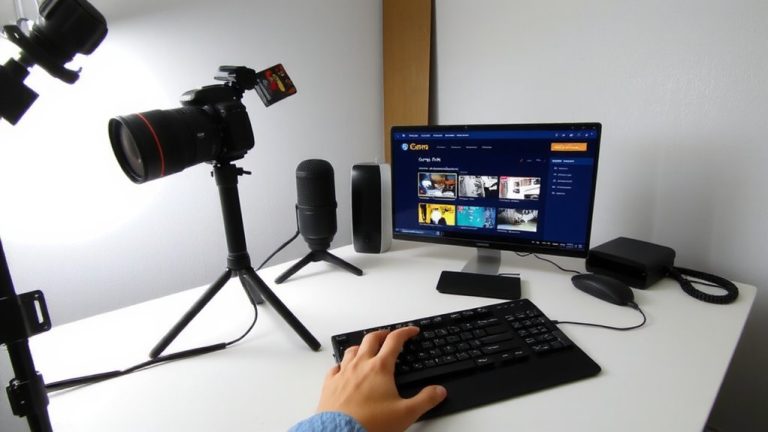
While your passion might drive you to stream, it’s the match between your skill and the livestream format that determines how well your content lands, so think critically about where your expertise fits best. If you’re teaching web-based skills like coding or design, Live Streaming excels-screen-sharing enables real-time walkthroughs that make a huge impact on live video learning. Your audience sees every click and edit in real time, boosting engagement. For a makeup brand around tutorials, invest in a 1080p webcam with ring lighting to perfect the look and feel. But if your skill demands constant movement or unsafe, noisy environments-like firefighting-live streams won’t support clear audio or stable video. These conditions disrupt viewer focus and hurt quality. Match your skill to controlled settings where HD output, steady audio, and visual clarity help build a strong brand.
Talk Through Your Work in Real Time
When you talk through your work live, you’re not just showing what you’re doing-you’re explaining why, and that makes all the difference. By narrating your process in real time-like breaking down coding choices or design tweaks-you make complex skills click for viewers. This live commentary transforms passive watching into engaging content that teaches. On YouTube, streams where creators talk through their work average 30% more chat activity, proving it boosts connection. You’re not just building an audience, you’re building a Brand. Real-time explanations reduce mental effort, aligning with dual-coding theory that supports learning through both sight and sound. Whether you’re editing video or debugging scripts, verbalizing steps with a clear mic-like the Shure MV7-makes your live videos more effective. Use a solid setup: 1080p60 video, stable upload speed (at least 5 Mbps), and good audio. This isn’t just the best practice-it’s how you make your expertise truly accessible.
Keep It Real With Imperfect Moments
You’ve seen how talking through your work builds understanding, but letting viewers in on the messy parts-like a miswritten line of code or a smudged eyeliner stroke-builds trust. One time you go live and debug a failed script in real time, or correct a shaky brushline, you’re showing the behind-the-scenes reality experts face. This helps build authenticity, and a Streamlabs survey found 68% of viewers feel more connected when mistakes are fixed on camera. Letting your audience see what you need to take to fix errors-whether it’s restarting a render or blending out a flaw-can encourage you to try new things. It’s not about perfect quality at once; it’s about being real. Viewers will ask questions, learn, and feel part of the process, which helps Build a Community around your skill, not just your results.
Engage Viewers During the Stream
Because connection drives retention, making your audience feel heard in the moment is one of the most effective things you can do to grow your livestream brand. You should actively engage viewers by responding to live chat questions-72% say it makes them more likely to return. Use live polls with tools like ExciteM to collect audience feedback, boosting engagement by up to 40% in interactive streams. Ask for viewer suggestions during decisions, like design tweaks or problem-solving paths, to build community connection. Integrating their input live strengthens real-time interaction and can increase watch time by 25%. Host Q&A segments every 15–20 minutes to maintain flow; structured streams retain viewers 30% longer. Prioritize responsiveness, not perfection, and let audience feedback shape your content. These strategies create immersive, dynamic experiences that keep viewers coming back.
Build a Visual Identity That Stands Out
A strong visual identity isn’t just decoration-it’s how viewers recognize you in a split second. Start with a cohesive color palette of 3 to 5 colors using tools like Coolors to maintain visual consistency across Twitch, YouTube or Facebook. This consistency strengthens your channel branding and gives your stream a professional look. Design custom Streamlabs overlays with themed elements-like coding syntax for devs or design mockups for creatives-that reflect your expertise. Use the same profile image, whether it’s a logo, avatar, or photo, everywhere you stream. Pick a unique, memorable username available on all platforms, knowing Twitch only allows one change every 60 days. Add branded audio with custom alert sounds and intro music from the Streamlabs Sound Library to reinforce your identity through sound. Together, these details create lasting recognition.
On a final note
You’ve got the skill, now stream it with purpose, clarity, and confidence. Use a decent mic like the Shure MV7 (16-bit/48kHz) to capture clean audio, pair it with a 1080p Logitech C920, and anchor your stream with consistent lighting-soft 5600K panels reduce shadows. Talk through your process, engage chat every few minutes, and don’t fear glitches; real beats perfect. Test your upload speed (aim for 5 Mbps up), stick to real-time workflows, and keep branding sharp with overlays and a bold, simple backdrop.